Participant
February 7, 2017
Answered

Photoshop gets stuck in Type Tool

  • February 7, 2017
  • 17 replies
  • 13019 views

This is the second time this has happened to me this week. Both time I had clicked on a text box with the type tool to edit the text, did Cmd A and Cmd C to copy the text, then hit Esc (I have it set to cancel the changes on Esc). But it doesn't cancel the changes and the text box is still live, I can still type inside the text box, I can't select any other tool in the toolbox (when I try, the entire toolbox goes blank), I can't select any other layer, clicking on the Check Mark or Cancel button at the top tool bar does nothing, and Cmd Return does nothing.

Both times this happened I had to Force Quit Photoshop but I'm hoping someone out there might have a fix for this for the future.

Here's what I'm running:

Photoshop CC 2017.0.1

MacBook Pro (13in Retina, early 2015)

macOS Sierra 10.12.3

2.7 Intel Core i5

8GB Ram
This topic has been closed for replies.
Correct answer gener7

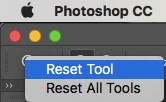
You can reset the Type Tool by right-clicking on its icon in the option bar at the top.

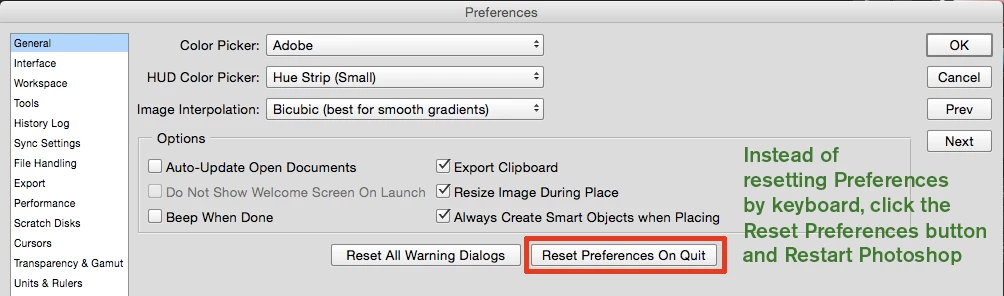
If that fails, reset preferences.

17 replies

thenewbeat
Participant
February 12, 2020

THE CORRECT ANSWER:


Press CMD + W to close the window. It will close and ask you to save, but will also then bring you through all the actions you attempted to do during the freeze, so watch out!

September 29, 2018

I have also started encountering this problem, and none of the remedies presented here have worked. Photoshop hangs if I try to use the type tool, or whenever i try to exit it. I have to kill its process in both cases. Reinstalling Adobe CC and PS, cleaning registry, resetting settings and cache/settings directories, nothing seems to fix this issue. It practically renders PS unusable when having to do anything with fonts. My system is the latest stable channel Win 10 and the problem manifests on two individual computers.

joshuab22185620
Participating Frequently
June 11, 2018

This is still a problem, but I found a temporary fix. If you hit cmd+w (the shortcut to close the window) it closes the file you are stuck on, also gives you the option to save as well. Hope this helps!

Participant
July 23, 2018

tried this. now photoshop is stuck on saving at 61%.

Participant
February 28, 2018

It's doing the same thing to me. And I'm not able to access any of the menu or tool options. Any other way? Wish the Photoshop or the ESC key would work!

Participant
January 19, 2018

Bumping this YET again – and will continue to do so daily until someone from Adobe acknowledges this issue.

I've lost thousands of dollars worth of work and time to this issue.

Resetting the type tool does not solve the problem, nor does clearing preferences. This is a software bug – plain and simple.

When working with multiple files, the text tool WILL get stuck in a text box on one file – not allowing text to bet edited elsewhere, and completely disabling all features, menus, etc. within Photoshop.

The only option is to force quit – which means it's 50/50 whether you get a recovered file or not.

SOLVE THIS PROBLEM – we pay a lot of money to use this software, and can't afford to lose more to lost work.

Participant
January 23, 2018

I agree with you. I have a big problem with the same issue. Its a pain when you dont have the file saved after putting in a lot of effort in a design or work.

wouterg11744736
Inspiring
January 16, 2018

Bumping as this problem is still in Photoshop (latest version) and just lost hours of work. Provided answer above does not work.

mikec41523680
Participant
December 18, 2017

This issue happens to me about 5-10 times daily. It's beyond frustrating. When is Adobe going to address this?

Our entire team has been moving away from Adobe products because of this. We don't have any of these issues in Sketch... Really wish they would address this ASAP!.

Participant
December 11, 2017

Just checking in as another user that loses countless hours of work because of this bug.

idanarbel
Participant
December 13, 2017

YES!!! started using Figma and each time I have to go back to Photoshop its hell

idanarbel
Participant
November 12, 2017

same issue here....stuck on type tool. won't save file, can't close photoshop. this is happening A LOT.

Inspiring
August 24, 2017

Still a reoccurring issue on my end too.