


twindeknecht
Participant
Jun 25, 2022 6:02 PM UTC
Answered

Photoshop not detecting copy/paste image size by default

On Photoshop v24.3.1, whenever I copy an image (from Chrome web browser) and go to paste it into Photoshop, it is not detecting the image size. Normally, when you copy and image, Photoshop will automatically detect the image size (pixels), and when you create a new image: File > New and paste the image, it will paste the actual image size from the clipboard.


Right now, it is using the last image size or custom image size, but not the "clipboard" size of the image.

This topic is closed to new replies. Start a new post to keep the conversation going.
J E L
J E LCorrect answer
Community Expert
Jun 25, 2022 6:48 PM UTC

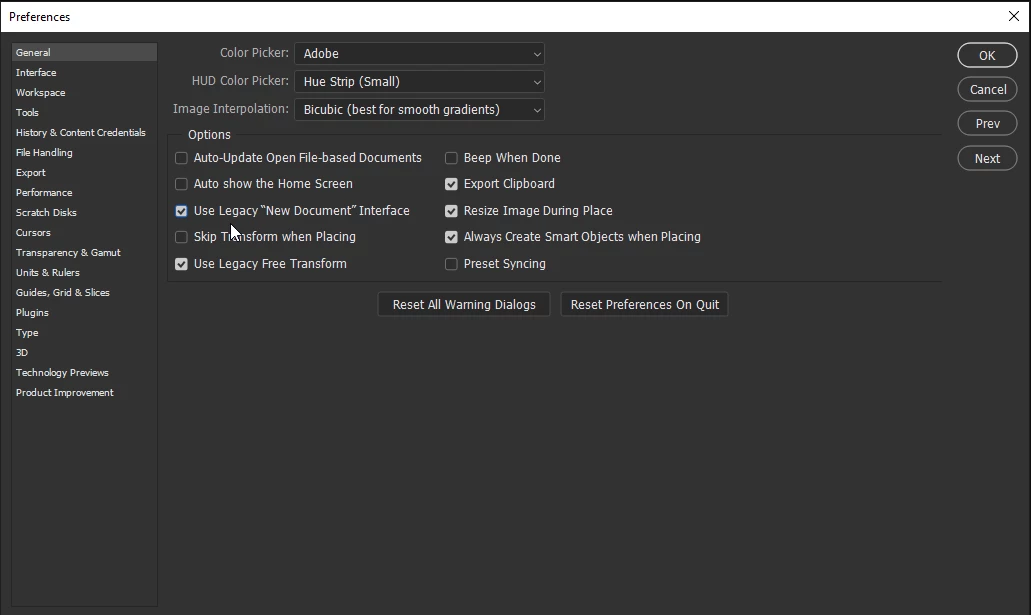
Hi @twindeknecht, Please try checking Use Legacy "New Document" Interface in Preferences on the General tab. Is it working now? Let us know.


32 replies

Participant
Apr 13, 2024 1:18 AM UTC

I probably use the shift-command-4 feature five or six times a day in my work, and I most often go into Photoshop, select file, new, it intuitively makes it the size of my clipboard, i say OK. Then I use command V to paste the clipboard. I use this to start a new image the correct size for a website, I use it to grab photos quickly in preview windows, I use it every single day in my work as a professional UX Designer for the forest service. I am on a new mac laptop pro and I can no longer do this simple copy and paste workflow. What can you be thinking. I know countless designers, photographers, graphic designer who all use this. I just have to say, I am so so so so very disappointed that you don't use the Human Centered discipline for your product. Really? After 20 years? Wow, ever think of asking your users what they want? I want to be able to paste from the clipboard. Even with the Settings - General- paste from clipboard, use legacy....... it still does not work.  Thanks

Translate
Legend
Sep 16, 2022 1:57 AM UTC

At last, this issue has finally been fixed.

Translate
DesignMe
Participating Frequently
Sep 16, 2022 2:56 PM UTC

What as teh issue? How do I now fix it - update to the current version of photoshop?

Translate
Known Participant
Sep 16, 2022 3:09 PM UTC

I'm glad something has been fixed. I guess I have been lucky, I did not have that issue, I have otherS. I fill out the 'pop-up' to tell Adobe my issueS, but nothing. Also, I did not see or was told when Adobe upgraded its version my relatively new laptop cannot run it and the two previous version crash. I am totally bummed out, I am dead in the H20. It is a good thing I do not depend on Adobe. Okay, I'm going to stop now. Good luck everyone. 


                                                           ADOBE DO BETTER!


Translate
richardb60414725
Inspiring
Sep 4, 2022 9:00 PM UTC

checking these boxes, in General, seems to have sorted the clipboard size problem for me. It might be the export clipboard option that's doing something.

Translate
Participant
Aug 12, 2022 4:48 PM UTC

@twindeknecht - Thanks for posting this topic. I just had to do a bunch of screenshots with the Snip & Sketch tool in Windows to copy & paste into Photoshop as I've done many times in the past, and was baffled as to why it wasn't automatically detecting the size. Very frustrating and was costing too many extra steps.


Thankfully the response from @J E L with the instruction to enable Legacy New Document in Preferences does the trick! 


And thankfully these forums are here with so many answers. That's twice this year this place has solved mystery issues for me caused by updates that changed things.


Translate
DesignMe
Participating Frequently
Aug 5, 2022 6:43 PM UTC

I found a way to use it in the new system. It's a work around. If I copy something, and say "new", it opens the size dialog box with the proportions of my item. if i click on another "size" then back to the generated size, it opens the intended box. It's not ideal, but it at least works.


Translate
Participant
Aug 5, 2022 6:38 PM UTC

Same issue. So annoying.... came to find the solution and found it right here. .... really appreciate this post 


Translate
Participant
Jul 21, 2022 5:13 PM UTC

Yep. Worked for me too.

Thank you for posting this.

Translate
Legend
Jul 2, 2022 8:34 AM UTC

Sorry @J E L, although the Legacy New Document does work, it is not the proper solution. This is a new bug that has appeared with the Ps 23.4.1 update. It worked fine before this latest Ps version.


Using the new New file dialog with an image copied to the Clipboard, the Width, Height, etc settings are not set to the dimensions and settings of the image in the Clipboard, but are left over from the settings for the last image opened with New file.


To get the correct Clipboard image settings, you can select another recent item and then reselect the Clipboard. The Clipboard image settings will then update to their correct values.

Translate
J E L
Community Expert
Community Expert
Jul 2, 2022 2:45 PM UTC

Hi @drtonyb, Yes, Adobe is aware of the bug, and it's been reported to the engineering team. We'll have to wait for future updates to see if the new “New Document” panel can retain clipboard dimensions seamlessly.

Translate
MicahBurke
Community Expert
Community Expert
Jul 11, 2022 6:30 PM UTC

I love it when updates ruin previously perfect features. 

Translate
Known Participant
Jun 29, 2022 4:36 PM UTC

Well, I had that issue as well. What the heck is going on here. Thank you Jain, now I can sleep! -Kit 

Translate
J E L
Community Expert
Community Expert
Jun 26, 2022 4:07 PM UTC

Glad to hear it! I think the option changed with the latest update, as many of us had to discover this in Preferences as well.

Translate