Craitza
Participant
October 21, 2019
Answered

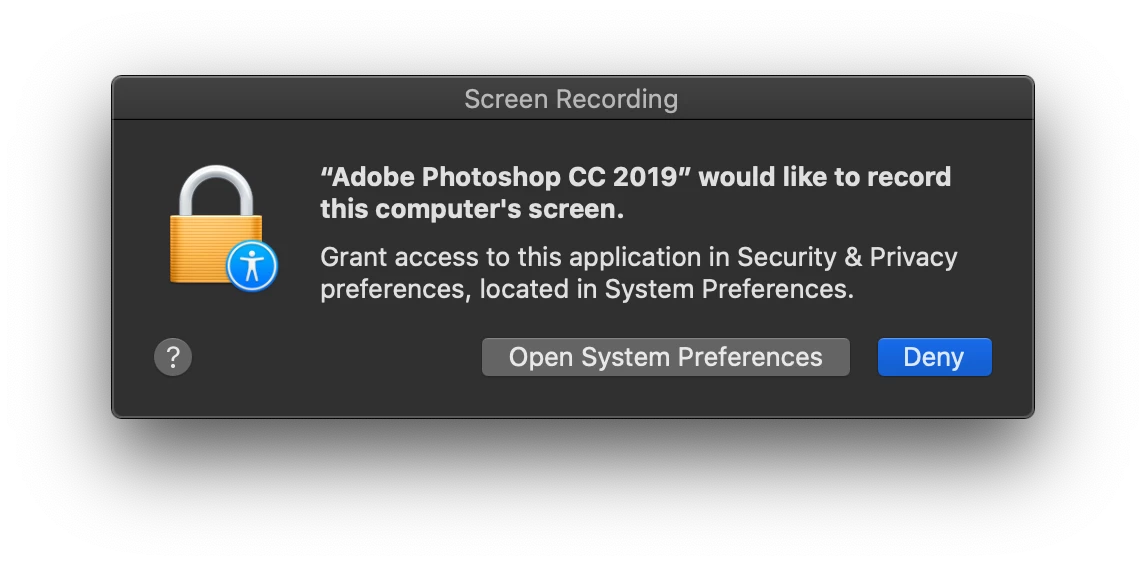
Photoshop Requesting access to record my computer's screen? - Any comments?

  • October 21, 2019
  • 3 replies
  • 23605 views


SAY WHAT PHOTOSHOP??!!!

NO IT'S NOT OK ...
NO I DON'T USE A CRACKED VERSION OF ADOBE ...

Just to be clear ... 


{Thread renamed by moderator}

Correct answer Pattie-F

For more info on this topic, you can refer to the following post. It gives details about the message asking to record the computer screen:  Why am I getting a request to allow Photoshop to record my screen


Pattie

3 replies

Pattie-F
Pattie-FCorrect answer
Legend
January 12, 2022

For more info on this topic, you can refer to the following post. It gives details about the message asking to record the computer screen:  Why am I getting a request to allow Photoshop to record my screen


Pattie

Known Participant
August 5, 2020

I came to this site because I had the exact same question. Appreciate that Sahil Chawla was able to explain the message which I also found disturbing as other posters. The response by Lumigraphics is dismissive and arrogant. Users of Adobe products have a right to be concerned about messages like those that appear to give Adobe Photoshop (or other Adobe product) carte blanc access to screen record. There is no indication that this message is about the eyedropper tool. Publically ridiculing the responders is what we come to expect on these "support" forums. I wish Adobe had removed your arrogant response. Maybe the users of Adobe products have given permissions necessary to make their software run on our computeres, and maybe we are aware that they collect user data, and maybe we know they use this data for marketing. That does not mean we give Adobe the freedom to screen record our desktops which may or may not have files/folders/images displayed that we deem NOTB. I stand by the original poster and follow up users who would like to see this message changed AND would like to have an Adobe software engineer clarify whether this is actually screen recording our desktops and sending the images to Adobe OR if it is just a temp file utilized by the Eyedropper Tool and then DELETED. Upstarts and snarky responses not welcome. Please just clarification by experts/Adobe programmers. Craitza, thank you for posting your concerns/question as several of us have it too. Sahil, if you could further clarify the normal "screen-recording" is not retained in any log or reported back to Adobe in any file that would be appreciated.

davescm
Community Expert
Community Expert
August 5, 2020

"There is no indication that this message is about the eyedropper tool"


That is because it is an Apple message not a Photoshop message. As Sahil explained it is needed so that the eydropper will work when sampling colours outside of Photoshop i.e. from another application. The screen is not recorded, just the colour values at that sampled spot. Apple's OS security sees that as screen recording.

There is more discussion on this in the Illustrator forum :

https://community.adobe.com/t5/illustrator/quot-illustrator-cc-2019-would-like-to-record-your-screen-quot-in-mac-os-catalina/td-p/10662743


Dave


Sahil.Chawla
Adobe Employee
Adobe Employee
October 21, 2019

Hi There,

Sorry for the confusion, this is totally normal and expected Photoshop behavior. Accoring to one of our engineers Photoshop & Illustrator require the screen recording permission so that the Eye Dropper can pick any color outside of the applciation's window.

You have to give this approval on the first use of the Dropper Tool.

Regards,
Sahil

Participant
March 5, 2020

Hi,

How do you keep the permissions applied. Everytime I close Illustrator or Photoshop I have to re-Give permission for the eyedropper tool.