


Answered
Photoshop script save as eps producing large file (EPSSaveOptions question)
Saving a file as eps in photoshop produces a file that's about 23,000kb. When using a script it produces a 850,000kb file.
File description:
The file is about 11k x 15k pixels, includes about 115 layers and 110 linked files.
I've looked around stackoverflow, adobe, scripting reference, other forums etc and can't figure out what eps saveoption needs to be used. Is there an easy fix to get the file size wayyy down?
Script:
#target photoshop
var psdpath = activeDocument.path.fsName; // full path
var parentdirectory = activeDocument.path.name; // folder name of file
// doing stuff here before saving...
// Saving
function SaveEPS (saveFile) {
      epsSaveOpts = new EPSSaveOptions();
// These have all been tried:
//        epsSaveOpts.embedColorProfile = true;
//	  epsSaveOpts.flattenOuput = true;
//	  epsSaveOpts.includeDocumentThumbnails = false;
//	  epsSaveOpts.saveEncoding = JPGMAXIMUM;
//	  epsSaveOpts.preview = false;
//	  epsSaveOpts.includeDocumentThumbnails = false;
      activeDocument.saveAs(saveFile, epsSaveOpts, true, Extension.LOWERCASE);
      }
saveName = File (psdpath+"/"+parentdirectory+" - suffix.eps");
SaveEPS (saveName);
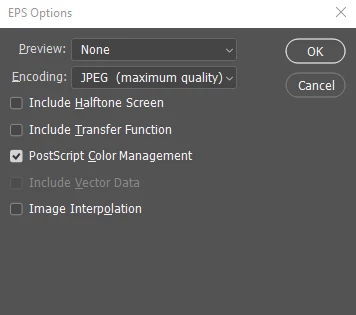
How it's saved manually:
 AdChoices