Participating Frequently
June 27, 2023
Answered

Photoshop tool icons are missing

  • June 27, 2023
  • 57 replies
  • 39610 views

Recenlty my Photoshop tool icons simply do not appear on the toolbar. they function fine but it is troublesome to find the right tool. The only way I could solve this is to reinstall photoshop but I cannot possibly do that every day.

Correct answer Sameer K

Hey, @Stefan31701036zdnm. Welcome to the Photoshop Community. I'll help you figure this out.

What version of Photoshop are you working on? Moving this to discussions for now.


Try this:

  • Go to the following location on Windows 10/11: Users/[user name]/AppData/Roaming/Adobe/UXP/PluginsStorage/PHSP
  • Press Windows + R & type this is the Run Window - %APPDATA%\Adobe\UXP\PluginsStorage
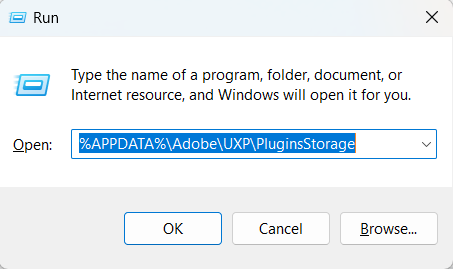


  • In the PHSP Folder, rename the 24 folder by adding a .old at the end. ('24' > Rename > '24.old')

These changes will give a refresh to panels in Photoshop. Let me know how it goes.

Thanks!

Sameer K

57 replies

Participant
October 15, 2025

Galera, quem poder me ajudar...  atulizei photoshop para versao 26.10.0 ta presentando Barra de ferramenta .Nao aparece os icones de cada ferramenta, somente um ponto, para mostrar a ferramenta, tem que clicar com botao direito do mause.Agradeço quem poder me ajudar. 

Ged_Traynor
Community Expert
Community Expert
October 15, 2025
Participant
September 26, 2025

Many of my icons are now missing from my toolbars in Photoshop. I have tried the fixes from the 2023 posts, like renaming the "24" folder to "~24" but that did not fix it. Pease help.

Peru Bob
Community Expert
Community Expert
September 26, 2025

Try resetting the tools and/or preferences.
To restore preferences quickly using a keyboard shortcut:

Press and hold Alt+Control+Shift (Windows) or Option+Command+Shift (Mac OS) as you start Photoshop. You are prompted to delete the current settings. The new preferences files are created the next time you start Photoshop.
Note: Using the keyboard shortcut, preference files for custom shortcuts, workspaces, and color settings will also be reset to default.

from here:

https://helpx.adobe.com/photoshop/using/preferences.html#restore_preferences

Participant
September 18, 2025

Same. Frustrating to a point I'm looking for alternatives and say goodbye to Adobe for good.


Participant
September 14, 2025

The fix offered by @7411280 has not worked for me. Using version 26.10.0. I've had this problem consistenly through several "updates"


Pixel D
Participant
September 2, 2025

Bonjour,
j'utilise depuis plusieurs années le meme pc et photoshop mais de temps en temps, j'avais ce bug d'affichage des outils et maintenant il est toujours là. 

- J'ai essayé de revenir sur une ancienne version, cela a corrigé le souci mais le probleme est revenu le lendemain. J'ai supprimé et re installé mais pareil. 


- Cote PC, j'ai de la place sur mon disque dur et c'est un pc qui tourne bien et assez equipé pour ca.
- J'ai essayé de changé les parametre des outils dans "espace de travail", cela corrige la disposition mais pas l'affichage.

C'est urgent, impossible de travailler. Auriez vous deja vu cela ?

Merci à vous


Participant
August 23, 2025

Yep, I have had the same problem with PS2025 version

I just stopped using that version, my favorite is PS2021 version.

Participant
August 20, 2025

@Sameer K 

thank you sameer bhai

Participant
August 1, 2025

Big Thanks 

Participant
July 31, 2025

Photoshop. Fix it please. And fonts don't work either, I'm having to use arrow keys to scroll through them. There's other stuff too. It's frustrating. None of the temp fixes really work. You need to hire someone to Bob the builder it. Artists are in pain here. 

Known Participant
July 31, 2025

It works until the next time I use PS pos. Several versions on my computer. They all do it sometimes and other times they work.


