New Participant
February 19, 2020
Answered

Problem with the Save As function when used in an Action since update 21.1

  • February 19, 2020
  • 9 replies
  • 29835 views

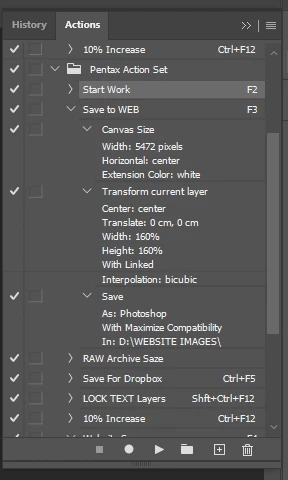
As part of my workflow of white backgrounding for website use, I have an action that squares off the canvas, boosts the size of the selected layer and then performs 'Save As' in a different folder to the open file. This gives me two files, one full size and one square. The whole process worked very well and I could process a lot of images quickly up until the most recent update. The D drive it is set to save it to is a local HDD and I can 'Save As' perfectly well outside of the Action but this slows down the workflow a lot. I tried rolling back the photoshop version but that didn't seem to help. Any ideas?


Here's a screenshot of the Action panel and the resulting Error message.


This topic has been closed for replies.
Correct answer Nikhil R Gupta

You are not the  only one, 
Not only did I receive the same error with Version 21.1, I got it at home and at work, so I can assure you that it not pc specific, but definitely a bug in 21.1

I have also had to revert back to a previous version and this seriously hinders my workflow.


Hello,
There is a new update available for Photoshop 21.1.1. Could you please test that and let us know that the issue is resolved.
Fixed issues in Photoshop
Thanks,
Nikhil Gupta

9 replies

Ffaelan Condragh
New Participant
May 13, 2020

Is there a confirmation on this fix yet?

New Participant
May 13, 2020

I have encountered no issues since last update.

Ffaelan Condragh
New Participant
May 13, 2020

Thank you

I had similar workflow issues as you and was hoping it had worked. 

amandalplunkett
Participating Frequently
March 2, 2020

I have 2 actions that resize and save my files onto a server that no longer seem to be functioning properly.


My workflow is:

edit --> save psd locally --> save a full sized jpg on the server --> save a resized jpg on the server.


I have actions to run the two jpg saves so they automatically get saved in the location on the server that I want them and in the case of the second action it resizes appropriately.


After years of these actions working suddenly today I get an error:

I can't seem to figure out why this is happening. I've restarted a number of times, to no avail.

It seems notable to me that in the error it implies that it's trying to save as the file location with the file name (i.e. \AG-SERVER\...\142548_1.jpg instead of just 142548_1.jpg) . I have tried re-recording the action and it worked while recording it but when I play it I run into the same error.


I am running photoshop 2020 v 21.1 on windows 10. And windows security\ windows defender is off


Any help greatly appreciated.

New Participant
March 4, 2020

Ran into this issue in our office today and we were able to run our actions after installing an older version (v 20.0.8). Not really a fix but a temporary solution.

amandalplunkett
Participating Frequently
March 4, 2020

Good to know, thanks! I ultimately started using photoshop 2018 again, just so we can still function. But good to know I can revert to an older 2020 version and have it work. Sure was missing that select object tool.


It's odd because none of the other folks in my department seem to be having this problem.

ika-127
New Participant
February 28, 2020

after launching the action writes: "file is not find"

PS 2019/win 7

action signuter+save as jpeg


Kukurykus
Brainiac
February 28, 2020
New Participant
February 28, 2020

Since 21.1, the save as function in Actions only works once. Next Save As in the Action leads to an error and stops the Action and the batch

Please solve and mention it in the release notes !


February 28, 2020

Hi

Bug reports can be posted on the Adobe Feedback Forum

guyl89490438
New Participant
February 26, 2020

After updating to 10.15.3 exporting from lightroom into an action that saves and closes the image (the save is built into the action itself as I'm saving these files as PSBs) as well as when I'm dragging and dropping a batch onto a droplet that does the same thing, Photoshop crashes on the second image. I've uninstalled and reinstalled PS as well as the whole CC suite and launcher and I still run into the issue. The only work around I've come up with is removing the save prompt from the action and letting them hang open after I batch process through the droplet. Any advice would be greatly appreciated. I've been banging my head against this wall for a while now.

Kukurykus
Brainiac
February 26, 2020

Maybe that's the same problem: Save as Action not working anymore

Alon_Rozen
New Participant
February 22, 2020

Hi,


I run the latest photoshop cc 21.1.0 20200212.r.106 2020/02/12: 4dd027efb58 x64. 

After the last update, whenever I try to save *.psd or *.jpg in actions I get the message: 

"Could not save 'file name' becasue the file name was not valid/ 

These actions worked for years without any problem. 

I restarted my computer, I re-installed photoshop - nothing helps. 

It is very important in my workflow. 

What am I missing?

Is it a known bug of the new update?


Thanks,

Alon


[Moderator note: PS-43966]

JJMack
Community Expert
February 22, 2020

That is a bug in 21.1.0. There are other bugs as well.  You can most likely get around the Save as bug by un-checking the save as step in the  action and run the action using Adobe Image processor script and have it save the output image

JJMack
New Participant
February 22, 2020

...not sure what "action using "Adobe Image precessor script" means


Nebur
Participating Frequently
February 22, 2020

Hi, after updating to 21.1 a simple action that I created is not working anymore, 
I delete it and re-created again and still not working, this action is to save a copy in a different folder as a jpeg, the error says "Could not save a copy as (file name) because the file name was not valid", the same image same file name can be save manually with no problems, I have been using this action for years with the same kind of name format, so, what can be wrong on this new version? Thanks.

Kukurykus
Brainiac
February 22, 2020
Earth Oliver
Brainiac
February 21, 2020

Personally, i never like using Save in an Action and i know this doesn't solve your problem, but have you ever tried using Batch or Image Processor to run this script? You can drop the Save portion of the action, then use either of those tools for the Save.

JJMack
Community Expert
February 21, 2020

While I prefer to use Image Processor and Image Processor Pro they have their own limitation or advantage it may depend on how you view it. They will only saved new files they will not save over existing file the will add sequence numbers to file names.

JJMack
Nebur
Participating Frequently
February 22, 2020

Definitely there is a problem on the Save As command, I just posted a problem report with a very simple action that it is to save a copy of an already saved file to a different folder as a jpeg, it gives me a"file invalid error", I have been using this action for years with no problems until this recent new update (21.1)

Brainiac
February 20, 2020

I can't make out the error message in the screenshot.

Brainiac
February 20, 2020
The document should already be saved (have a path)