
TrishMvhl
Inspiring
April 29, 2026
Answered

PS 2026 Suddenly Command-Shift-F Not Working

  • April 29, 2026
  • 5 replies
  • 72 views

On both of my Macs, PS 2026 Command-Shift-F has completely stopped working since yesterday. Was there some kind of wonky update? I’ve scoured Google searching for a fix. I’m on a deadline… help!!

    Correct answer Jeff Arola

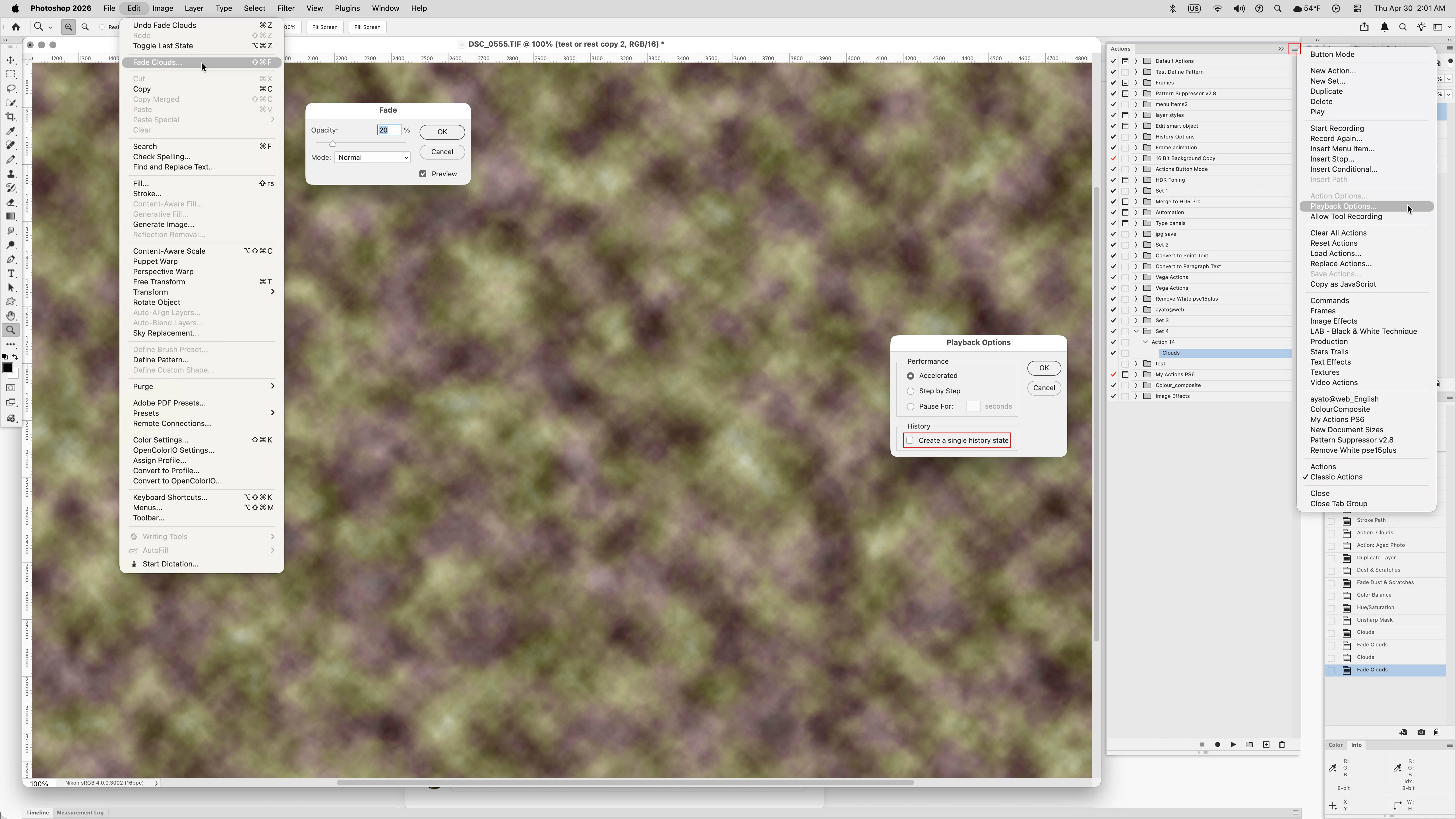
    One thing I’ve found with actions, even those with a single step, for example with a filter like Clouds, is Edit>Fade is greyed out. However, if from the Actions fly-out menu under Playback Options you uncheck Create a single history state, then Edit>Fade works again after running actions.


    5 replies

    TrishMvhl
    TrishMvhlAuthor
    Inspiring
    April 30, 2026

    Jef, THANK YOU!!!! That solved it on the Mac I’m using right now. Can’t wait to get back to my main Mac in a few hours and try it there. But WHY did this random problem occur? I would have NEVER figured out how to fix it. I’m a comic book colorist and know how to use Photoshop for my specific needs, but it’s become so complicated that every update and change fills me with dread. Many of my peers have switch to Clip as a result. I am so very grateful… thank you, Jeff!

    TrishMvhl
    TrishMvhlAuthor
    Inspiring
    April 30, 2026

    Sorry I for the typo in your name, Jeff...was typing too fast!

    Jeff Arola
    Community Expert
    Jeff ArolaCommunity ExpertCorrect answer
    Community Expert
    April 30, 2026

    One thing I’ve found with actions, even those with a single step, for example with a filter like Clouds, is Edit>Fade is greyed out. However, if from the Actions fly-out menu under Playback Options you uncheck Create a single history state, then Edit>Fade works again after running actions.


    snosking234
    Participating Frequently
    April 30, 2026

    Oh, looks like you were right—Fade is back to normal now. 


    snosking234
    Participating Frequently
    April 30, 2026

    Hi ​@Trevor.Dennis
    , I’m currently experiencing an issue with the Fade tool (Ctrl+Shift+F). When using actions from the Actions panel created in earlier versions, everything works normally. However, after updating to version 27.6, Fade becomes disabled once an action finishes. Meanwhile, newer actions still allow Fade to be used. What I need is to be able to use Fade immediately after finishing an action in the Actions panel.

    Jeff Arola
    Community Expert
    Community Expert
    April 30, 2026

    Is what is described in this thread sound like the issue your reporting?

    https://community.adobe.com/questions-712/non-working-ctrl-shift-f-fade-command-1559546

    Trevor.Dennis
    Community Expert
    Community Expert
    April 30, 2026

    That was with Windows, so something is going on.

    @TrishMvhl  AFAIK You are the second person to report this, but it is working OK for me. So, it would be useful to find some commonality with you and the other thread.  ​@eraydigital reported the shortcut not working in an Action.  Does that get with you?


    What function were you attempting to fade?

    @eraydigital was it a particular function for you, or in all cases?

    @TrishMvhl Check the Edit menu before using the shortcut to see if Fade is greyed out?

    Try other functions like simply applying a brush stroke, and fading it.


    CMass
    Community Manager
    Community Manager
    April 30, 2026

    Hey @TrishMvhl


    I'm very sorry this issue is happening in the middle of a deadline, we'll try and help you as much as we can here, but if you're in need of urgent help, please start a chat here: https://adobe.ly/4dehqEN

    For us to troubleshoot further we'll need more details. What exact version of Photoshop are you using and was this an issue in the previous version? You can find the exact version of Photoshop by going to Help > System Info. Let us know!

    ^CM

    snosking234
    Participating Frequently
    April 30, 2026

    Hi ​@CMass , I’m currently experiencing an issue with the Fade tool (Ctrl+Shift+F). When using actions from the Actions panel created in earlier versions, everything works normally. However, after updating to version 27.6, Fade becomes disabled once an action finishes. Meanwhile, newer actions still allow Fade to be used. What I need is to be able to use Fade immediately after finishing an action in the Actions panel.