

Pattie-F
Legend
May 31, 2021
Question

🔎 Quick Tip: Photoshop Layer shortcuts

  • May 31, 2021
  • 12 replies
  • 8107 views


Layer Shortcuts


Did you know there is a super useful Photoshop shortcut that creates a new layer containing the merged content of visible layers? If you want to create a new merged layer but still want to retain all of the original layers, turn off visibility for the layers you don't want to have included and choose Ctrl+Alt+Shift+E on a PC or Command+Option+Shift+E on a mac. This will create a new layer above the top selected layer that contains the merged content of the visible layers.
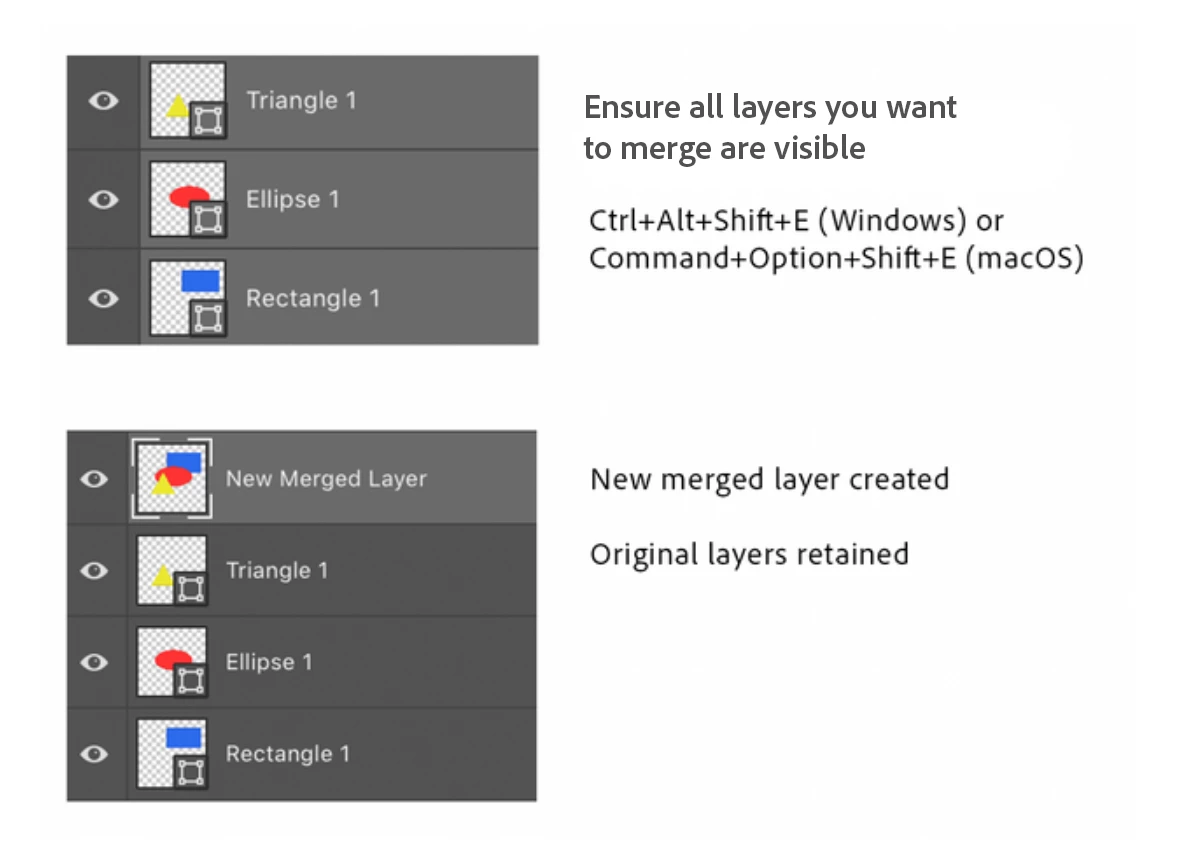


Here are a few other handy layer shortcuts and some helpful links you may want to visit to learn more about layers. If you have a favorite layer shortcut, feel free to add a comment to this post to share with others.


Action

Windows

mac OS

Duplicate layer

Crtl+J 

Command+J

Group selected layers­

Ctrl+G

Command+G

Move layer to top of list

Shift+Ctrl+] 

Shift- Command -] 

Send layer to bottom of list

Shift+Ctrl-[ 

Shift- Command -[ 

Merge all layers

Ctrl+E

Command+E

Merge visible layers

Ctrl+ Shift+E

Command+ Shift+E

Merge visible layers to new layer

Ctrl+Alt+Shift+E

Command+Option+Shift+E


Note for Mac, Command = ⌘


Related links:

Layer Basics

Layers Panel

Manage Layers and Groups

Work with Layers

Fill and Adjustment Layer Shortcuts

Photoshop User Guide

Quick Tips Home Page

This topic has been closed for replies.

12 replies

Participant
July 30, 2021

Thanks Pattie.


<link removed by moderator>

Participant
July 22, 2021

I used and LOVED the layers shortcutCommand+Option+Shift+E all the time but it doesn't work for me anymore. I have a new 2019 MacBook Pro BigSur. I was using a 2015 MacBookPro with BigSur prior to the new one. I've gone back and it works fine on that computer.  

I cannot for the life of me figure out why it won't work on my new Mac.

I've read things about going into preferences and then the keyboard but I'm not sure what to do. 

Can anyone give me a clue to what I'm doing wrong?


Han Ding
Participant
July 1, 2021

Thanks, this is useful 🙂

Jumpenjax
Community Expert
Community Expert
June 30, 2021

Sweet! Thanks for sharing!👍

Lee- Graphic Designer, Print Specialist, Photographer
happie_97
Community Expert
Community Expert
June 30, 2021

This is super helpful! Thank you! 😊

Randy Hufford
Community Expert
Community Expert
June 21, 2021

Yes I love this short cut. I use it all of the time! Thank You for other valuable shortcuts!

PECourtejoie
Community Expert
Community Expert
June 18, 2021

Edited-

Pattie-F
Pattie-FAuthor
Legend
June 24, 2021

@PECourtejoie 

I will try it in the current version and see if the shortcut works as specified for me. Are you Mac or PC?


PECourtejoie
Community Expert
Community Expert
June 29, 2021

Both, check your PMs

Participant
June 7, 2021

No, I didn't know this but it will definitely be used multiple times daily, going forward!

PECourtejoie
Community Expert
Community Expert
June 4, 2021

I'd like to share this additional list of layer tips from Adobe Evangelist Julieanne Kost: Fundamental Layers Panel Tips and Techniques

Trevor.Dennis
Community Expert
Community Expert
June 13, 2021

Some good stuff there Pierre.  I didn't know the rename multiple layers trick.

Ctrl Alt , (comma) to show all layers was also new to me and useful.  I use Alt clicking a layer's eye icon to isolate it for editing, and you can sometimes find that Alt click the eye icon again does not turn the other layers back on, so I shall be using that one for sure.  Adding Shift to the above shortcut turns all layers off.


She is not discussing layer masks, but one of my favourite layer mask shortcuts is Alt click the mask to bring it up in the document window.  That can be a useful way to reveal problem areas.

I still don't know if it is possible to merge layers while keeping the lower layer's name.  I have a more than vague idea that someone told me how to do that trick, and I'm thinking that it was either Pierre or Christoph.  Does it ring a bell with you? 

PECourtejoie
Community Expert
Community Expert
June 15, 2021

Hi! it might have been Christoph, maybe with a script... if it was me, I forgot how 😊

Trevor.Dennis
Community Expert
Community Expert
June 4, 2021

Hey, I didn't know the move to the top and bottom of the stack shortcuts. 

I tend to use Ctrl [ (move up one position) and Ctrl ] (move down position).


Christoph, I have a vague memory that you might have given me a shortcut to merge down keeping the name of the lower layer.  It was a long time ago if it happened, and I can't remember what the shortcut might have been. That's iif it is even possible.  It is useful where you have an adjustment layer or two above the layer you are merging to, and your merged layer ends up being named Curves 1.


Same thing with Smart Objects except it is more problematic with them.  You can rename the SO after making it, but if you double click to open in a new window to edit it, it reverts back to the original name.  It's more of an affront to the OCD that content creators all seem to suffer from, than a genuine issue, but OCD can be a serious problem if you are the person who has it.