
Kbirch
Participant
October 15, 2018
Answered

Scaling Images with shift no longer works after update (20.0)

  • October 15, 2018
  • 75 replies
  • 264293 views

After updating to CC 2019, I am not longer able to scale images evenly simply by holding shift.

I went to keyboard shortcuts and found a "scale" shortcut that was unassigned, so i assigned it to "S" as it simply wouldn't let me assign shift:
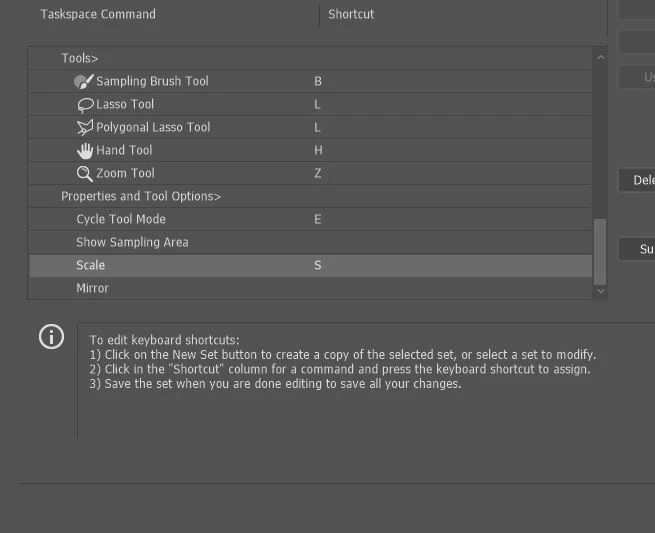
Now it seems to only want to scale evenly and won't let me scale however I want simply by dragging the corner of the image. Sometimes it doesn't go evenly when I transform with Ctrl+T and scales evenly after I press S, but wont let me go back to scaling unevenly.

Any Ideas?

Correct answer John Waller

It's a new feature. The old behaviour has been reversed. Default = proportional (constrain). Shift for non-proportional. Few people see any logic in this change.

Plenty of forum posts on this

Scaling Images with shift no longer works after update (20.0)

CC20 transform tool: Shift doesn't keep Aspect ratio

The new behaviour can be disabled.

To revert to the legacy transform behavior, do the following:

  1. Use Notepad (Windows) or a text editor on Mac OS to create a plain text file (.txt).
  2. Type the text below in the text file:

    TransformProportionalScale 0

  3. Save the file as "PSUserConfig.txt" to your Photoshop settings folder:
    • Windows: [Installation Drive]:\Users\[User Name]\AppData\Roaming\Adobe\Adobe Photoshop CC 2019\Adobe Photoshop CC 2019 Settings\
    • macOS: //Users/[User Name]/Library/Preferences/Adobe Photoshop CC 2019 Settings/

75 replies

rduggan@2gcinc.com
Participating Frequently
October 19, 2018

perfect demo...Where is adobe in all of this? Not one comment!!!

jonw35650570
Participant
October 19, 2018

Its true, Adobe should be on this and reassuring their users... the fix above worked, but people should NOT have to make and edit files and folder systems! Not acceptable. Not everyone is as tech savy.

I have made the .txt file (you must convert it to a plain text file) and it works fine for those who are wondering.

Adobe sitting on their subscriptions and leaving us to it... this is industry leading software! Common adobe, give us a response?

Participant
October 19, 2018

What an absolute pain in the $%*£!! The simplest of tasks to create a quick visual became epic!! I have followed the instructions above and thankfully scaling now works as it did before the update!!! How much time did I waste?!

Inspiring
October 19, 2018

OH MY GOD ADOBE! WHY HAVE YOU DONE THIS!?

Like others here, 23+ years of professional Photoshop use - since V3 back in 1995… and now you change such a fundamental part of the app?!

Not only that, it is now at-odds with the behaviour of other Adobe apps, such as InDesign.

And I thought the 'help' pop-ups and 'home screen' additions were annoying enough…

tobyn88968509
Participating Frequently
October 19, 2018

This is hands down the worst, dumbest update I've ever seen from Adobe. Why, why WHY?

I also cannot find the folder to put this text file in either, can anyone help?

Carola_BHG
Inspiring
October 19, 2018

tobyn88968509​ Hi! I think it's been said before. You have to make the Library folder visible since it's hidden by default.

Just…

  1. Go to the Finder
  2. Open the Go menu
  3. Hit the "alt" key to display the Library
  4. Click on it to open it

I think you'll be able to keep going from there and find the Preferences folder

Carola_BHG
Inspiring
October 19, 2018

The key problem with this change is that all other apps in my ecosystem (macOS) work like the traditional way to do it. Transform will scale non-uniformly, transform+shift will keep the scale. All the other apps work like this and it would be very weird to have just one that works differently - and not even in all cases, since some kind of layers work "the old way".

Not to mention the difficulty changing a shortcut many people have been using for more than 10 years. It was hilarious to see incredible professionals struggling with this at Adobe MAX demonstrations Hey, if the change had any reason to be done, it could be learnt with a few months of practice. But all of the other apps work the other way, so I disabled it for good.

rduggan@2gcinc.com
Participating Frequently
October 18, 2018

Adobe there are many busy professionals that have been using Photoshop for eons (for me since 1988!!!!) and have priced projects according to how much time it takes to complete...

Photoshop 2019 has wasted 4 hours of my day trying to scale, trying to save, trying to move objects...I get locked out and have to force quit.

It seems the crazy changes were made to appease beginners that are trying to learn. You are causing me time and money and want to know how to get 2018 back up and running until you can debug this crappy version.

rduggan@2gcinc.com
Participating Frequently
October 22, 2018

ADOBE...still nothing? Just wait until more professionals update. I have 5 more macs in my office in which my mac was the only one updated...I told my employees DO NOT UPDATE!

Please let us know what you are planning to do...I can only hope you don't screw up other Adobe programs.

And to all other software developers like Quark DO NOT FOLLOW THIS LEAD it is wasting businesses money and time!

Participant
October 18, 2018

Guys!!! All users were accustomed to the same mechanic but it had been totally changed. What`s the reason? It doesn`t make sense

marial62617084
Participant
October 18, 2018

Well... I ended up calling shift button the "shift" button, since every time I press it I end up distorting everything. Thank you ADOBE so much for that wonderful update -_-

dans52574335
Participant
October 18, 2018

Who is doing non-uniform scaling in the first place anyways? Why would you ever have / need such a function? I don't think I've used it in 20 years of using PS.

Inspiring
October 17, 2018

The INCONSISTENCY is the worst part:

  1. If you try to scale an image the default behavior is to lock the dimensions. Shift enables free transform
  2. If you try to scale a shape the default behavior is FREE transform. Shift Locks the dimensions!

WTF?

Why would Adobe change this? It makes no sense.

Btw, EVERY. SINGLE. OTHER Adobe program uses the original schema of default free transform and shift to maintain dimensions (After Effects, Illustrator, Indesign, etc.). Wildly inconsistent and completely unnecessary.

Is there any place to actually make a suggestion and ask them to remove this? Or is Adobe going to be stubborn like always and just carry on despite widespread user frustration.

daniagon
Participating Frequently
October 19, 2018

I agree 100%... the inconsistency is what kills me. Why would they apply this change on one program and not all the others? When I was finally getting used to not holding shift I realized I still had to do it on Illustrator and my brain broke  

jonw35650570
Participant
October 17, 2018

The most utter pointless update!

Holding shift + alt for over 10 years is built into your motor memory and now Adobe change it? I understand the logic... but seriously. GIVE US AN OPTION TO TURN IT OFF.

Not happy Adobe! Your killing my efficiency.

dans52574335
Participant
October 17, 2018

Arrrrrrrrrrrrrrrrrrhhhhhhhhhhhhhhhhhhhhhhhhhhhhhhhhhhhhhghghghghgghghghghhhhh!!! WHY? WHY? WHY? WHY? This is the most ridiculous change. I've been using PS for 15 years... now they decide to change it?