Participant
January 18, 2023
Answered

Script to automate Load Files into Stack

  • January 18, 2023
  • 4 replies
  • 4236 views

Hi, this is my first post. I know this has been asked a few times in various forms but I want to describe my situation as clearly as I can. I’ve been trying to figure it out myself for a couple of days but I’m not getting anywhere. I don’t have a scripting background.


Situation:

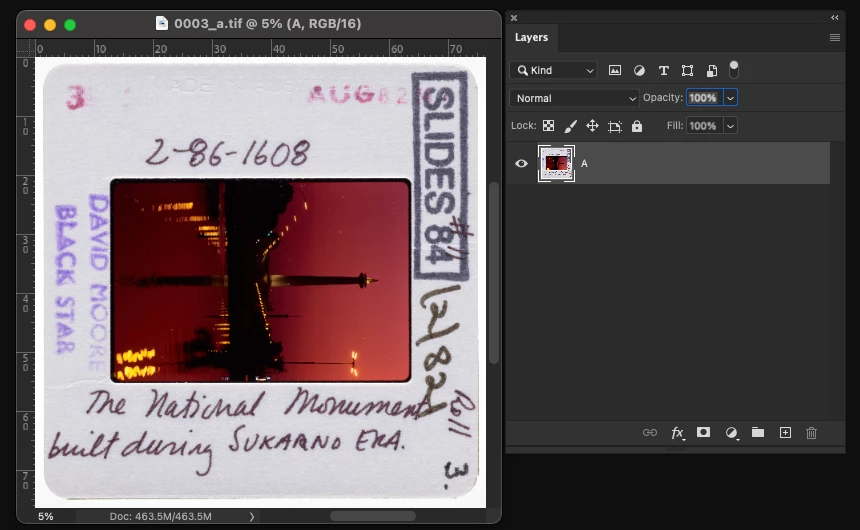
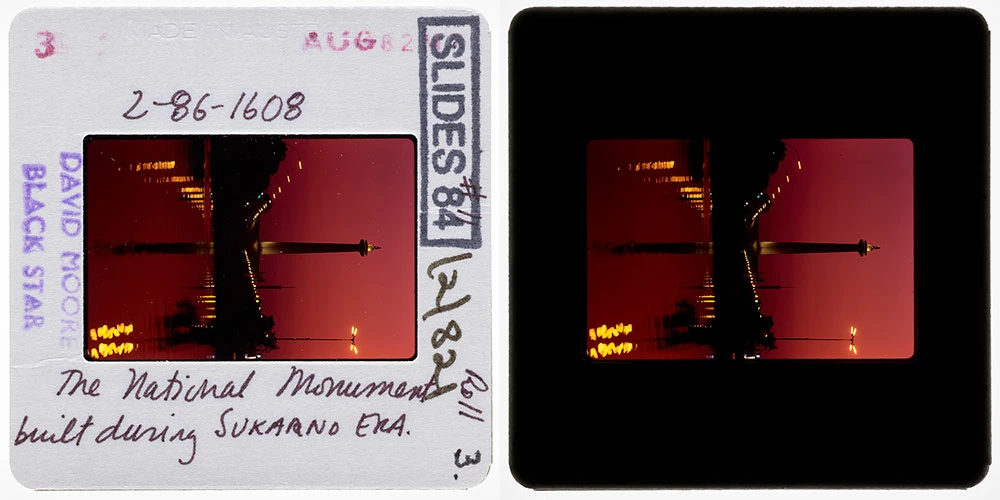
I’m a Imaging Officer for a cultural institution. I have around 16k files that require layering as pairs – an image exposed to capture slide mount details (A) and an exposure to capture the transparency itself (B). They required capturing in this way because top lights on the transparency highlight dust and scratches, while capturing the transparency from underneath with a lightbox does not.


Each file is unflattened, the A files have a single layer called 'A' and the B files a layer called 'B'.

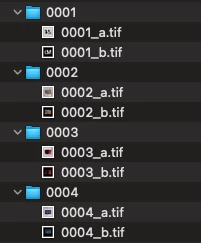
All files are matched in pairs in their own folders:


Automation:


I’d like to be able to automate the following:


  • Access subfolder, open file *_a & *_b  (files are 16bit tifs)
  • load files into stack/add open files
  • save as layered Tif – no compression - in same folder


The rest of my workflow would involve placing a layer mask over the transparency in A to reveal B.

Would it be possible to have a script work in this way? Any help would be very much appreciated.

Correct answer Stephen Marsh

This version recurses into all child sub-folders under the parent root/top-level folder and retrieves files matching the nominated file types.


/*

Stack N Number of Document Sets to Layers - Recursive Folders.jsx
Stephen Marsh
8th June 2024 Version
https://community.adobe.com/t5/photoshop-ecosystem-discussions/script-to-automate-load-files-into-stack/m-p/13499068

A generic, skeleton "framework" script to help fast-track development of similar scripts for combining multiple "sequence" single-layer files to layers.

This script will recurse into all sub-folders under the main top-level/root input folder.

Input files must be alpha/numeric sorting in order to stack in the correct set quantity.

Example: File-01.jpg File-02.jpg etc, FileA1.tif FileA2.tif etc, File1a.tif File1b.tif etc.

A minimum of 2 or more files per stack is required. The quantity of input files must be evenly divisible by the stack quantity.

A named action set and action can be set on line 185 to "do something" with the stacked layers.

*/

#target photoshop

// app.documents.length === 0
if (!app.documents.length) {

    try {

        // Save and disable dialogs
        var restoreDialogMode = app.displayDialogs;
        app.displayDialogs = DialogModes.NO;

        // Main script function
        (function () {

            // Select the input folder
            var inputFolder = Folder.selectDialog('Please select the top-level/root folder with sub-folders/files to process');
            if (inputFolder === null) return;

            // Limit the file format input, add or remove as required
            var filesAndFolders = scanSubFolders(inputFolder, /\.(png|jpg|jpeg|tif|tiff|psd|psb)$/i);
            // Set the recursive folder's files
            var fileList = filesAndFolders[0];
            // Recursive folder and file selection
            // Function parameters: folder object, RegExp or string
            function scanSubFolders(tFolder, mask) {
                /*
                Adapted from:
                https://community.adobe.com/t5/photoshop-ecosystem-discussions/photoshop-javascript-open-files-in-all-subfolders/m-p/5162230
                */
                var sFolders = [];
                var allFiles = [];
                sFolders[0] = tFolder;
                // Loop through folders
                for (var j = 0; j < sFolders.length; j++) {
                    var procFiles = sFolders[j].getFiles();
                    // Loop through this folder contents
                    for (var i = 0; i < procFiles.length; i++) {
                        if (procFiles[i] instanceof File) {
                            if (mask == undefined) {
                                // If no search mask collect all files
                                allFiles.push(procFiles);
                            }
                            if (procFiles[i].fullName.search(mask) != -1) {
                                // Otherwise only those that match mask
                                allFiles.push(procFiles[i]);
                            }
                        } else if (procFiles[i] instanceof Folder) {
                            // Store the subfolder
                            sFolders.push(procFiles[i]);
                            // Search the subfolder
                            scanSubFolders(procFiles[i], mask);
                        }
                    }
                }
                return [allFiles];
            }

            // Force alpha-numeric list sort
            // Use .reverse() for the first filename in the merged file
            // Remove .reverse() for the last filename in the merged file
            fileList.sort().reverse();

            //////////////////////////// Static Set Quantity - No GUI ////////////////////////////
            // var setQty = 2;
            //////////////////////////////////////////////////////////////////////////////////////

            // or...

            //////////////////////////// Variable Set Quantity - GUI /////////////////////////////
            // Loop the input prompt until a number is entered
            var origInput;
            while (isNaN(origInput = prompt('No. of files per set (minimum 2):', '2')));
            // Test if cancel returns null, then terminate the script
            if (origInput === null) {
                alert('Script cancelled!');
                return
            }
            // Test if an empty string is returned, then terminate the script
            if (origInput === '') {
                alert('A value was not entered, script cancelled!');
                return
            }
            // Test if a value less than 2 is returned, then terminate the script
            if (origInput < 2) {
                alert('A value less than 2 was entered, script cancelled!');
                return
            }
            // Convert decimal input to integer
            var setQty = parseInt(origInput);
            //////////////////////////////////////////////////////////////////////////////////////

            // Validate that the file list is not empty
            var inputCount = fileList.length;
            var cancelScript1 = (inputCount === 0);
            if (cancelScript1 === true) {
                alert('Zero input files found, script cancelled!');
                return;
            }
            // Validate the input count vs. output count - Thanks to Kukurykus for the advice to test using % modulus
            var cancelScript2 = !(inputCount % setQty);
            alert(inputCount + ' input files stacked into sets of ' + setQty + ' will produce ' + inputCount / setQty + ' output files.');
            // Test if false, then terminate the script
            if (cancelScript2 === false) {
                alert('Script cancelled as the quantity of input files are not evenly divisible by the set quantity.');
                return;
            }

            // Hide the Photoshop panels
            app.togglePalettes();
            
            // Script running notification window - courtesy of William Campbell
            // https://www.marspremedia.com/download?asset=adobe-script-tutorial-11.zip
            // https://youtu.be/JXPeLi6uPv4?si=Qx0OVNLAOzDrYPB4
            var working;
            working = new Window("palette");
            working.preferredSize = [300, 80];
            working.add("statictext");
            working.t = working.add("statictext");
            working.add("statictext");
            working.display = function (message) {
                this.t.text = message || "Script running, please wait...";
                this.show();
                app.refresh();
            };
            working.display();

            // Set the file processing counter
            var fileCounter = 0;

            // Loop through and open the file sets
            while (fileList.length) {
                // Sets of N quantity files
                for (var a = 0; a < setQty; a++) {
                    try {
                        app.open(fileList.pop());
                    } catch (e) { }
                }

                // Set the base doc layer name
                app.activeDocument = documents[0];
                docNameToLayerName();

                // Set the save path back to the source/input sub-folder
                var outputFolder = documents[0].path;

                // Stack all open docs to the base doc
                while (app.documents.length > 1) {
                    app.activeDocument = documents[1];
                    docNameToLayerName();
                    app.activeDocument.activeLayer.duplicate(documents[0]);
                    app.activeDocument = documents[0];

                    // Do something to the stacked active layer (blend mode, opacity etc)
                    // app.activeDocument.activeLayer.blendMode = BlendMode.MULTIPLY;

                    app.documents[1].close(SaveOptions.DONOTSAVECHANGES);
                }

                ////////////////////////////////// Start doing stuff //////////////////////////////////

                /*
                // Run an action on the stacked layers, change the case-sensitive names as required...
                try {
                    app.doAction("My Action", "My Action Set Folder");
                } catch (e) {
                    alert(e + ' ' + e.line);
                }
                */

                ////////////////////////////////// Finish doing stuff //////////////////////////////////

                // Delete XMP metadata to reduce final file size of output files
                removeXMP();

                // Save name + suffix & save path
                var Name = app.activeDocument.name.replace(/\.[^\.]+$/, '');
                var saveFile = File(outputFolder + '/' + Name + '_x' + setQty + '-Sets' + '.psd');
                // var saveFile = File(outputFolder + '/' + Name + '_x' + setQty + '-Sets' + '.tif');
                // var saveFile = File(outputFolder + '/' + Name + '_x' + setQty + '-Sets' + '.jpg');
                // var saveFile = File(outputFolder + '/' + Name + '_x' + setQty + '-Sets' + '.png');

                // Call the save function
                savePSD(saveFile);
                //saveTIFF(saveFile);
                //saveJPEG(saveFile);
                //savePNG(saveFile);

                // Close all open files without saving
                while (app.documents.length) {
                    app.activeDocument.close(SaveOptions.DONOTSAVECHANGES);
                }

                // Increment the file saving counter
                fileCounter++;


                ///// Functions /////

                function savePSD(saveFile) {
                    psdSaveOptions = new PhotoshopSaveOptions();
                    psdSaveOptions.embedColorProfile = true;
                    psdSaveOptions.alphaChannels = true;
                    psdSaveOptions.layers = true;
                    psdSaveOptions.annotations = true;
                    psdSaveOptions.spotColors = true;
                    // Save as
                    app.activeDocument.saveAs(saveFile, psdSaveOptions, true, Extension.LOWERCASE);
                }

                /* Not currently used, a placeholder to swap in/out as needed
                function saveTIFF(saveFile) {
                    tiffSaveOptions = new TiffSaveOptions();
                    tiffSaveOptions.embedColorProfile = true;
                    tiffSaveOptions.byteOrder = ByteOrder.IBM;
                    tiffSaveOptions.transparency = true;
                    // Change layers to false to save without layers
                    tiffSaveOptions.layers = true;
                    tiffSaveOptions.layerCompression = LayerCompression.ZIP;
                    tiffSaveOptions.interleaveChannels = true;
                    tiffSaveOptions.alphaChannels = true;
                    tiffSaveOptions.annotations = true;
                    tiffSaveOptions.spotColors = true;
                    tiffSaveOptions.saveImagePyramid = false;
                    // Image compression = NONE | JPEG | TIFFLZW | TIFFZIP
                    tiffSaveOptions.imageCompression = TIFFEncoding.TIFFLZW;
                    // Save as
                    app.activeDocument.saveAs(saveFile, tiffSaveOptions, true, Extension.LOWERCASE);
                }
                */

                /* Not currently used, a placeholder to swap in/out as needed
                function saveJPEG(saveFile) {
                    jpgSaveOptions = new JPEGSaveOptions();
                    jpgSaveOptions.embedColorProfile = true;
                    jpgSaveOptions.formatOptions = FormatOptions.STANDARDBASELINE;
                    jpgSaveOptions.matte = MatteType.NONE;
                    jpgSaveOptions.quality = 10;
                    // Save as
                    activeDocument.saveAs(saveFile, jpgSaveOptions, true, Extension.LOWERCASE);
                }
                */

                /* Not currently used, a placeholder to swap in/out as needed
                function savePNG(saveFile) {
                    var pngOptions = new PNGSaveOptions();
                    pngOptions.compression = 0; // 0-9
                    pngOptions.interlaced = false;
                    // Save as
                    app.activeDocument.saveAs(saveFile, pngOptions, true, Extension.LOWERCASE);
                }
                */

                function docNameToLayerName() {
                    var layerName = app.activeDocument.name.replace(/\.[^\.]+$/, '');
                    app.activeDocument.activeLayer.name = layerName;
                }

                function removeXMP() {
                    if (!documents.length) return;
                    if (ExternalObject.AdobeXMPScript == undefined) ExternalObject.AdobeXMPScript = new ExternalObject("lib:AdobeXMPScript");
                    var xmp = new XMPMeta(activeDocument.xmpMetadata.rawData);
                    XMPUtils.removeProperties(xmp, "", "", XMPConst.REMOVE_ALL_PROPERTIES);
                    app.activeDocument.xmpMetadata.rawData = xmp.serialize();
                }
            }

            // Restore saved dialogs
            app.displayDialogs = restoreDialogMode;

            // Restore the Photoshop panels
            app.togglePalettes();

            // Ensure Photoshop has focus before closing the running script notification window
            app.bringToFront();
            working.close();

            // End of script notification
            app.beep();
            alert('Script completed!' + '\n' + fileCounter + ' combined files saved to their respective source folders in:' + '\n' + outputFolder.parent.fsName);

        }());

    } catch (e) {
        // Restore the Photoshop panels
        app.togglePalettes();

        // Restore saved dialogs
        app.displayDialogs = restoreDialogMode;
        alert("If you see this message, something went wrong!" + "\r" + e + ' ' + e.line);
    }
}

else {
    alert('Stack "N" Number of Sets:' + '\n' + 'Please close all open documents before running this script!');
}




4 replies

Stephen Marsh
Community Expert
Community Expert
October 19, 2024

I have put a GUI on the script for stacking variable quantity file sets (2 or more files):

v1.0 Features:


  • Buttons to select the input and output folders
  • Supported input formats: PNG, JPG, TIFF, PSD, PSB, WEBP (the underlying code is easily changed to add more formats)
  • A field to enter the number of files to be stacked per set
  • Files will be stacked in alpha/numeric sort order
  • Supported output formats: PSD, PSB, TIFF (layers or flattened) or JPG (flattened), PNG and WEBP.
  • Option to Remove all supported XMP metadata
  • Dropdown menus to select a loaded action set and action to play on the top layer of each set (the action can then select other layers as needed for additional processing)


What it doesn't do: The script doesn't attempt to auto-align the images. All images are intended to have the same pixel dimensions and resolution PPI values.


/*

Stack Documents to Sets of N Layers scriptUI GUI.jsx
Stephen Marsh

v1.0, 15th October 2024
v1.1, 15th November 2024, WebP save format support added and other minor improvements
v1.2, 16th November 2024, Added "user friendly" file format variables for save options for PSD, TIFF, JPEG, PNG and WEBP formats
v1.3, 28th December 2024, Added PSB Large Document Format save option
v1.4, 26th January 2025, Added a file sort order checkbox for descending or ascending file sorting/stacking order
v1.5, 30th January 2025, Added a dropdown menu to select different file naming options
v1.6, 30th April 2025, Added an option to the renaming dropdown to use the combined layer names to name the files (in reverse order)
https://community.adobe.com/t5/photoshop-ecosystem-discussions/script-to-automate-load-files-into-stack/m-p/13499068#U14928257
https://community.adobe.com/t5/photoshop-ecosystem-discussions/batch-processing-load-2-files-as-layers-play-action-export-image-repeat-for-every-quot-file-pair/m-p/12317165

NOTE:
Input files must be alpha/numeric sorting in order to stack in the correct set quantity.
Example: File-01.jpg File-02.jpg etc, FileA1.tif FileA2.tif etc, File1a.tif File1b.tif etc.
A minimum of 2 or more files per stack is required. The quantity of input files must be evenly divisible by the stack quantity.

*/

#target photoshop;

// Adjust the following "user friendly" variables as required. A GUI for these file format options isn't planned!

// savePSD global variables
var embedColorProfile = true; // Boolean: true | false
var alphaChannels = true; // Boolean: true | false
var annotations = true; // Boolean: true | false
var spotColors = true; // Boolean: true | false

// saveTIFF global variables
var tiffEmbedColorProfile = true; // Boolean: true | false
var tiffByteOrder = ByteOrder.IBM; // ByteOrder.MACOS | ByteOrder.IBM
var tiffTransparency = true; // Boolean: true | false
var tiffLayerCompression = LayerCompression.ZIP; // LayerCompression.RLE | LayerCompression.ZIP
var tiffInterleaveChannels = true; // Boolean: true | false
var tiffAlphaChannels = true; // Boolean: true | false
var tiffAnnotations = true; // Boolean: true | false
var tiffSpotColors = true; // Boolean: true | false
var tiffSaveImagePyramid = false; // Boolean: true | false
var tiffImageCompression = TIFFEncoding.TIFFLZW; // TIFFEncoding.NONE | TIFFEncoding.JPEG | TIFFEncoding.TIFFLZW | TIFFEncoding.TIFFZIP

// saveJPEG global variables
var jpegEmbedColorProfile = true; // Boolean: true | false
var jpegFormatOptions = FormatOptions.STANDARDBASELINE; // FormatOptions.STANDARDBASELINE | FormatOptions.OPTIMIZEDBASELINE | FormatOptions.PROGRESSIVE
var jpegMatte = MatteType.NONE; // MatteType.NONE | MatteType.WHITE | MatteType.BLACK
var jpegQuality = 10; // Numeric: 0 - 12

// savePNG global variables
var pngCompression = 0; // Numeric: 0 - 9
var pngInterlaced = false; // Boolean: true | false

// saveWebP global variables
var webPCompressionType = "compressionLossy"; // String: "compressionLossless" | "compressionLossy"
var webPCompIsLossless = false; // Boolean: true | false
var webPQuality = 75; // Numeric: 0 (lowest lossy quality) - 100 (highest lossy quality)
var webPIncludeXMPData = true; // Boolean: true | false
var webPIncludeEXIFData = false; // Boolean: true | false
var webPIncludePsExtras = false; // Boolean: true | false
var webPLowerCase = true; // Boolean: true | false
var webPEmbedProfiles = true; // Boolean: true | false


//////////


// Folder button global variables, declare them early for the main dialog window OK button!
var inputFolder, outputFolder;


// Check if documents are open
if (app.documents.length === 0) {
    try {
        // Save and disable dialogs
        var restoreDialogMode = app.displayDialogs;
        app.displayDialogs = DialogModes.NO;

        // Main script function
        (function () {

            // Create the main dialog window
            var theDialogWin = new Window("dialog", "Stack Documents to Sets of N Layers (v1.6)");
            theDialogWin.orientation = "column";
            theDialogWin.alignChildren = ["fill", "top"];
            theDialogWin.spacing = 10;
            theDialogWin.margins = 16;

            // Input panel
            var inputPanel = theDialogWin.add("panel", undefined, "Input Folder");
            inputPanel.orientation = "column";
            inputPanel.alignChildren = ["fill", "top"];
            inputPanel.spacing = 5;
            inputPanel.margins = 10;
            //
            var inputFolderGroup = inputPanel.add("group");
            inputFolderGroup.orientation = "row";
            inputFolderGroup.alignChildren = ["left", "center"];
            var inputFolderBtn = inputFolderGroup.add("button", undefined, "Select Input Folder");
            inputFolderBtn.preferredSize.width = 170; // Make 3px larger than the output folder button's width for visual alignment
            var inputFolderText = inputFolderGroup.add("statictext", undefined, "No folder selected", { truncate: "middle" });
            inputFolderText.preferredSize.width = 425;
            // Sorting Order checkbox
            var sortOrderCheckbox = inputPanel.add("checkbox", undefined, "Reverse File Stacking Order");
            sortOrderCheckbox.value = true;
            sortOrderCheckbox.helpTip = "Enable for file 001 layered below 002 | Disable for file 002 layered below 001";

            // Output panel
            var outputPanel = theDialogWin.add("panel", undefined, "Output Folder");
            outputPanel.orientation = "column";
            outputPanel.alignChildren = ["fill", "top"];
            outputPanel.spacing = 5;
            outputPanel.margins = 15;
            //
            var outputFolderGroup = outputPanel.add("group");
            outputFolderGroup.orientation = "row";
            outputFolderGroup.alignChildren = ["left", "center"];
            var outputFolderBtn = outputFolderGroup.add("button", undefined, "Select Output Folder");
            outputFolderBtn.preferredSize.width = 167; // Adjust the button width for visual alignment with the settings panel elements
            var outputFolderText = outputFolderGroup.add("statictext", undefined, "No folder selected", { truncate: "middle" });
            outputFolderText.preferredSize.width = 425;

            // Settings panel
            var settingsPanel = theDialogWin.add("panel", undefined, "Settings");
            settingsPanel.orientation = "column";
            settingsPanel.alignChildren = ["fill", "top"];
            settingsPanel.spacing = 5;
            settingsPanel.margins = 15;
            //
            var setGroup = settingsPanel.add("group");
            setGroup.orientation = "row";
            setGroup.alignChildren = ["left", "center"];
            setGroup.add("statictext", undefined, "Quantity per set:");
            var setQtyInput = setGroup.add("editnumber", undefined, "2");
            setQtyInput.characters = 5; // Limit the input to 5 digits for the desired field width
            setQtyInput.helpTip = "A minimum of 2 or more files per stack is required. The quantity of input files must be evenly divisible by the stack quantity.";
            // Validate input to ensure it is equal to or greater than 2
            setQtyInput.onChange = function () {
                var value = parseInt(this.text);
                if (isNaN(value) || value < 2) {
                    this.text = "2";  // Reset to default value if the input is invalid
                    alert("Please enter a valid number (minimum 2) for files per set.");
                }
            };

            var formatGroup = settingsPanel.add("group");
            formatGroup.orientation = "row";
            formatGroup.alignChildren = ["left", "center"];
            formatGroup.add("statictext", undefined, "Save format:");

            // Create the conditional dropdown options array based on Photoshop version 2022 check/test
            var formatOptions = ["PSD", "PSB", "TIFF", "JPEG", "PNG"];
            if (parseFloat(app.version) >= 23) {
                formatOptions.push("WEBP");
            }

            // Populate the dropdown menu with format options
            var formatDropdown = formatGroup.add("dropdownlist", undefined, formatOptions);
            formatDropdown.selection = 0;
            formatDropdown.preferredSize.width = 76; // Specific width for visual alignment with the set quantity field

            // Layers checkbox
            var layersCheckbox = settingsPanel.add("checkbox", undefined, "Layers");
            layersCheckbox.enabled = (formatDropdown.selection.text === "PSD" || formatDropdown.selection.text === "PSB" || formatDropdown.selection.text === "TIFF");
            layersCheckbox.value = layersCheckbox.enabled;

            // Remove XMP checkbox
            var removeXMPCheckbox = settingsPanel.add("checkbox", undefined, "Remove XMP Data");
            removeXMPCheckbox.value = true;
            removeXMPCheckbox.helpTip = "Remove XMP metadata, including photoshop:DocumentAncestors metadata bloat!";

            // Add a dropdown menu for save naming options
            settingsPanel.add('statictext', undefined, 'Select a File Naming Option:');
            var namingDropdown = settingsPanel.add('dropdownlist', undefined, [
                'Use the top layer to name the files',
                'Use the bottom layer to name the files',
                'Use the combined layer names to name the files',
                'Use the combined layer names to name the files (in reverse order)'
            ]);
            namingDropdown.selection = 0; // Default selection

            // Run Action panel
            var actionsPanel = theDialogWin.add("panel", undefined, "Run Action on top layer");
            actionsPanel.orientation = "column";
            actionsPanel.alignChildren = "fill";
            // Add action menus to the actions panel
            var actionGroup = actionsPanel.add("group");
            actionGroup.orientation = "column";
            actionGroup.alignChildren = ["fill", "top"];
            actionGroup.alignment = ["fill", "top"];
            var actionSetGroup = actionGroup.add("group");
            actionSetGroup.orientation = "row";
            actionSetGroup.alignChildren = ["left", "center"];
            actionSetGroup.alignment = ["fill", "top"];
            actionSetGroup.add('statictext', undefined, 'Action Set:').preferredSize.width = 70;
            var actionSetDropdown = actionSetGroup.add('dropdownlist', undefined, []);
            actionSetDropdown.alignment = ["fill", "center"];
            var actionLabelGroup = actionGroup.add("group");
            actionLabelGroup.orientation = "row";
            actionLabelGroup.alignChildren = ["left", "center"];
            actionLabelGroup.alignment = ["fill", "top"];
            actionLabelGroup.add('statictext', undefined, 'Action:').preferredSize.width = 70;
            var actionDropdown = actionLabelGroup.add('dropdownlist', undefined, []);
            actionDropdown.alignment = ["fill", "center"];
            // Populate the action set dropdown
            actionSetDropdown.add('item', '');
            var actionSets = getActionSets();
            for (var i = 0; i < actionSets.length; i++) {
                actionSetDropdown.add('item', actionSets[i]);
            }
            actionSetDropdown.selection = actionSetDropdown.items[0];
            actionDropdown.add('item', '');
            // When the action set is changed, update the action dropdown
            actionSetDropdown.onChange = function () {
                actionDropdown.removeAll();
                if (actionSetDropdown.selection && actionSetDropdown.selection.text != '') {
                    var actions = getActions(actionSetDropdown.selection.text);
                    for (var i = 0; i < actions.length; i++) {
                        actionDropdown.add('item', actions[i]);
                    }
                    if (actions.length > 0) {
                        actionDropdown.selection = actionDropdown.items[0];
                    }
                } else {
                    actionDropdown.add('item', '');
                    actionDropdown.selection = actionDropdown.items[0];
                }
            };

            // Add Cancel and OK buttons
            var btnGroup = theDialogWin.add("group");
            btnGroup.orientation = "row";
            btnGroup.alignChildren = ["right", "center"];
            var cancelBtn = btnGroup.add("button", undefined, "Cancel");
            var okBtn = btnGroup.add("button", undefined, "OK");
            // Add OK button validation
            okBtn.onClick = function () {
                if (!inputFolder) {
                    alert("Please select an input folder.");
                    return; // Stop execution if inputFolder is not defined
                }
                var setQty = parseInt(setQtyInput.text);
                if (isNaN(setQty) || setQty < 2) {
                    alert("Please enter a valid number (minimum 2) for files per set.");
                    return;
                }
                theDialogWin.close(1); // Close the dialog if validation passes
            };

            // Add file format info text element next to the format dropdown menu
            var formatInfoText = formatGroup.add("statictext", undefined, "");
            formatInfoText.preferredSize.width = 400;
            formatInfoText.graphics.foregroundColor = formatInfoText.graphics.newPen(formatInfoText.graphics.PenType.SOLID_COLOR, [0.8, 0.8, 0.8], 1); // Set the info text colour

            // Enable/disable layers checkbox and update info text based on format selection
            formatDropdown.onChange = function () {
                layersCheckbox.enabled = (this.selection.text === "PSD" || this.selection.text === "PSB" || this.selection.text === "TIFF");
                if (layersCheckbox.enabled) {
                    layersCheckbox.value = true; // Enable the checkbox if PSD, PSB or TIFF is selected
                } else {
                    layersCheckbox.value = false; // Disable and uncheck it for other formats
                }

                // Update info text based on selected format and variables
                switch (this.selection.text) {
                    case "PSD":
                        formatInfoText.text = "(Standard Photoshop Format)";
                        break;
                    case "PSB":
                        formatInfoText.text = "(Large Document Format)";
                        break;
                    case "TIFF":
                        formatInfoText.text = '(' + tiffByteOrder.toString().replace(/ByteOrder\./, '') + ' Byte Order, ' + tiffImageCompression.toString().replace(/TIFFEncoding\./, '') + ' Compression)';
                        break;
                    case "JPEG":
                        formatInfoText.text = '(' + jpegFormatOptions.toString().replace(/FormatOptions\./, '') + ' Format Option, Quality ' + jpegQuality + ')';
                        break;
                    case "PNG":
                        formatInfoText.text = "(Lossless Compression " + pngCompression + ", Supports Transparency)";
                        break;
                    case "WEBP":
                        formatInfoText.text = "(Lossy Compression " + webPQuality + ", Supports Transparency)";
                        break;
                }
            };

            // Trigger onChange initially to set default text
            formatDropdown.onChange();

            // Input and output folder selection logic
            inputFolderBtn.onClick = function () {
                inputFolder = Folder.selectDialog('Please select the top-level/root folder with sub-folders/files to process');
                if (inputFolder) {
                    inputFolderText.text = inputFolder.fsName;
                    outputFolder = inputFolder;  // Set output folder to input folder
                    outputFolderText.text = inputFolder.fsName;  // Show the actual path
                }
            };
            //
            outputFolderBtn.onClick = function () {
                var tempFolder = Folder.selectDialog('Please select the output folder');
                if (tempFolder) {
                    outputFolder = tempFolder;
                    outputFolderText.text = outputFolder.fsName;
                }
            };

            // Show the dialog
            if (theDialogWin.show() === 1) {
                if (!inputFolder) {
                    alert("No input folder selected. Script cancelled!");
                    return; // Exit the script
                }


                //////////


                // Set quantity min value validation
                var setQty = parseInt(setQtyInput.text);
                if (isNaN(setQty) || setQty < 2) {
                    alert("Please enter a valid number (minimum 2) for files per set.");
                    return;
                }

                // Main script logic
                var fileList = inputFolder.getFiles(/\.(png|jpg|jpeg|tif|tiff|psd|psb|webp)$/i);

                // Validate file list
                if (fileList.length === 0) {
                    alert('Zero input files found, script cancelled!');
                    return;
                }

                // Validate the input count vs. output count - Thanks to Kukurykus for the advice to test using the % modulus (remainder) operator
                if (fileList.length % setQty !== 0) {
                    alert('The quantity of input files are not evenly divisible by the set quantity.');
                    return;
                }

                // Confirmation
                if (!confirm(fileList.length + ' input files stacked into sets of ' + setQty + ' will produce ' + fileList.length / setQty + ' output files. Continue?')) {
                    // User clicked Cancel
                    alert('Script cancelled!');
                    return; // Exit the script
                }

                // Sort files based on the checkbox value
                if (sortOrderCheckbox.value) {
                    fileList.sort().reverse();
                } else {
                    fileList.sort();
                }

                // Hide the Photoshop panels
                app.togglePalettes();

                // Create the progress window
                var progress = new Window("palette");
                progress.text = "Processing Files";
                progress.orientaton = "column";
                progress.alignChildren = ["center", "top"];
                progress.spacing = 10;
                progress.margins = 16;
                var progressBar = progress.add("progressbar", undefined, 0, fileList.length / setQty);
                progressBar.preferredSize.width = 300;
                var progressText = progress.add("statictext", undefined, "Processing...");
                progress.show();

                // Process files to the set quantity
                var fileCounter = 0;
                while (fileList.length) {
                    // Open and process files
                    var currentSet = [];
                    for (var a = 0; a < setQty; a++) {
                        currentSet.push(fileList.pop());
                    }
                    for (var i = 0; i < currentSet.length; i++) {
                        app.open(currentSet[i]);
                    }

                    // Stack the docs
                    app.activeDocument = documents[0];
                    docNameToLayerName();
                    while (app.documents.length > 1) {
                        app.activeDocument = documents[1];
                        docNameToLayerName();
                        // Dupe the layer to the target doc
                        app.activeDocument.activeLayer.duplicate(documents[0]);
                        // Return to the target doc
                        app.activeDocument = documents[0];
                        // Do something to the stacked active layer (blend mode, opacity etc)
                        // app.activeDocument.activeLayer.blendMode = BlendMode.MULTIPLY;
                        // app.activeDocument.activeLayer.opacity = 50;
                        app.documents[1].close(SaveOptions.DONOTSAVECHANGES);
                    }

                    // Run the selected action
                    if (actionSetDropdown.selection && actionSetDropdown.selection.text != '' &&
                        actionDropdown.selection && actionDropdown.selection.text != '') {
                        selectFrontLayer();
                        runAction(actionSetDropdown.selection.text, actionDropdown.selection.text); // Play the selected action!
                    }

                    // Remove XMP metadata if checkbox is checked
                    if (removeXMPCheckbox.value) {
                        removeXMP();
                    }

                    // Set an empty array to hold the layer names
                    var layerNames = [];
                    // Loop through all layers in the document
                    for (var i = 0; i < app.activeDocument.layers.length; i++) {
                        var layerName = app.activeDocument.layers[i].name;
                        // Replace commas with underscores
                        layerName = layerName.split(',');
                        // Add the split names to the array
                        layerNames.push(layerName);
                    }
                    // Reverse the array from the original loop
                    layerNames.reverse();

                    // File saving options for user dropdown menu selection
                    var saveFile;
                    var combinedLayerNames = '';
                    var combinedLayerNamesReversed = '';
                    var layers = app.activeDocument.layers;
                    // Combine layer names (for option 3)
                    for (var i = 0; i < layers.length; i++) {
                        combinedLayerNames += layers[i].name;
                        if (i < layers.length - 1) combinedLayerNames += '_'; // Separate names with an underscore
                    }
                    // Combine layer names (for option 4)
                    for (var j = layers.length - 1; j >= 0; j--) {
                        combinedLayerNamesReversed += layers[j].name;
                        if (j > 0) combinedLayerNamesReversed += '_'; // Separate names with an underscore
                    }
                    // Determine file naming option based on user dropdown menu selection
                    switch (namingDropdown.selection.index) {
                        case 0:
                            saveFile = new File(outputFolder + '/' + layers[0].name); // Top layer name (option 1)
                            break;
                        case 1:
                            saveFile = new File(outputFolder + '/' + layers[layers.length - 1].name); // Bottom layer name (option 2)
                            break;
                        case 2:
                            saveFile = new File(outputFolder + '/' + combinedLayerNames); // Combined layer names (option 3)
                            break;
                        case 3:
                            saveFile = new File(outputFolder + '/' + combinedLayerNamesReversed); // Combined layer names reversed (option 4)
                            break;
                    }

                    // File format dropdown text
                    switch (formatDropdown.selection.text) {
                        case "PSD":
                            savePSD(saveFile, layersCheckbox.value);
                            break;
                        case "PSB":
                            savePSB(saveFile, layersCheckbox.value);
                            break;
                        case "TIFF":
                            saveTIFF(saveFile, layersCheckbox.value);
                            break;
                        case "JPEG":
                            saveJPEG(saveFile);
                            break;
                        case "PNG":
                            savePNG(saveFile);
                            break;
                        case "WEBP":
                            saveWebP(saveFile);
                            break;
                    }

                    // Close document
                    app.activeDocument.close(SaveOptions.DONOTSAVECHANGES);

                    // Update progress
                    fileCounter++;
                    progressBar.value = fileCounter;
                    progressText.text = "Processing...";
                    progress.update();
                }

                // Clean up, close the progress window and restore the Photoshop panels
                // Ensure Photoshop has focus before closing the progress window
                app.bringToFront();
                progress.close();
                app.togglePalettes();
                app.displayDialogs = restoreDialogMode;

                // End of script notification
                app.beep();
                alert('Script completed!' + '\n' + fileCounter + ' combined files saved to ' + outputFolder.fsName);
            }
        })();

    } catch (err) {
        // Restore the Photoshop panels
        app.togglePalettes();
        app.displayDialogs = restoreDialogMode;
        app.beep();
        alert("Error!" + "\r" + err + "\r" + 'Line: ' + err.line);
    }
} else {
    app.beep();
    alert('Stack Documents to Sets of N Layers:' + '\n' + 'Please close all open documents before running this script!');
}


//////////


// Functions

function docNameToLayerName() {
    var layerName = app.activeDocument.name.replace(/\.[^\.]+$/, '');
    app.activeDocument.activeLayer.name = layerName;
}

function removeXMP() {
    if (ExternalObject.AdobeXMPScript == undefined) ExternalObject.AdobeXMPScript = new ExternalObject("lib:AdobeXMPScript");
    var xmp = new XMPMeta(activeDocument.xmpMetadata.rawData);
    XMPUtils.removeProperties(xmp, "", "", XMPConst.REMOVE_ALL_PROPERTIES);
    app.activeDocument.xmpMetadata.rawData = xmp.serialize();
}

function savePSD(saveFile, saveLayers) {
    var psdSaveOptions = new PhotoshopSaveOptions();
    psdSaveOptions.embedColorProfile = embedColorProfile;
    psdSaveOptions.alphaChannels = alphaChannels;
    psdSaveOptions.layers = saveLayers;
    psdSaveOptions.annotations = annotations;
    psdSaveOptions.spotColors = spotColors;
    app.activeDocument.saveAs(saveFile, psdSaveOptions, true, Extension.LOWERCASE);
}

function savePSB(saveFile, saveLayers) {
    var s2t = function (s) {
        return app.stringIDToTypeID(s);
    };
    var descriptor = new ActionDescriptor();
    var descriptor2 = new ActionDescriptor();
    descriptor2.putBoolean(s2t("maximizeCompatibility"), true);
    descriptor.putObject(s2t("as"), s2t("largeDocumentFormat"), descriptor2);
    descriptor.putPath(s2t("in"), saveFile);
    descriptor.putBoolean(s2t("lowerCase"), true);
    descriptor.putBoolean(s2t("layers"), saveLayers);
    executeAction(s2t("save"), descriptor, DialogModes.NO);
}

function saveTIFF(saveFile, saveLayers) {
    var tiffSaveOptions = new TiffSaveOptions();
    tiffSaveOptions.embedColorProfile = tiffEmbedColorProfile;
    tiffSaveOptions.byteOrder = tiffByteOrder;
    tiffSaveOptions.transparency = tiffTransparency;
    tiffSaveOptions.layers = saveLayers;
    tiffSaveOptions.layerCompression = tiffLayerCompression;
    tiffSaveOptions.interleaveChannels = tiffInterleaveChannels;
    tiffSaveOptions.alphaChannels = tiffAlphaChannels;
    tiffSaveOptions.annotations = tiffAnnotations;
    tiffSaveOptions.spotColors = tiffSpotColors;
    tiffSaveOptions.saveImagePyramid = tiffSaveImagePyramid;
    tiffSaveOptions.imageCompression = tiffImageCompression;
    app.activeDocument.saveAs(saveFile, tiffSaveOptions, true, Extension.LOWERCASE);
}

function saveJPEG(saveFile) {
    var jpgSaveOptions = new JPEGSaveOptions();
    jpgSaveOptions.embedColorProfile = jpegEmbedColorProfile;
    jpgSaveOptions.formatOptions = jpegFormatOptions;
    jpgSaveOptions.matte = jpegMatte;
    jpgSaveOptions.quality = jpegQuality;
    app.activeDocument.saveAs(saveFile, jpgSaveOptions, true, Extension.LOWERCASE);
}

function savePNG(saveFile) {
    var pngOptions = new PNGSaveOptions();
    pngOptions.compression = pngCompression;
    pngOptions.interlaced = pngInterlaced;
    app.activeDocument.saveAs(saveFile, pngOptions, true, Extension.LOWERCASE);
}

function saveWebP(saveFile) {
    var s2t = function (s) {
        return app.stringIDToTypeID(s);
    };
    var descriptor = new ActionDescriptor();
    var descriptor2 = new ActionDescriptor();
    descriptor2.putEnumerated(s2t("compression"), s2t("WebPCompression"), s2t(webPCompressionType));
    if (webPCompIsLossless == false) {
        descriptor2.putInteger(s2t("quality"), webPQuality);
    }
    // Metadata options
    descriptor2.putBoolean(s2t("includeXMPData"), webPIncludeXMPData);
    descriptor2.putBoolean(s2t("includeEXIFData"), webPIncludeEXIFData);
    descriptor2.putBoolean(s2t("includePsExtras"), webPIncludePsExtras);
    // WebP format and save path
    descriptor.putObject(s2t("as"), s2t("WebPFormat"), descriptor2);
    descriptor.putPath(s2t("in"), saveFile);
    // The extension
    descriptor.putBoolean(s2t("lowerCase"), webPLowerCase);
    // Embed color profile
    descriptor.putBoolean(s2t("embedProfiles"), webPEmbedProfiles);
    // Execute the save
    executeAction(s2t("save"), descriptor, DialogModes.NO);
}

function getActionSets() {
    var actionSets = [];
    var i = 1;
    while (true) {
        try {
            var ref = new ActionReference();
            ref.putIndex(charIDToTypeID('ASet'), i);
            var desc = executeActionGet(ref);
            var name = desc.getString(charIDToTypeID('Nm  '));
            actionSets.push(name);
            i++;
        } catch (err) {
            //alert("Error!" + "\r" + err + "\r" + 'Line: ' + err.line);
            break;
        }
    }
    return actionSets;
}

function getActions(actionSet) {
    var actions = [];
    var i = 1;
    while (true) {
        try {
            var ref = new ActionReference();
            ref.putIndex(charIDToTypeID('Actn'), i);
            ref.putName(charIDToTypeID('ASet'), actionSet);
            var desc = executeActionGet(ref);
            var actionName = desc.getString(charIDToTypeID('Nm  '));
            actions.push(actionName);
            i++;
        } catch (err) {
            //alert("Error!" + "\r" + err + "\r" + 'Line: ' + err.line);
            break;
        }
    }
    return actions;
}

function runAction(actionSet, actionName) {
    var actionRef = new ActionReference();
    actionRef.putName(charIDToTypeID('Actn'), actionName);
    actionRef.putName(charIDToTypeID('ASet'), actionSet);
    var desc = new ActionDescriptor();
    desc.putReference(charIDToTypeID('null'), actionRef);
    executeAction(charIDToTypeID('Ply '), desc, DialogModes.NO);
}

function selectFrontLayer() {
    // Without affecting visibility
    try {
        if (activeDocument.artLayers[0].visible === false) {
            activeDocument.activeLayer = activeDocument.artLayers[0];
            activeDocument.activeLayer.visible = false;
        } else {
            activeDocument.activeLayer = activeDocument.artLayers[0];
        }
    } catch (err) {
        alert("Error!" + "\r" + err + "\r" + 'Line: ' + err.line);
    }
}

function selectBackLayer() {
    // Without affecting visibility
    try {
        if (activeDocument.layers[activeDocument.layers.length - 1].visible === false) {
            activeDocument.activeLayer = activeDocument.layers[activeDocument.layers.length - 1];
            activeDocument.activeLayer.visible = false;
        } else {
            activeDocument.activeLayer = activeDocument.layers[activeDocument.layers.length - 1];
        }
    } catch (err) {
        alert("Error!" + "\r" + err + "\r" + 'Line: ' + err.line);
    }
}


  1. Copy the code text to the clipboard
  2. Open a new blank file in a plain-text editor (not in a word processor)
  3. Paste the code in
  4. Save as a plain text format file – .txt
  5. Rename the saved file extension from .txt to .jsx
  6. Install or browse to the .jsx file to run (see below)

https://prepression.blogspot.com/2017/11/downloading-and-installing-adobe-scripts.html

Stephen Marsh
Community Expert
Stephen MarshCommunity ExpertCorrect answer
Community Expert
January 26, 2023

This version recurses into all child sub-folders under the parent root/top-level folder and retrieves files matching the nominated file types.


/*

Stack N Number of Document Sets to Layers - Recursive Folders.jsx
Stephen Marsh
8th June 2024 Version
https://community.adobe.com/t5/photoshop-ecosystem-discussions/script-to-automate-load-files-into-stack/m-p/13499068

A generic, skeleton "framework" script to help fast-track development of similar scripts for combining multiple "sequence" single-layer files to layers.

This script will recurse into all sub-folders under the main top-level/root input folder.

Input files must be alpha/numeric sorting in order to stack in the correct set quantity.

Example: File-01.jpg File-02.jpg etc, FileA1.tif FileA2.tif etc, File1a.tif File1b.tif etc.

A minimum of 2 or more files per stack is required. The quantity of input files must be evenly divisible by the stack quantity.

A named action set and action can be set on line 185 to "do something" with the stacked layers.

*/

#target photoshop

// app.documents.length === 0
if (!app.documents.length) {

    try {

        // Save and disable dialogs
        var restoreDialogMode = app.displayDialogs;
        app.displayDialogs = DialogModes.NO;

        // Main script function
        (function () {

            // Select the input folder
            var inputFolder = Folder.selectDialog('Please select the top-level/root folder with sub-folders/files to process');
            if (inputFolder === null) return;

            // Limit the file format input, add or remove as required
            var filesAndFolders = scanSubFolders(inputFolder, /\.(png|jpg|jpeg|tif|tiff|psd|psb)$/i);
            // Set the recursive folder's files
            var fileList = filesAndFolders[0];
            // Recursive folder and file selection
            // Function parameters: folder object, RegExp or string
            function scanSubFolders(tFolder, mask) {
                /*
                Adapted from:
                https://community.adobe.com/t5/photoshop-ecosystem-discussions/photoshop-javascript-open-files-in-all-subfolders/m-p/5162230
                */
                var sFolders = [];
                var allFiles = [];
                sFolders[0] = tFolder;
                // Loop through folders
                for (var j = 0; j < sFolders.length; j++) {
                    var procFiles = sFolders[j].getFiles();
                    // Loop through this folder contents
                    for (var i = 0; i < procFiles.length; i++) {
                        if (procFiles[i] instanceof File) {
                            if (mask == undefined) {
                                // If no search mask collect all files
                                allFiles.push(procFiles);
                            }
                            if (procFiles[i].fullName.search(mask) != -1) {
                                // Otherwise only those that match mask
                                allFiles.push(procFiles[i]);
                            }
                        } else if (procFiles[i] instanceof Folder) {
                            // Store the subfolder
                            sFolders.push(procFiles[i]);
                            // Search the subfolder
                            scanSubFolders(procFiles[i], mask);
                        }
                    }
                }
                return [allFiles];
            }

            // Force alpha-numeric list sort
            // Use .reverse() for the first filename in the merged file
            // Remove .reverse() for the last filename in the merged file
            fileList.sort().reverse();

            //////////////////////////// Static Set Quantity - No GUI ////////////////////////////
            // var setQty = 2;
            //////////////////////////////////////////////////////////////////////////////////////

            // or...

            //////////////////////////// Variable Set Quantity - GUI /////////////////////////////
            // Loop the input prompt until a number is entered
            var origInput;
            while (isNaN(origInput = prompt('No. of files per set (minimum 2):', '2')));
            // Test if cancel returns null, then terminate the script
            if (origInput === null) {
                alert('Script cancelled!');
                return
            }
            // Test if an empty string is returned, then terminate the script
            if (origInput === '') {
                alert('A value was not entered, script cancelled!');
                return
            }
            // Test if a value less than 2 is returned, then terminate the script
            if (origInput < 2) {
                alert('A value less than 2 was entered, script cancelled!');
                return
            }
            // Convert decimal input to integer
            var setQty = parseInt(origInput);
            //////////////////////////////////////////////////////////////////////////////////////

            // Validate that the file list is not empty
            var inputCount = fileList.length;
            var cancelScript1 = (inputCount === 0);
            if (cancelScript1 === true) {
                alert('Zero input files found, script cancelled!');
                return;
            }
            // Validate the input count vs. output count - Thanks to Kukurykus for the advice to test using % modulus
            var cancelScript2 = !(inputCount % setQty);
            alert(inputCount + ' input files stacked into sets of ' + setQty + ' will produce ' + inputCount / setQty + ' output files.');
            // Test if false, then terminate the script
            if (cancelScript2 === false) {
                alert('Script cancelled as the quantity of input files are not evenly divisible by the set quantity.');
                return;
            }

            // Hide the Photoshop panels
            app.togglePalettes();
            
            // Script running notification window - courtesy of William Campbell
            // https://www.marspremedia.com/download?asset=adobe-script-tutorial-11.zip
            // https://youtu.be/JXPeLi6uPv4?si=Qx0OVNLAOzDrYPB4
            var working;
            working = new Window("palette");
            working.preferredSize = [300, 80];
            working.add("statictext");
            working.t = working.add("statictext");
            working.add("statictext");
            working.display = function (message) {
                this.t.text = message || "Script running, please wait...";
                this.show();
                app.refresh();
            };
            working.display();

            // Set the file processing counter
            var fileCounter = 0;

            // Loop through and open the file sets
            while (fileList.length) {
                // Sets of N quantity files
                for (var a = 0; a < setQty; a++) {
                    try {
                        app.open(fileList.pop());
                    } catch (e) { }
                }

                // Set the base doc layer name
                app.activeDocument = documents[0];
                docNameToLayerName();

                // Set the save path back to the source/input sub-folder
                var outputFolder = documents[0].path;

                // Stack all open docs to the base doc
                while (app.documents.length > 1) {
                    app.activeDocument = documents[1];
                    docNameToLayerName();
                    app.activeDocument.activeLayer.duplicate(documents[0]);
                    app.activeDocument = documents[0];

                    // Do something to the stacked active layer (blend mode, opacity etc)
                    // app.activeDocument.activeLayer.blendMode = BlendMode.MULTIPLY;

                    app.documents[1].close(SaveOptions.DONOTSAVECHANGES);
                }

                ////////////////////////////////// Start doing stuff //////////////////////////////////

                /*
                // Run an action on the stacked layers, change the case-sensitive names as required...
                try {
                    app.doAction("My Action", "My Action Set Folder");
                } catch (e) {
                    alert(e + ' ' + e.line);
                }
                */

                ////////////////////////////////// Finish doing stuff //////////////////////////////////

                // Delete XMP metadata to reduce final file size of output files
                removeXMP();

                // Save name + suffix & save path
                var Name = app.activeDocument.name.replace(/\.[^\.]+$/, '');
                var saveFile = File(outputFolder + '/' + Name + '_x' + setQty + '-Sets' + '.psd');
                // var saveFile = File(outputFolder + '/' + Name + '_x' + setQty + '-Sets' + '.tif');
                // var saveFile = File(outputFolder + '/' + Name + '_x' + setQty + '-Sets' + '.jpg');
                // var saveFile = File(outputFolder + '/' + Name + '_x' + setQty + '-Sets' + '.png');

                // Call the save function
                savePSD(saveFile);
                //saveTIFF(saveFile);
                //saveJPEG(saveFile);
                //savePNG(saveFile);

                // Close all open files without saving
                while (app.documents.length) {
                    app.activeDocument.close(SaveOptions.DONOTSAVECHANGES);
                }

                // Increment the file saving counter
                fileCounter++;


                ///// Functions /////

                function savePSD(saveFile) {
                    psdSaveOptions = new PhotoshopSaveOptions();
                    psdSaveOptions.embedColorProfile = true;
                    psdSaveOptions.alphaChannels = true;
                    psdSaveOptions.layers = true;
                    psdSaveOptions.annotations = true;
                    psdSaveOptions.spotColors = true;
                    // Save as
                    app.activeDocument.saveAs(saveFile, psdSaveOptions, true, Extension.LOWERCASE);
                }

                /* Not currently used, a placeholder to swap in/out as needed
                function saveTIFF(saveFile) {
                    tiffSaveOptions = new TiffSaveOptions();
                    tiffSaveOptions.embedColorProfile = true;
                    tiffSaveOptions.byteOrder = ByteOrder.IBM;
                    tiffSaveOptions.transparency = true;
                    // Change layers to false to save without layers
                    tiffSaveOptions.layers = true;
                    tiffSaveOptions.layerCompression = LayerCompression.ZIP;
                    tiffSaveOptions.interleaveChannels = true;
                    tiffSaveOptions.alphaChannels = true;
                    tiffSaveOptions.annotations = true;
                    tiffSaveOptions.spotColors = true;
                    tiffSaveOptions.saveImagePyramid = false;
                    // Image compression = NONE | JPEG | TIFFLZW | TIFFZIP
                    tiffSaveOptions.imageCompression = TIFFEncoding.TIFFLZW;
                    // Save as
                    app.activeDocument.saveAs(saveFile, tiffSaveOptions, true, Extension.LOWERCASE);
                }
                */

                /* Not currently used, a placeholder to swap in/out as needed
                function saveJPEG(saveFile) {
                    jpgSaveOptions = new JPEGSaveOptions();
                    jpgSaveOptions.embedColorProfile = true;
                    jpgSaveOptions.formatOptions = FormatOptions.STANDARDBASELINE;
                    jpgSaveOptions.matte = MatteType.NONE;
                    jpgSaveOptions.quality = 10;
                    // Save as
                    activeDocument.saveAs(saveFile, jpgSaveOptions, true, Extension.LOWERCASE);
                }
                */

                /* Not currently used, a placeholder to swap in/out as needed
                function savePNG(saveFile) {
                    var pngOptions = new PNGSaveOptions();
                    pngOptions.compression = 0; // 0-9
                    pngOptions.interlaced = false;
                    // Save as
                    app.activeDocument.saveAs(saveFile, pngOptions, true, Extension.LOWERCASE);
                }
                */

                function docNameToLayerName() {
                    var layerName = app.activeDocument.name.replace(/\.[^\.]+$/, '');
                    app.activeDocument.activeLayer.name = layerName;
                }

                function removeXMP() {
                    if (!documents.length) return;
                    if (ExternalObject.AdobeXMPScript == undefined) ExternalObject.AdobeXMPScript = new ExternalObject("lib:AdobeXMPScript");
                    var xmp = new XMPMeta(activeDocument.xmpMetadata.rawData);
                    XMPUtils.removeProperties(xmp, "", "", XMPConst.REMOVE_ALL_PROPERTIES);
                    app.activeDocument.xmpMetadata.rawData = xmp.serialize();
                }
            }

            // Restore saved dialogs
            app.displayDialogs = restoreDialogMode;

            // Restore the Photoshop panels
            app.togglePalettes();

            // Ensure Photoshop has focus before closing the running script notification window
            app.bringToFront();
            working.close();

            // End of script notification
            app.beep();
            alert('Script completed!' + '\n' + fileCounter + ' combined files saved to their respective source folders in:' + '\n' + outputFolder.parent.fsName);

        }());

    } catch (e) {
        // Restore the Photoshop panels
        app.togglePalettes();

        // Restore saved dialogs
        app.displayDialogs = restoreDialogMode;
        alert("If you see this message, something went wrong!" + "\r" + e + ' ' + e.line);
    }
}

else {
    alert('Stack "N" Number of Sets:' + '\n' + 'Please close all open documents before running this script!');
}



Russell_PAuthor
Participant
January 29, 2023

Hi @Stephen Marsh , 

Amazing, thank you for having a look into this. Apologies, I've been on leave. I will dive back into all of this and let you know how we get on. Thanks for your time and effort.

Stephen Marsh
Community Expert
Community Expert
January 18, 2023

@Russell_P – EDIT; Here is the most up-to-date version:


/* 

Stack N Number of Document Sets to Layers - Top Level Folder.jsx
Stephen Marsh
8th June 2024 Version
https://community.adobe.com/t5/photoshop-ecosystem-discussions/script-to-automate-load-files-into-stack/m-p/13499068

A generic, skeleton "framework" script to help fast-track development of similar scripts for combining multiple "sequence" single-layer files to layers.

This script requires input files from a single folder to be alpha/numeric sorting in order to stack in the correct set quantity. 

Example: File-01.jpg File-02.jpg etc, FileA1.tif FileA2.tif etc, File1a.tif File1b.tif etc.

A minimum of 2 or more files per stack is required. The quantity of input files must be evenly divisible by the stack quantity.

A named action set and action can be set on line 159 to "do something" with the stacked layers.

*/

#target photoshop

// app.documents.length === 0
if (!app.documents.length) {

    try {

        // Save and disable dialogs
        var restoreDialogMode = app.displayDialogs;
        app.displayDialogs = DialogModes.NO;

        // Main script function
        (function () {

            // Select the input folder
            var inputFolder = Folder.selectDialog('Please select the folder with files to process');
            if (inputFolder === null) return;

            // Limit the file format input, add or remove as required
            var fileList = inputFolder.getFiles(/\.(png|jpg|jpeg|tif|tiff|psd|psb)$/i);

            // Force alpha-numeric list sort
            // Use .reverse() for the first filename in the merged file
            // Remove .reverse() for the last filename in the merged file
            fileList.sort().reverse();

            //////////////////////////// Static Set Quantity - No GUI ////////////////////////////
            // var setQty = 2;
            //////////////////////////////////////////////////////////////////////////////////////

            // or...

            //////////////////////////// Variable Set Quantity - GUI /////////////////////////////
            // Loop the input prompt until a number is entered
            var origInput;
            while (isNaN(origInput = prompt('No. of files per set (minimum 2):', '2')));
            // Test if cancel returns null, then terminate the script
            if (origInput === null) {
                alert('Script cancelled!');
                return
            }
            // Test if an empty string is returned, then terminate the script 
            if (origInput === '') {
                alert('A value was not entered, script cancelled!');
                return
            }
            // Test if a value less than 2 is returned, then terminate the script 
            if (origInput < 2) {
                alert('A value less than 2 was entered, script cancelled!');
                return
            }
            // Convert decimal input to integer
            var setQty = parseInt(origInput);
            //////////////////////////////////////////////////////////////////////////////////////

            // Validate that the file list is not empty
            var inputCount = fileList.length;
            var cancelScript1 = (inputCount === 0);
            if (cancelScript1 === true) {
                alert('Zero input files found, script cancelled!');
                return;
            }
            // Validate the input count vs. output count - Thanks to Kukurykus for the advice to test using % modulus
            var cancelScript2 = !(inputCount % setQty);
            alert(inputCount + ' input files stacked into sets of ' + setQty + ' will produce ' + inputCount / setQty + ' output files.');
            // Test if false, then terminate the script
            if (cancelScript2 === false) {
                alert('Script cancelled as the quantity of input files are not evenly divisible by the set quantity.');
                return;
            }

            // Select the output folder
            var outputFolder = Folder.selectDialog("Please select the folder to save to");
            if (outputFolder === null) {
                alert('Script cancelled!');
                return;
            }

            // or

            /*
            // Create the output sub-directory
            var outputFolder = Folder(decodeURI(inputFolder + '/Output Sets Folder'));
            if (!outputFolder.exists) outputFolder.create();
            */
            
            // Hide the Photoshop panels
            app.togglePalettes();
            
            // Script running notification window - courtesy of William Campbell
            // https://www.marspremedia.com/download?asset=adobe-script-tutorial-11.zip
            // https://youtu.be/JXPeLi6uPv4?si=Qx0OVNLAOzDrYPB4
            var working;
            working = new Window("palette");
            working.preferredSize = [300, 80];
            working.add("statictext");
            working.t = working.add("statictext");
            working.add("statictext");
            working.display = function (message) {
                this.t.text = message || "Script running, please wait...";
                this.show();
                app.refresh();
            };
            working.display();

            // Set the file processing counter
            var fileCounter = 0;

            // Loop through and open the file sets
            while (fileList.length) {
                // Sets of N quantity files
                for (var a = 0; a < setQty; a++) {
                    try {
                        app.open(fileList.pop());
                    } catch (e) { }
                }

                // Set the base doc layer name
                app.activeDocument = documents[0];
                docNameToLayerName();

                // Stack all open docs to the base doc
                while (app.documents.length > 1) {
                    app.activeDocument = documents[1];
                    docNameToLayerName();
                    app.activeDocument.activeLayer.duplicate(documents[0]);
                    app.activeDocument = documents[0];

                    // Do something to the stacked active layer (blend mode, opacity etc)
                    // app.activeDocument.activeLayer.blendMode = BlendMode.MULTIPLY;

                    app.documents[1].close(SaveOptions.DONOTSAVECHANGES);
                }

                ////////////////////////////////// Start doing stuff //////////////////////////////////

                /*
                // Run an action on the stacked layers, change the case-sensitive names as required...
                try {
                    app.doAction("My Action", "My Action Set Folder");
                } catch (e) { }
                */

                /*
                // Average stacked layers
                app.runMenuItem(stringIDToTypeID("selectAllLayers"));
                var idnewPlacedLayer = stringIDToTypeID("newPlacedLayer");
                executeAction(idnewPlacedLayer, undefined, DialogModes.NO);
                var idapplyImageStackPluginRenderer = stringIDToTypeID("applyImageStackPluginRenderer");
                var desc1217 = new ActionDescriptor();
                var idimageStackPlugin = stringIDToTypeID("imageStackPlugin");
                var idavrg = charIDToTypeID("avrg");
                desc1217.putClass(idimageStackPlugin, idavrg);
                var idname = stringIDToTypeID("name");
                desc1217.putString(idname, """Mean""");
                executeAction(idapplyImageStackPluginRenderer, desc1217, DialogModes.NO);
                */

                ////////////////////////////////// Finish doing stuff //////////////////////////////////

                // Delete XMP metadata to reduce final file size of output files
                removeXMP();

                // Save name + suffix & save path
                var Name = app.activeDocument.name.replace(/\.[^\.]+$/, '');
                var saveFile = File(outputFolder + '/' + Name + '_x' + setQty + '-Sets' + '.psd');
                // var saveFile = File(outputFolder + '/' + Name + '_x' + setQty + '-Sets' + '.jpg');

                // Call the save function
                savePSD(saveFile);
                //saveTIFF(saveFile);
                //saveJPEG(saveFile);
                //savePNG(saveFile);

                // Close all open files without saving
                while (app.documents.length) {
                    app.activeDocument.close(SaveOptions.DONOTSAVECHANGES);
                }

                // Increment the file saving counter
                fileCounter++;


                ///// Functions /////

                function savePSD(saveFile) {
                    psdSaveOptions = new PhotoshopSaveOptions();
                    psdSaveOptions.embedColorProfile = true;
                    psdSaveOptions.alphaChannels = true;
                    psdSaveOptions.layers = true;
                    psdSaveOptions.annotations = true;
                    psdSaveOptions.spotColors = true;
                    // Save as
                    app.activeDocument.saveAs(saveFile, psdSaveOptions, true, Extension.LOWERCASE);
                }

                /* Not currently used, a placeholder to swap in/out as needed
                function saveTIFF(saveFile) {
                    tiffSaveOptions = new TiffSaveOptions();
                    tiffSaveOptions.embedColorProfile = true;
                    tiffSaveOptions.byteOrder = ByteOrder.IBM;
                    tiffSaveOptions.transparency = true;
                    // Change layers to false to save without layers
                    tiffSaveOptions.layers = true;
                    tiffSaveOptions.layerCompression = LayerCompression.ZIP;
                    tiffSaveOptions.interleaveChannels = true;
                    tiffSaveOptions.alphaChannels = true;
                    tiffSaveOptions.annotations = true;
                    tiffSaveOptions.spotColors = true;
                    tiffSaveOptions.saveImagePyramid = false;
                    // Image compression = NONE | JPEG | TIFFLZW | TIFFZIP
                    tiffSaveOptions.imageCompression = TIFFEncoding.TIFFLZW;
                    // Save as
                    app.activeDocument.saveAs(saveFile, tiffSaveOptions, true, Extension.LOWERCASE);
                }
                */

                /* Not currently used, a placeholder to swap in/out as needed
                function saveJPEG(saveFile) {
                    jpgSaveOptions = new JPEGSaveOptions();
                    jpgSaveOptions.embedColorProfile = true;
                    jpgSaveOptions.formatOptions = FormatOptions.STANDARDBASELINE;
                    jpgSaveOptions.matte = MatteType.NONE;
                    jpgSaveOptions.quality = 10;
                    // Save as
                    activeDocument.saveAs(saveFile, jpgSaveOptions, true, Extension.LOWERCASE);
                }
                */

                /* Not currently used, a placeholder to swap in/out as needed
                function savePNG(saveFile) {
                    var pngOptions = new PNGSaveOptions();
                    pngOptions.compression = 0; // 0-9
                    pngOptions.interlaced = false;
                    // Save as
                    app.activeDocument.saveAs(saveFile, pngOptions, true, Extension.LOWERCASE);
                }
                */

                function docNameToLayerName() {
                    var layerName = app.activeDocument.name.replace(/\.[^\.]+$/, '');
                    app.activeDocument.activeLayer.name = layerName;
                }

                function removeXMP() {
                    if (!documents.length) return;
                    if (ExternalObject.AdobeXMPScript == undefined) ExternalObject.AdobeXMPScript = new ExternalObject("lib:AdobeXMPScript");
                    var xmp = new XMPMeta(activeDocument.xmpMetadata.rawData);
                    XMPUtils.removeProperties(xmp, "", "", XMPConst.REMOVE_ALL_PROPERTIES);
                    app.activeDocument.xmpMetadata.rawData = xmp.serialize();
                }

            }

            // Restore saved dialogs
            app.displayDialogs = restoreDialogMode;

            // Restore the Photoshop panels
            app.togglePalettes();

            // Ensure Photoshop has focus before closing the running script notification window
            app.bringToFront();
            working.close();

            // End of script notification
            app.beep();
            alert('Script completed!' + '\n' + fileCounter + ' combined files saved to:' + '\n' + outputFolder.fsName);

            // Open the output folder in the Finder or Explorer
            // outputFolder.execute();

        }());

    } catch (e) {
        // Restore the Photoshop panels
        app.togglePalettes();

        // Restore saved dialogs
        app.displayDialogs = restoreDialogMode;
        alert("If you see this message, something went wrong!" + "\r" + e + ' ' + e.line);
    }
}

else {
    alert('Stack "N" Number of Sets:' + '\n' + 'Please close all open documents before running this script!');
}


Stephen Marsh
Community Expert
Community Expert
January 19, 2023

@Russell_P – Sorry about the two incorrect links, have you had time to try the script posted above?


Just to process a single subfolder to evaluate the stacking. You can reference an action set/action to play in the script once the two files are stacked...


I'll help to make adjustments to the script based on your feedback as this is just a "start point".


  1. Copy the code text to the clipboard
  2. Open a new blank file in a plain-text editor (not in a word processor)
  3. Paste the code in
  4. Save as a plain text format file – .txt
  5. Rename the saved file extension from .txt to .jsx
  6. Install or browse to the .jsx file to run (see below for more in-depth info):

https://prepression.blogspot.com/2017/11/downloading-and-installing-adobe-scripts.html

Stephen Marsh
Community Expert
Community Expert
January 18, 2023

@Russell_P - I have posted multiple variations of scripts for layering pairs or sets using three or more images, either from single or multiple separate input folders.


<Edit: Incorrect link removed>

Stephen Marsh
Community Expert
Community Expert
January 18, 2023

My script template only looks at the root/top-level input folder... It doesn't recurse into sub-folders.


That would need to be changed, or you run one pair's sub-folder at a time, which isn't great.

Russell_PAuthor
Participant
January 18, 2023

Thanks @Stephen Marsh for the framework script. It's a good start for me to dive deeper.

Yes, running things one sub-folder at a time is not ideal. I'll let you know how I get along in the coming days.