
Scripting error Photoshop CS6
Photoshop CS6 Windows 10Pro
After a major computer crash and a new install on a new computer a script I wrote more than 10 years ago as stopped working. I'm not sure this is the exact one that worked as I found it under a file named "old scripts" but, it is pretty close. The purpose of the script is to first open a dialog box to imput a name, it then adds that to the front of the file name then saves to a folder. It then creates a new image, pastes the original image and another image saved in a folder flattens the result then saves that result to two different places, closes the image and returns to bridge. Here is my not so elegant code.
//Event save and print
//===================================
//saveas to "D:/1 today modified"
var doc = app.activeDocument;
var dirPath ="D:/1 today modified/";

var docRef = activeDocument;

function getInfo(){

      fileName = Window.prompt("Enter Name!","");

      if (fileName == null)
      {
         alert("Script aborted!");
         return; // quit
       }
       else{ //lets save the file
          saveFile = new File(dirPath + fileName  + " "+ fname +"");
          SaveJPEG(saveFile,12);

          }
}
function SaveJPEG(saveFile, jpegQuality){
doc.flatten();
jpgSaveOptions = new JPEGSaveOptions()
jpgSaveOptions.embedColorProfile = true
jpgSaveOptions.formatOptions = FormatOptions.STANDARDBASELINE
jpgSaveOptions.matte = MatteType.NONE
jpgSaveOptions.quality = jpegQuality //1-12
doc.saveAs(saveFile, jpgSaveOptions, false,Extension.LOWERCASE)
}
{
fname = docRef.name;
}
  getInfo();
//=============================================
//save without ad
var saveFile = new File("C:/Event/Today without ad/" + activeDocument.name);
SaveJPEG(saveFile,12);
//var saveFile = new File("C:/Event/Today without ad/" + fileName + " " + activeDocument.name);
SaveJPEG(saveFile,12);
function SaveJPEG(saveFile, jpegQuality){
jpgSaveOptions = new JPEGSaveOptions()
jpgSaveOptions.embedColorProfile = true
jpgSaveOptions.formatOptions = FormatOptions.STANDARDBASELINE
jpgSaveOptions.matte = MatteType.NONE
jpgSaveOptions.quality = jpegQuality //1-12
activeDocument.saveAs(saveFile, jpgSaveOptions, false,Extension.LOWERCASE)
}
//=============================================
//save without ad to second drive
var saveFile = new File("D:/1 Event prints backup/" + activeDocument.name);
SaveJPEG(saveFile,12);
//var saveFile = new File(""D:/1 Event prints backup/" + fileName + " " + activeDocument.name);
SaveJPEG(saveFile,12);
function SaveJPEG(saveFile, jpegQuality){
jpgSaveOptions = new JPEGSaveOptions()
jpgSaveOptions.embedColorProfile = true
jpgSaveOptions.formatOptions = FormatOptions.STANDARDBASELINE
jpgSaveOptions.matte = MatteType.NONE
jpgSaveOptions.quality = jpegQuality //1-12
activeDocument.saveAs(saveFile, jpgSaveOptions, false,Extension.LOWERCASE)
}
//==========================================
//rotate if not landscape
var docRef = app.activeDocument;

if (docRef.width > docRef.height) {
   // image is horizontal, so rotate it
   docRef.rotateCanvas(90);
};


//=================================
//change canvas size

app.backgroundColor.rgb.red =  0;
app.backgroundColor.rgb.green =  0;
app.backgroundColor.rgb.blue = 0;

app.activeDocument.resizeCanvas(8, 12, AnchorPosition.TOPLEFT);

//==================================
//open logo
var fileRef = new File( "C:\Event\Today with Ad\today info.jpg" ) ;
var docRef = app.open(fileRef)
//==================================
//copy and paste logo
//select add logo and paste

app.activeDocument.selection.selectAll()
app.activeDocument.selection.copy()
app.activeDocument.close()


app.activeDocument.paste()
function alignCS3(method)
{
   var id116 = charIDToTypeID( "Algn" );
      var desc17 = new ActionDescriptor();
      var id117 = charIDToTypeID( "null" );
         var ref8 = new ActionReference();
         var id118 = charIDToTypeID( "Lyr " );
         var id119 = charIDToTypeID( "Ordn" );
         var id120 = charIDToTypeID( "Trgt" );
         ref8.putEnumerated( id118, id119, id120 );
      desc17.putReference( id117, ref8 );
      var id121 = charIDToTypeID( "Usng" );
      var id122 = charIDToTypeID( "ADSt" );
      var id123 = charIDToTypeID( method );
      desc17.putEnumerated( id121, id122, id123 );
   executeAction( id116, desc17, DialogModes.NO );
}

app.activeDocument.selection.selectAll();
alignCS3("AdLf");   // move layer to the left
alignCS3("AdBt");   // move layer to the bottom
app.activeDocument.selection.deselect();
//================
//Flatten image
app.activeDocument.flatten()
//===============
//ad file name plus

// this script is a variation of the script addTimeStamp.js that is installed with PS7
//Copyright 2002-2003.  Adobe Systems, Incorporated.  All rights reserved.
//All amendments Copyright Brian Price 2004 (brian@secalis.com)

//Check if a document is open
if ( documents.length > 0 )
{
	var originalRulerUnits = preferences.rulerUnits;
	preferences.rulerUnits = Units.PERCENT;

	try
	{
		var docRef = activeDocument;

		// Create a text layer at the front

		var myLayerRef = docRef.artLayers.add();
		myLayerRef.kind = LayerKind.TEXT;
		myLayerRef.name = "Filename";
		var myTextRef = myLayerRef.textItem;

		//Set your parameters below this line

		//If you wish to show the file extension, change the n to y in the line below, if not use n.
		var ShowExtension = "n";
		// Insert any text to appear before the filename, such as your name and copyright info between the quotes.
		//If you do not want extra text, delete between the quotes (but leave the quotes in).
		var TextBefore = "Image #";

		// Insert any text to appear after the filename between the quotes.
		//If you do not want extra text, delete between the quotes (but leave the quotes in).
		var TextAfter = ""
		// Set font size in Points
		myTextRef.size = 16;

		//Set font - use GetFontName.js to get exact name
		myTextRef.font = "ComicSansMS";

		//Set text colour in RGB values
		var newColor = new SolidColor();
	newColor.rgb.red = 0;
	newColor.rgb.green = 50;
	newColor.rgb.blue = 176;
	myTextRef.color = newColor;

		// Set the position of the text - percentages from left first, then from top.
		myTextRef.position = new Array( 8, 98.5);

		// Set the Blend Mode of the Text Layer. The name must be in CAPITALS - ie change NORMAL to DIFFERENCE.
		myLayerRef.blendMode = BlendMode.NORMAL;

		// select opacity in percentage
		myLayerRef.opacity = 100;

	// The following code strips the extension and writes tha text layer. fname = file name only

di=(docRef.name).indexOf(".");
fname = (docRef.name).substr(0, di);
//use extension if set
	if ( ShowExtension == "y" )
	{
   fname = docRef.name
   }


		myTextRef.contents = TextBefore + "  " + fname +  "  " + TextAfter;


	}
	catch( e )
	{
		// An error occurred. Restore ruler units, then propagate the error back
		// to the user
		preferences.rulerUnits = originalRulerUnits;
		throw e;
	}

	// Everything went Ok. Restore ruler units
	preferences.rulerUnits = originalRulerUnits;
}
else
{
	alert( "You must have a document open to add the filename!" );
}
//============================
//flatten
app.activeDocument.flatten()

//============================
//save and send to printer
var saveFile = new File("C:/Event/Today Sent to printer/" + activeDocument.name);
SaveJPEG(saveFile,12);

function SaveJPEG(saveFile, jpegQuality){
jpgSaveOptions = new JPEGSaveOptions()
jpgSaveOptions.embedColorProfile = true
jpgSaveOptions.formatOptions = FormatOptions.STANDARDBASELINE
jpgSaveOptions.matte = MatteType.NONE
jpgSaveOptions.quality = jpegQuality //1-12
activeDocument.saveAs(saveFile, jpgSaveOptions, false,Extension.LOWERCASE)
}

//============================================
//close
app.activeDocument.close()
//=================================
//open bridge
{
app.doAction("go to bridge","My Actions");

}
I get this error
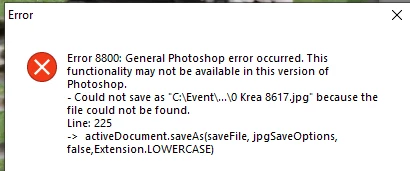
There are four lines that trigger it.
This 3 times
activeDocument.saveAs(saveFile, jpgSaveOptions, false,Extension.LOWERCASE)and this once.
doc.saveAs(saveFile, jpgSaveOptions, false,Extension.LOWERCASE)this is the expected 8x12 result from an original 8/10 without the added info.
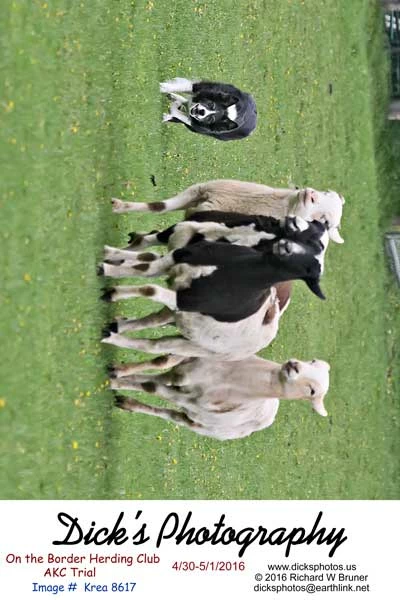
As I said I'm not positive that this is the script that worked but, it's close.
Thank you for looking.
Dick
 AdChoices