


Select Layer - Cycle Blend Modes - Return to Initial Active Layer
Script idea
To cycle through the layer blend modes.
If active layer blende mode is NORMAL make MULTIPLY
If active layer blende mode is DIVIDE make MULTIPLY
If active layer blende mode is COLORBLEND make MULTIPLY
If active layer blende mode is MULTIPLY make NORMAL
Script functionality
Get the active layer ID
Select layer MEMO
Cycle layer MEMO blend modes
Reselect the initial layer ID
The first script cycles the blend modes when the active layer is MEMO.
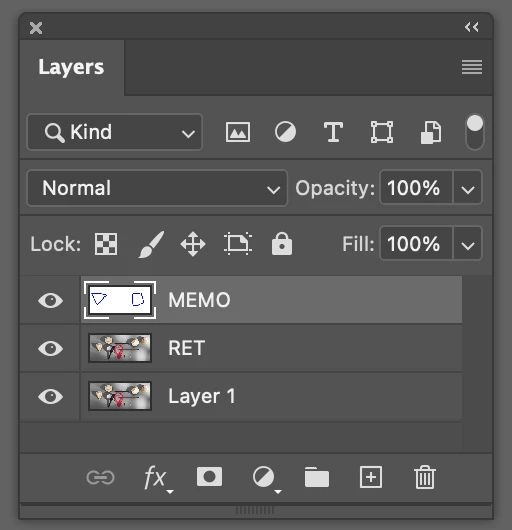
#target photoshop
app.bringToFront();

cTID = function(s) { return app.charIDToTypeID(s); };
sTID = function(s) { return app.stringIDToTypeID(s); };
Stdlib = function Stdlib() {};

var activeLayer = activeDocument.activeLayer.name;
var doc = app.activeDocument;
var actLayer = app.activeDocument.activeLayer;
var layerName = actLayer.name;
var targetItem = "MEMO";

var COLORBLEND = BlendMode.COLORBLEND;
var MULTIPLY = BlendMode.MULTIPLY;
var DIVIDE = BlendMode.DIVIDE;
var NORMAL = BlendMode.NORMAL;

try {

  toggelBlendMode();

  function toggelBlendMode() {

    if(actLayer.blendMode == NORMAL || actLayer.blendMode == DIVIDE || actLayer.blendMode == COLORBLEND ) {
      alert('The blend mode is ' +actLayer.blendMode);
      alert('1')
      app.activeDocument.activeLayer.blendMode = MULTIPLY;

    }
    else {
      alert('The blend mode is ' +actLayer.blendMode);
      alert('2')
      app.activeDocument.activeLayer.blendMode = NORMAL;
    }

  }

} catch(e){
  alert( e + ' ' + e.line );
}
The second script gets that active layer ID selects the layer MEMO, cycles the blend mode, and reselects to the initial layer ID.
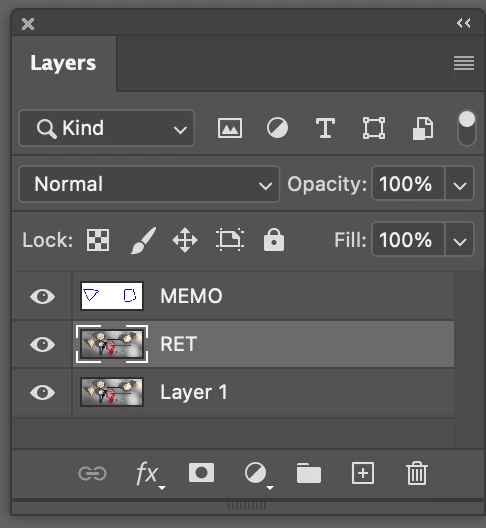
#target photoshop
app.bringToFront();

cTID = function(s) { return app.charIDToTypeID(s); };
sTID = function(s) { return app.stringIDToTypeID(s); };
Stdlib = function Stdlib() {};

var activeLayer = activeDocument.activeLayer.name;
var doc = app.activeDocument;
var actLayer = app.activeDocument.activeLayer;
var layerName = actLayer.name;
var targetItem = "MEMO";

var COLORBLEND = BlendMode.COLORBLEND;
var MULTIPLY = BlendMode.MULTIPLY;
var DIVIDE = BlendMode.DIVIDE;
var NORMAL = BlendMode.NORMAL;
const initLyrID = getLayerID()

try {

  selectLayer(targetItem)

  toggelBlendMode();

  selectLayer(initLyrID)

  function toggelBlendMode() {

    if(actLayer.blendMode == NORMAL || actLayer.blendMode == DIVIDE || actLayer.blendMode == COLORBLEND ) {
      alert('The blend mode is ' +actLayer.blendMode);
      alert('1')
      app.activeDocument.activeLayer.blendMode = MULTIPLY;

    }
    else if(actLayer.blendMode == MULTIPLY) {
      alert('The blend mode is ' +actLayer.blendMode);
      alert('2')
      app.activeDocument.activeLayer.blendMode = NORMAL;
    }

  }

} catch(e){
  alert( e + ' ' + e.line );
}


function getLayerID(){
  var ref = new ActionReference();
  ref.putEnumerated( charIDToTypeID('Lyr '),charIDToTypeID('Ordn'),charIDToTypeID('Trgt') );
  return executeActionGet(ref).getInteger(stringIDToTypeID( "layerID" ));
  }


  function selectLayer(id, add, viz) {
    try {
        var d = new ActionDescriptor();
        if (viz == undefined) viz = false;
        var r = new ActionReference();
        if (typeof(id) == "string") r.putName( charIDToTypeID( "Lyr " ), id);
        else                        r.putIdentifier( charIDToTypeID( "Lyr " ), id);
        d.putReference( charIDToTypeID( "null" ), r );
        d.putBoolean( charIDToTypeID( "MkVs" ), viz );
        if (add == true) d.putEnumerated( stringIDToTypeID( "selectionModifier" ), stringIDToTypeID( "selectionModifierType" ), stringIDToTypeID( "addToSelection" ) );
        if (add == -1)   d.putEnumerated( stringIDToTypeID( "selectionModifier" ), stringIDToTypeID( "selectionModifierType" ), stringIDToTypeID( "removeFromSelection" ) );
        var ok = true;
        try { executeAction( charIDToTypeID( "slct" ), d, DialogModes.NO ); } catch(e) { ok = false; }
        d = null;
        return ok;
        }

    catch (e) { alert(e); return false; }
  }
Problem
It does not work correctly when the functions selectLayer() and getLayerID() are introduced to select the layer MEMO and reselect the initial active layer.
Error
It does not change the layer MEMO blend mode to NORMAL when the layer is on MULTIPLY
Help
Can someone please help understand if this functionality is possible and if this approach makes sense to cycle the MEMO layer blend mode?
 AdChoices