
Participant
January 27, 2020
Answered

Selections not grabbing all of a specific pixel value in Photoshop

  • January 27, 2020
  • 3 replies
  • 675 views

I have a peculiar and particular problem when trying to select some pixel values. I have a grayscale TIFF (not compressed) in 8-bit structure with pixel values ranging from 0 through 40. Using the wand tool or select color range, I am attemping to select non-contiguous, not anti-aliased pixels of one particular value. In this current case, the pixel value of 2. The problem is that when I do this, not all the "2" values are selected, even if they are adjacent. It is as if they are of two different values. I can add to the selection and combine them, and I can subtract either set from the other (consistent pixels). 


I have my eyedropper tool set to Point Sample, tolerance is zero, and all three checkboxes are unchecked. There are no alpha channels present or extraneous layers. I have the Select Color Range set to 0 Fuzziness and no Localized Color Clusters (or Detect Faces). The range % defaults to grayed out with no value. The same result as above with the eyedropper occurs.


What's going on with the selection algorithm that would allow this to happen? I've seen it only with a few pixel values (2 being the most prominent).


I am using Photoshop CC 2018 (v 19.0) on a Win 10 PC. Other relevant specs can be furnished if helpful.


Thanks,
CJSF

{Thread renamed by moderator}
This topic has been closed for replies.
Correct answer davescm

If you are looking for info panel values of 2 using the RGB values make sure that your working space for RGB and for grayscale are in the same gamma e.g sRGB and sGray for grayscale.  That will make sure the eyedropper, info display and the document are showing the same values.


As far as the selection, I've just tried it and I can do this with Select color range.

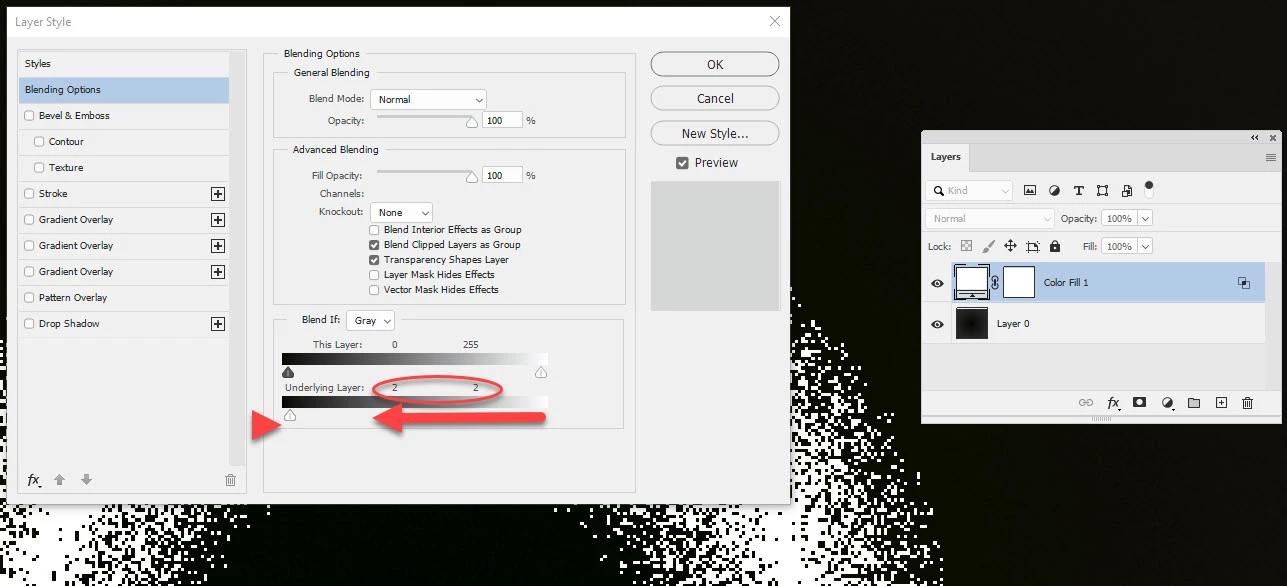
However,  another way is to make the pixels contrast - and then select from there. To do that, add a white solid fill colour layer and, in Blending Options,  set "Blend If layer below" to "2". All the 2 values should now turn white.

Dave

3 replies

Legend
January 28, 2020
If your gray file does not have a profile assigned, you can get such results by measuring the values in RGB. You will get supposedly the same value of 2 for different levels.
Either assign a profile to the file or use the 16-bit RGB representation for the eyedropper.
Paste the levels layer (0,1,50-> 0,255) above your layer and you will see that those colors that you consider equal to 2 are actually different.
 
cferro43Author
Participant
January 28, 2020

Thank you all for the replies. I will look into implemented your suggestions today. The issue seems to be color/gray porfiles, if I understand it (which now that I think about it makes sense!). I'll update the thread with my success (heh!).


CJSF

cferro43Author
Participant
January 28, 2020

Assigning sGray to the image took care of the issue, thank you so much. And thanks to everyone who suggested a solution! 


CJSF

davescm
Community Expert
davescmCommunity ExpertCorrect answer
Community Expert
January 27, 2020

If you are looking for info panel values of 2 using the RGB values make sure that your working space for RGB and for grayscale are in the same gamma e.g sRGB and sGray for grayscale.  That will make sure the eyedropper, info display and the document are showing the same values.


As far as the selection, I've just tried it and I can do this with Select color range.

However,  another way is to make the pixels contrast - and then select from there. To do that, add a white solid fill colour layer and, in Blending Options,  set "Blend If layer below" to "2". All the 2 values should now turn white.

Dave

Sahil.Chawla
Adobe Employee
Adobe Employee
January 27, 2020

Hi there,

Could you please share a screenshot of how the selection looks? It would be helpful for us to view the image.

Also, have you tried increasing the Tolerence setting on the Magic Wand Tool and see if it helps?

Regards,
Sahil

cferro43Author
Participant
January 27, 2020

If I increase the tolerance, then I start selecting values I do not want (3s). I'm not sure how a screenshot will help here. The whole image is 4096x4096, and the values are all very dark. I've displayed the selection as a quick mask of a subset area, zoomed way in, if that helps. The pixel boundaries are visible. Both of these are "2" values selected ( shown in  near-black), just different pixel sets, from the same subset.


CJSF