Participant
November 17, 2021
Answered

Skratch disk and Photoshop temp files issue

  • November 17, 2021
  • 1 reply
  • 729 views

Hello frends,
I am working on the project right now and my work file is around 4gb *.psb.
Here is my problem...
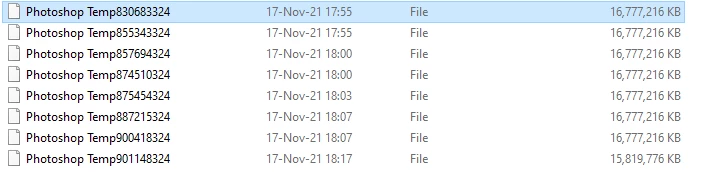
Can i reduce somehow numbers and size of this tmp files?
Thanks.



This topic has been closed for replies.
Correct answer D Fosse

Yes, this is all perfectly normal and fully expected, and a good illustration of real world disk space requirements.


This will only grow as you accumulate history states, each of which potentially up to the full uncompressed file size. And if you have more than one file open, each of them needs their own disk space, again according to how many history states are active. And then on top of that, smart objects have a lot of overhead adding to the original file size.


If you're working with big files, you should consider 500 GB a realistic minimum. If you want to have good working headroom, 1 TB or more.

1 reply

PECourtejoie
Community Expert
Community Expert
November 17, 2021

Hi! Are those file present only when Photoshop is running? That would be normal, but I would expect one of them, not several.

Does the file have smart objects? That could also explain it. If the files are still there when photoshop is closed, then it might have closed unexpectedly, and you could delete the leftover temporary files.

Participant
November 17, 2021

Hi! Thanks for the quick answer.
Yes, my work file contain a lot of smart objects.
The file im working on is my primary exporter to generate assets for my project.
Many of that smart objects are linked to external psd or png files.
When i close photoshop all temp files are gone without leftover temp files.
But when im working on the file that make my workstation laggy.
Today i have upgrade my workstation with 2tb ssd to avoid "skratch disk is full - error msg" while saving the project file.
Thanks.

D Fosse
Community Expert
D FosseCommunity ExpertCorrect answer
Community Expert
November 17, 2021

Yes, this is all perfectly normal and fully expected, and a good illustration of real world disk space requirements.


This will only grow as you accumulate history states, each of which potentially up to the full uncompressed file size. And if you have more than one file open, each of them needs their own disk space, again according to how many history states are active. And then on top of that, smart objects have a lot of overhead adding to the original file size.


If you're working with big files, you should consider 500 GB a realistic minimum. If you want to have good working headroom, 1 TB or more.