

davescm
Community Expert
Community Expert
May 8, 2020
Question

Something for the Weekend - Part 92 - Going Underground.

  • May 8, 2020
  • 21 replies
  • 11529 views

Hi

There were some brilliant ideas in last week's cabin and woods challenge. For this week though we have had enough fresh air and are going urban, specifically into the subway. I created and rendered this image in Blender 3D, and used Adobe Substance for texturing.


Now the scene is set, what will you do with it? What story will you tell with your edited image? You can do anything you like, just don't get mugged!


 The “rules”:

  • Anything goes, as long as it meets the forum rules on decency, copyright etc.
  • Anyone, and everyone, is welcome to have a go, whether you are a complete beginner or a Photoshop expert.
  • There are no prizes apart from the chance to practice, show off, or bring a bit of humour and fun. Don't be shy, join in and have a go!

To download the image below in jpeg format at 3000 x 2000 pixels and with an embedded ICC colour profile (sRGB), hover over the image and click on the circle with the arrows at the top right. Then, when the image opens in its own window, right click and choose “Save Image As/Save Target As” (or similar depending on your browser)
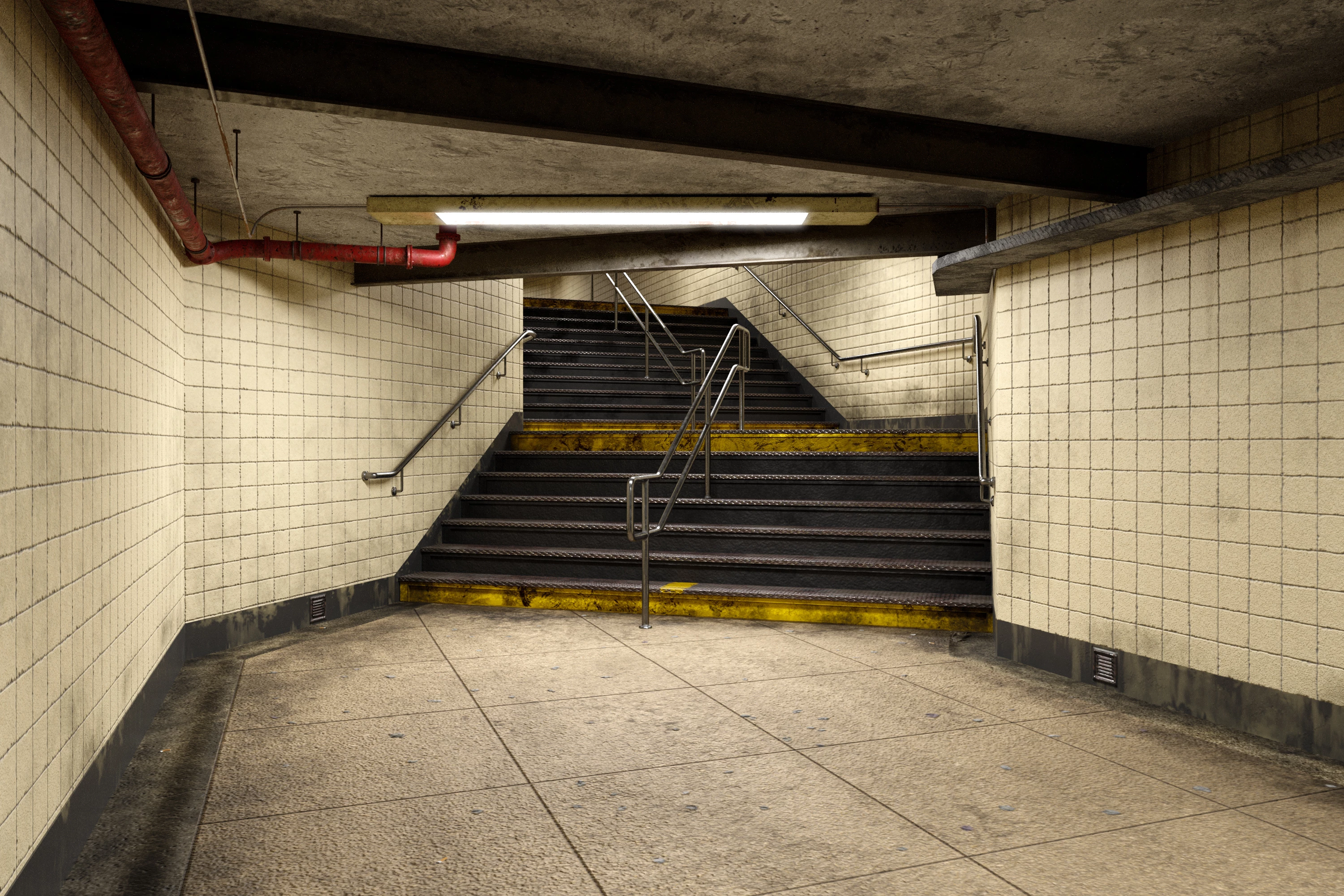
 

When posting back your image – please use the Blue reply button in this first post. If posting a comment on someone else’s entry then please use the grey reply button next to their image post.


Have fun.


Dave

21 replies

Participant
January 2, 2025

This is my firsty time trying to create an image using generative fill.  I was very disappointed!  It took me many tries and I could not get what I was after.  For exasmple.  I tried to include an open violin case.  AI did not know what a violin case was no matter how I tried.  Most disappointing - the figures that were included look like they were pasted into the photo.

davescm
Community Expert
davescmCommunity ExpertAuthor
Community Expert
January 2, 2025

Yes I can see it has done some strange things with the background image too.

You had some nice ideas though, There will be a new challenge (number 231) posted tomorrow (Friday in UK)


Dave

Participant
April 28, 2024

davescm
Community Expert
davescmCommunity ExpertAuthor
Community Expert
April 29, 2024

Nice job @Cloud.9.iDzynes   I'd forgotten about this challenge. We are now up to challenge 213 if you want to join us there :


https://community.adobe.com/t5/photoshop-ecosystem-discussions/something-for-the-weekend-part-213-look-before-you-leap/td-p/14581224


Dave

Jacob Bugge
Community Expert
Community Expert
May 13, 2020
Rafael Aviles
Legend
May 13, 2020

Dave and Trevor, thank you very much for mentioning the lack of grounding shadows and for your helpful hints and suggestions. Here is what I came up with. 

War Unicorn
Community Expert
Community Expert
May 12, 2020

I'm walking down the stairs and continuing onward when I hear skittering. I stop to look behind me...

It's here.

davescm
Community Expert
davescmCommunity ExpertAuthor
Community Expert
May 12, 2020

I'm out of there fast !  I would recomend viewing Warunicorn's image at full size to see it properly. Properly spooky it is - nice job !


Dave

Rista12
Participating Frequently
May 12, 2020

I became interested in the discussion of shadows and tried to apply it.  Did I get it anywhere near right or is it entirely out of whack?  I considered that the light fixture is sort of between the people.

davescm
Community Expert
davescmCommunity ExpertAuthor
Community Expert
May 12, 2020

Hi Rista

In such soft overhead and multiple lighting, the shadows will be much softer than that. They won't be casting shadows on the walls. They also fall away quickly the further way they move from the object. Finally don't forget the shadows on the subject due to the soft overhead lighting, not just from the subject.

Something like this:

Dave


Rista12
Participating Frequently
May 12, 2020

Dave, seeing your version next to mine makes all my mistakes very clear.  I even got the direction wrong.

Thank you so much for taking the time to give such easily visible advice.

Jacob Bugge
Community Expert
Community Expert
May 11, 2020
Ussnorway7605025
Legend
May 12, 2020

I love it

jane-e
Community Expert
Community Expert
May 11, 2020

Unlike the NYC rat who had to leave his pizza on the third step from the bottom, this guy made it all the way down.


Jane


davescm
Community Expert
davescmCommunity ExpertAuthor
Community Expert
May 12, 2020

Nice idea Jane. Similarly to Rafaels image a very subtle shadow would help to ground the rat and pizza. If you look at any edge, even in soft lighting, there is a darkening of the object and the ground where they meet. That is because those "corners" are not lit from all directions.  Look closely at your desk or table where your computer meets it and you will see that slight darkening. By simulating that when compositing we can make it loook realistic. In the 3D rendering world, that is what Ambient Occlusion does.  Keep it subtle though, a little bit adds realism, overdone it looks as false as when it was missing.


Dave

jane-e
Community Expert
Community Expert
May 13, 2020

I've added some some subtle shadows, Dave. Thank you for the great advice!

~ Jane

Rafael Aviles
Legend
May 10, 2020


A few windows make a big difference...

Trevor.Dennis
Community Expert
Community Expert
May 11, 2020

That's good hans.  They all fit the scene pretty well and are nicely scaled into the background.  Think about adding some shadows next time.  That rarely means the drop shadow layer style, but try painting a black blob on a layer below each person and blurring it with Gaussian Blur and dropping opacity.  Then use the Smudge tool to tweak it pushing and pulling into place.  We are usually told to set shadow layers to Multiply, but I rarely notice any difference. 


Dave has an advantage here as he can render people into the scene and see exactly how their shadows should fall.  It's all part of what make these SFTW threads so useful.  I have learned a huge amount since we started them, and that's both from getting stuck and working it out myself, to having other posters tell us how they do stuff.  Plus the addage of use it or lose it applies to Photoshop the same as anything else that's a bit complicated.  I'd not been using Photoshop much since the forum got stuffed up last year, and I have had to think hard to remember stuff even after that short break.  That's what comes from being an old bugger though.

Rafael Aviles
Legend
May 11, 2020

Trevor, in case you meant to reply to my posting and not Hans's, thanks! (I think that is the case because of the lack of proper shadows under the people in my entry.) I should have added the shadows, I am familiar with the techniques but I did not take the time to properly finish the scene, I was in a rush to do something else. The scaling of the people was a lucky accident, all of them come from a single shot of tourists at the High Line area in NYC. That is to say, I just used a plain Transform step to make sure the people in the foreground seemed the right size; the others fell right into place!


Rafael Aviles

hans-g.
Legend
May 10, 2020

Hi all,


below I quote a thread Peter Grainge, Adobe Community Professional, started in May 07, 2020:


Not getting any forum emails?
I suddenly stopped getting any forum emails. No settings changed and no change to my email address.


It's the same to me and it is a pity that I can't see at once in my eMail letter box, whether there is a comment or a "Like". Do you have noted the same?


Stay healthy
Hans-Günter

davescm
Community Expert
davescmCommunity ExpertAuthor
Community Expert
May 12, 2020

I don't use forum emails Hans. I visit here most days and just glance through the notifications for any replies before looking at new posts.

Dave