


Start Adobe Actions via JSX Script (without interruption)
Hey guys,
I am new to the Photoshop scripting (did some JSX scripts for Illustrator/InDesign) and have read some guides:
- ActionReference / charIDToTypeID / stringIDToTypeID
- What ActionManager is (series) / Github abstraction
- Script(ing)Listener plugin / YouTube on it (by another member from here)
- Photoshop Docs Github / Github (somewhat official)
Ah... my question 😅 - I am trying to start an Action (not from ActionManager or using Application.executeAction), but from Application.doAction.
I am using this (very basic and sample code) to start an action from an .atn file:
// loading the action file into Photoshop
var actionFile = new File("/path/to/action/MyActionSet.atn");
app.load(actionFile);

// using doAction to start it
app.doAction("MyAction", "MyActionSet");
The issue which I am facing is that "MyAction" might fail due to missing files or any other reason (I am not certain what all cases for failure are here). When such a failure occurs Photoshop displays a pop-up, usually with the error/s:
- "The command “Select” is not currently available."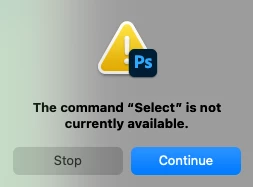
- "Could not place the document because actions that reference files can only be played on the same platform on which they were recorded."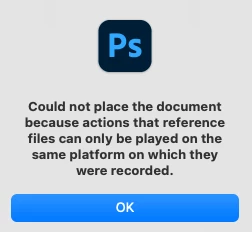
Those errors seem to be explanatory, but the fact that a pop-up appears and user interaction is required to proceed makes the process unusable to me.
I would like to start the action and if anything fails:
- either to receive feedback for it and stop the execution (exception in JSX maybe?)
- or if receiving feedback is not possible to not have to deal with the pop-up and my JSX script to continue executing
Is this possible? I was thinking that it was maybe possible using Application.executeAction, but my assumption are on the basis of forum posts which do not do this specifically and it's hard (as I imagine it is for everyone as there are no official docs on this) to connect the dots on its usage.
Finally, I've tried using ChatGPT but it doesn't produce any meaning answers on this:
// Specify the action name and set name
var actionName = "MyAction";
var setName = "MyActionSet";

// Check if the action set is already loaded, and load it if necessary
if (!app.actions.getByName(setName)) {
  var actionFile = new File("/path/to/your/action.atn");
  app.load(actionFile);
}

// Find the action reference
var actionReference = new ActionReference();
actionReference.putName(charIDToTypeID("ASet"), setName);
actionReference.putName(charIDToTypeID("Actn"), actionName);

// Execute the action
var actionDescriptor = new ActionDescriptor();
actionDescriptor.putReference(charIDToTypeID("null"), actionReference);
executeAction(charIDToTypeID("Dcmn"), actionDescriptor, DialogModes.NO);
Which does not work. My thoughts are that specifically this "DialogModes.NO" does the trick of not popping any User Required Pop-Ups.
** Edit 1:
I pieced JSX code to run the script using executeAction instead of doAction.
However, I am still getting pop-ups even with the option DialogModes.NO:
function runActionHere(action, actionSet) {
  var actionRef = new ActionReference();
  actionRef.putName(charIDToTypeID("Actn"), action);
  actionRef.putName(charIDToTypeID("ASet"), actionSet);

  var actionDesc = new ActionDescriptor();
  actionDesc.putReference(charIDToTypeID("null"), actionRef);

  app.executeAction(
    charIDToTypeID("Ply "),
    actionDesc,
    DialogModes.NO
  );
}

  // disable here
  app.displayDialogs = DialogModes.NO;

  try {
    runActionHere("MyAction", "MyActionSet");
  } catch(e) {
    $.writeln("Error occurred:\n" + e);
  }
** Edit 2:
Managed to do this after a reboot of my machine. For me, the issue seems to be related with the initial Photoshop installation and that it didn't considered some settings set by the script. Answer contains the code
 AdChoices