

Inspiring
June 11, 2017
Question

Text tool switching words around.

  • June 11, 2017
  • 2 replies
  • 514 views

I used the Rectangular Marquee Tool to draw out a box, selected the Type Tool and typed in an address. For some reason when I type 38 Port drive, San Barbara, CA it comes out Port Drive, SAN BARBARA 38?
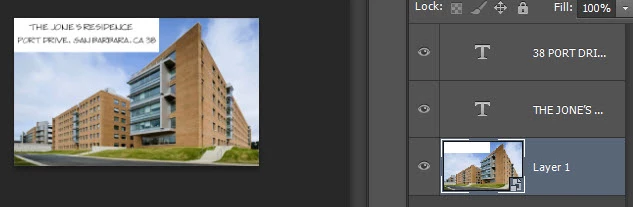

    This topic has been closed for replies.

    2 replies

    Participant
    January 15, 2018

    This is ridiculous that 4 years after the original post similar question, Adobe hasn't fixed this issue. I just had to go create an entire new paragraph type, after an hour of trying to fix this freaking problem. Why *** anyone should have to do this, when it should be written properly, is beyond me. ADOBE please fix this stupid issue!!!! Thanks for making me waste an hour searching for answers!!!

    [Profanity removed... families visit this forum... Mod]

    c.pfaffenbichler
    Community Expert
    Community Expert
    June 11, 2017

    Good day!

    Does this help?

    My numbers and punctuation glitching on Photoshop. Help?

    Regards,

    Pfaffenbichler

    Inspiring
    June 11, 2017

    It did, thanks so much. In the link above scroll down to this post--it worked for me:

    This is what you do:

    NOTE: THIS DOES INCLUDE HAVING MIDDLE EASTERN SET, BUT ISN'T THE FIX ITSELF!

    1. Go to 'Type' through the menu, or (preferences on mac) and make sure type set is set to Middle Eastern.

                There, wasn't so hard, was it? =]

    2. Now, do this:

    3.

    4.

    5. This may set back and forth if you have a certain text layer selected, so make sure you're doing this independently of any layers.