


Inspiring
October 13, 2026
Question

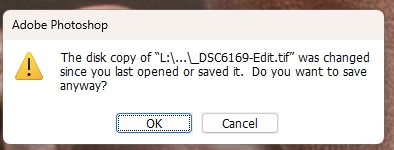
The past couple days Photoshop keeps giving a pop up asking me to confirm saving when it should not be asking

This issue came up either way earlier this year or last year, I seem to have it show up at least once a year and I can never remember each time how to stop it.

But this week photoshop was just fine until a couple days ago or so and now it asks me every single time if I want to save anyways…...uhh yes?  

How do I get rid of this notification?

nothing is being changed on it, nothing is accessing it any differently than the week/year prior, I literally have not done anything different…...just started on new edits, that’s it.

I don’t do anything different in lightroom, it sits in the background exactly the same as it always is when I transfer it over to photoshop

I can’t remember what the heck it was I had to do before to stop this random event.  Was there some new update that randomly change settings for no reason?  I already tried going into file handling and told it to NOT ask, but it still asks anyways.


    10 replies

    jane-e
    Community Expert
    Community Expert
    October 13, 2026

    ​@Thai5C65 wrote
    “they…labeled that normal Lightroom and then added Classic”


    There are separate boards for Lightroom and Lightroom Classic. If your issue is about Lightroom Classic, here is the direct link:

    https://community.adobe.com/lightroom-classic-672

    If staff does not move your post, you can repost there.

    Jane

    Translate
    Per Berntsen
    Community Expert
    Community Expert
    October 13, 2026

    Jane, ​@Thai5C65 is no doubt using Lightroom Classic. (Lightroom does not use a catalog).

    The saving issue happens in Photoshop, when sending tiff files from LrC for editing.
    It is probably caused by a setting in LrC.

    Translate
    Per Berntsen
    Community Expert
    Community Expert
    October 13, 2026

    ​@jane-e 

    The dialog is the Catalog settings in Lightroom Classic.

    ​@Thai5C65 

    I have seen this dialog occasionally with tiff files when using Edit in Photoshop (using the Edit Original option).
    I’m not sure why it happens, but I have my catalog Metadata settings set up like below.
    I suspect that it has something to do with metadata, and that it could be caused by doing edits on the file in LrC while it is open in Photoshop.
    What happens if you disable the option Include Develop settings in metadata inside JPEG, TIFF, PNG and PSD files ?


    Translate
    jane-e
    Community Expert
    Community Expert
    October 13, 2026

    ​@jane-e 

    The dialog is the Catalog settings in Lightroom Classic.


    Thanks, Per!

    This post is in the Photoshop forum and the screenshot is not a Ps dialog. 

    ​@Thai5C65 also refers to Lightroom, while they appear to be using Lightroom Classic.


    ​@Thai5C65 please clarify your issue and which application is having the issue so we can better assist.

    Jane


    Translate
    jane-e
    Community Expert
    Community Expert
    October 13, 2026

    ​@Thai5C65 

    Photoshop does not use a catalog.

    Let us know so we can better assist.

    Jane


    Translate
    Thai5C65Author
    Inspiring
    October 13, 2026

    Ohhh I remember what it was last time to fix it…..it was LR automatic write XMP to sidecart…….that option is not on this time, so there is something completely different messing it up now


    Translate
    Sameer K
    Community Manager
    Community Manager
    October 13, 2026

    Hey, @Thai5C65. Thanks for the post and the update. Does this also happen when you open images that are stored on the internal drive? How long does it take for the pop-up to appear? Has this started to happen since v27.11 became available?


    Does this happen when you open the TIF without using the Lightroom Edit-in workflow? Also, do you have any programs or scheduled backup operations that could be interacting with the L drive?


    Knowing this will help us discover the triggers.
    Thanks!
    Sameer K
    (Type '@' and type my name to mention me when you reply)

    Translate
    Thai5C65Author
    Inspiring
    October 13, 2026

    Hi, ​@Sameer K 

    So what I always do is I open LR first, do my color grading, and when photos are selected for edits I click to send to photoshop from there.  Then tab over to photoshop, do the edit, saving multiple times along the way (without any pop up) export png when done, tab back to LR, go to the next photo selected for edit, do it again.

    This has been the one and only process I’ve ever done for years.

    The first couple years the automatic write to xmp from LR was default on and no issues, then LR started to random crash for no reason, no crash report no nothing, just force closes itself (this is still an on going different issue still not fixed), so then I turned it off and continued since the culprit was found to be that option.  couple years later again people were finally trying to help with the LR issue, and while troubleshooting, I had that option turned back on, then suddenly Photoshop no longer liked that option between the time I turned it off and back on a while later and started this pop up.

    Then someone pointed out, PS didn’t like that setting, so I turned it back off, I think this was sometime around last year or so.  That fixed the PS pop up issue.

    But now it has not been turned back on since and now PS is popping that up again.  So the only thing I can think now is Adobe added some other setting that is now doing the exact same.

    Oh, it’s all on internal, I never use any cloud.  It pops up within a split second of hitting save, it does not do it for any backup/background save or whatever…..unless somehow that got turned off without me touching it.

    This started again within a week or two ago.  I did not do any update before hand, so it was on the one or two version I was on before the very last one I just updated to last night to see if it would go away and it did not.

    I did not try if opening LR directly from the TIF because it is buried in tons of other photos since I pull them directly from galleries in LR.   Oh…..There was ONE time I hit save that it did not do the pop up last night, which threw me off, I was making little tweak fixes at the very end when I was done and had to go back and fix some parts before exporting again and saved and no pop up, but then had to change something else minutes later and saved to be actually done and it popped up again.   So I must have gotten that one rogue normal save between some sort of interval of the TIF being tampered with.

    I did try this opening another file directly from the file, but it was a PSD file, not a TIF, because it default saves them as PSD when I do edits from individual images not using LR, for other random projects, and it does not do it for those PSD outside of LR.  So far it only does it on the TIFs sent from LR with LR open.   I also have not tried yet to close LR after I send to PS, just thought of that now while typing this, would be an annoying process constantly having to close reopen LR every photo as a normal thing, but I have not done that yet for troubleshooting.

    Translate