Known Participant
September 24, 2021
Question

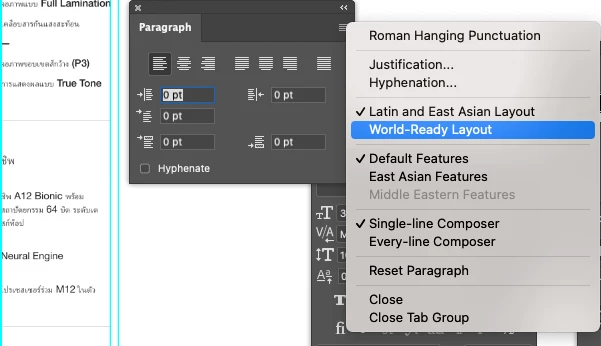
To apply World -Ready layout & Diacritics through scripting or Action Manager Code

  • September 24, 2021
  • 2 replies
  • 8450 views


Hi All,


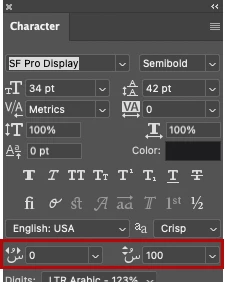
I have checked the Photoshop Object model for apply "World_ready layout " to all text layers in the .psd files, but I can't find any possibilites over there. Is it possible via Action manager code or scripting and also I want to apply Horizontal and Vertical Diacritics to be set to 0.


This topic has been closed for replies.

2 replies

Participating Frequently
March 30, 2024

I as able to get the code functions via ScriptingListener. Here is code for applying "World Ready Layout" & "Latin and East-Asian Layout":

setWorldReadyLayout();

function setWorldReadyLayout() {
  var descriptor = new ActionDescriptor();
  var descriptor2 = new ActionDescriptor();
  var reference = new ActionReference();

  reference.putProperty( stringIDToTypeID( "property" ), stringIDToTypeID( "paragraphStyle" ));
  reference.putEnumerated( stringIDToTypeID( "textLayer" ), stringIDToTypeID( "ordinal" ), stringIDToTypeID( "targetEnum" ));
  descriptor.putReference( stringIDToTypeID( "null" ), reference );
  descriptor2.putEnumerated( stringIDToTypeID( "textComposerEngine" ), stringIDToTypeID( "textComposerEngine" ), stringIDToTypeID( "textOptycaComposer" )); // World-Ready Layout code
  descriptor.putObject( stringIDToTypeID( "to" ), stringIDToTypeID( "paragraphStyle" ), descriptor2 );
  executeAction( stringIDToTypeID( "set" ), descriptor, DialogModes.NO );
}

setLEALayout();

function setLEALayout() {
  var descriptor = new ActionDescriptor();
  var descriptor2 = new ActionDescriptor();
  var reference = new ActionReference();

  reference.putProperty( stringIDToTypeID( "property" ), stringIDToTypeID( "paragraphStyle" ));
  reference.putEnumerated( stringIDToTypeID( "textLayer" ), stringIDToTypeID( "ordinal" ), stringIDToTypeID( "targetEnum" ));
  descriptor.putReference( stringIDToTypeID( "null" ), reference );
  descriptor2.putEnumerated( stringIDToTypeID( "textComposerEngine" ), stringIDToTypeID( "textComposerEngine" ), stringIDToTypeID( "textLatinCJKComposer" )); // Latin and East-Asian Layout code
  descriptor.putObject( stringIDToTypeID( "to" ), stringIDToTypeID( "paragraphStyle" ), descriptor2 );
  executeAction( stringIDToTypeID( "set" ), descriptor, DialogModes.NO );
}
New Participant
July 1, 2024

how to use this code 


Known Participant
September 24, 2021

Hi All,


Is there any way to enable the world-ready layout in the photoshop document via any scripting language

JJMack
Adobe Expert
September 24, 2021

Try setting up a Text Tool Preset with that option set and select that preset in your script after activating the text tool it should work.


Script and actions can do very little when it come to setting  Photoshop UI options.  

JJMack
Rocky@Author
Known Participant
September 27, 2021

Activate the text tool in Photoshop set the font the paragraph options etc etc you want to be used with the text tool.  Once All is like you want to use the text tool. Create a new text tool preset.


I have tried, but I can't able to apply the preset for texts in the psd files. It's applied for newly created text after selecting the customized presets. Is it right?


Is it possible to apply the above via Action Manager Code?