


Inspiring
November 7, 2019
Answered

Unable to open from Bridge to Photoshop

  • November 7, 2019
  • 2 replies
  • 1863 views

HELP,,since the update..I am unable to open images from Bridge into Photoshop..I get the message as follows...

'This file does not have an app associated with it for performing this action..Please install an app. or if one is already installed create an association in the default apps settings page...WHAT!!!!
This topic has been closed for replies.
Correct answer

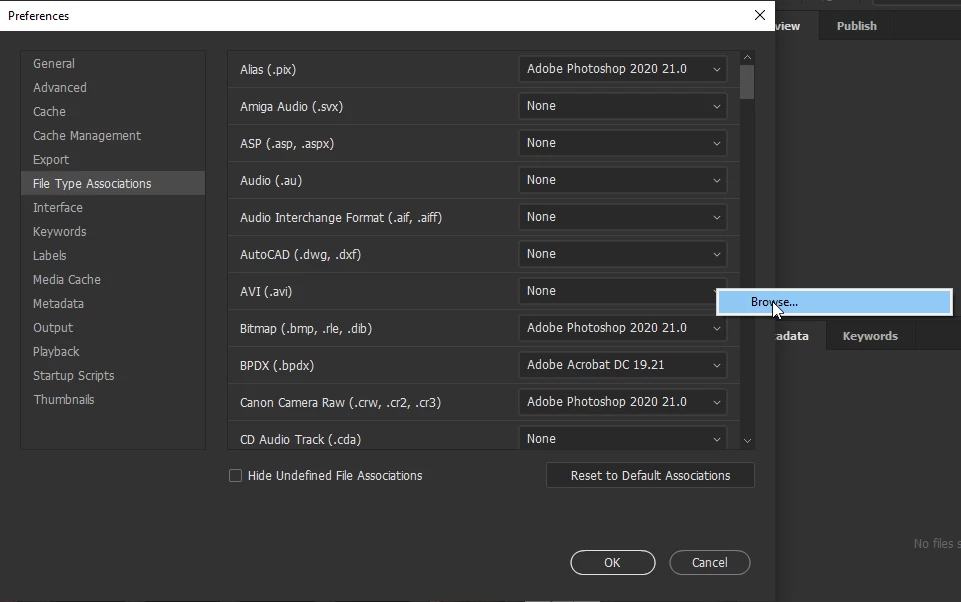
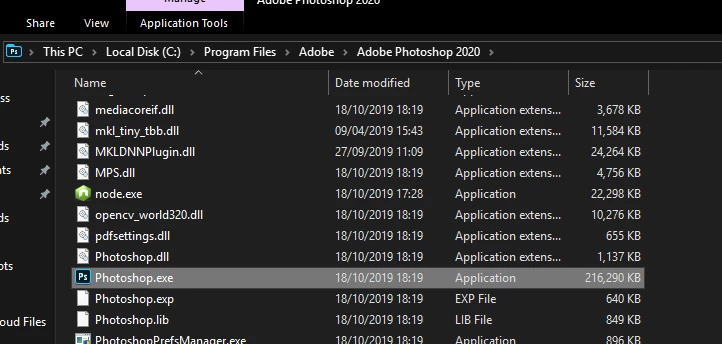
Click on the down arrow and navigate to the Photoshop.exe file

2 replies

gener7
Community Expert
Community Expert
November 7, 2019

I don't know what version Bridge you are running, but 10.0 is the latest and you can update that via the Creative Cloud Desktop app.


If you have an older copy, you can check File Type Associations there and fix it.


michael dAuthor
Inspiring
November 7, 2019

You are right. It is the file association preferences that had gone. They all showed none...Many thanks

gener7
Community Expert
Community Expert
November 7, 2019

All three copies of Bridge I have, 2018, 2019, and 2020 do show the latest Photoshop. Usually I get a question about enabling startup scripts and I always answer "yes".

November 7, 2019

Hi

Have you checked the File Type Associations in Bridge preferences to make sure Photoshop 2020 is set as the default

michael dAuthor
Inspiring
November 7, 2019

Thanks Ged..I think you are right.. Gone into Preferences/File type associations.. all are showing as none..Question..How do I put Adobe Photoshop 2020 21.0 in there?  

Correct answer
November 7, 2019

Click on the down arrow and navigate to the Photoshop.exe file