


Inspiring
September 5, 2017
Answered

Use a Curves Preset as an Action

  • September 5, 2017
  • 1 reply
  • 1017 views

Hi

I have saved a curves adjustment layer as a preset, and I would like to save this as an action, so I can apply it to multiple images. Is this possible to do?

Any ideas / suggestions would be much appreciated.

Paul.
This topic has been closed for replies.
Correct answer Stephen Marsh

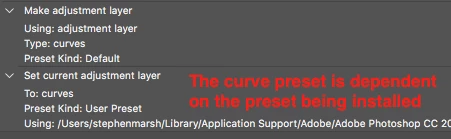
I personally would record the actual curve edits into the action, rather than try to apply a preset using an action, there is no dependency on the preset being available.

However, yes, it is possible for an action to create a curve adjustment layer and then apply an installed curve preset:

1 reply

Stephen Marsh
Community Expert
Stephen MarshCommunity ExpertCorrect answer
Community Expert
September 6, 2017

I personally would record the actual curve edits into the action, rather than try to apply a preset using an action, there is no dependency on the preset being available.

However, yes, it is possible for an action to create a curve adjustment layer and then apply an installed curve preset:

Inspiring
September 7, 2017

Thanks Stephen. The best solution for what i needed was to record an action and manually input the curves data as part of the action, which i think is what you advised above.

Paul.