Inspiring
October 2, 2023
Answered

Where is my PS file - a simple question but hard to resolve on Mac?

  • October 2, 2023
  • 3 replies
  • 647 views

I have files here and there - although, of course, I try to keep everything in order 🙂 Despite this effort, every now and then, I lose the connection to the original file, even though I have it visible in PS, on the screen. My question is: Why isn't there a way to see where the file is located? There are all kind of not so importat data on the left lower corner in the photo view - but not the most import - where is the file???

This topic has been closed for replies.
Correct answer Conrad_C
quote

…even though I have it visible in PS, on the screen. My question is: Why isn't there a way to see where the file is located?

By @tuomasvirtanen.fi


The answer to your question is, when a document is open in Photoshop, there already is a way to see where the file is located.

On your Mac, Control-click the document’s tab and choose Reveal in Finder. (Or right-click, if you have enabled right-click on your Mac.)
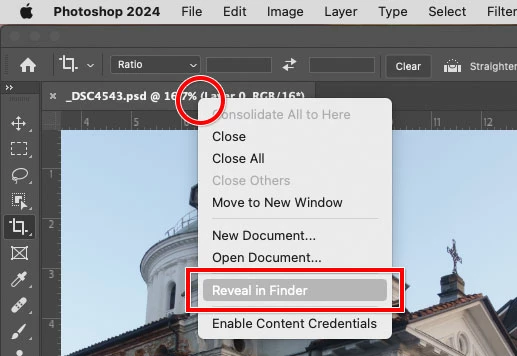


Reveal in Finder does several helpful things at once, including:

  • Switches to the Finder desktop 
  • Pops open the folder containing the Photoshop document 
  • Selects the Photoshop document in the folder 


Many Mac applications have the Reveal in Finder command, although the exact menu changes depending on the application. In Windows, it’s typically named Reveal in Explorer.


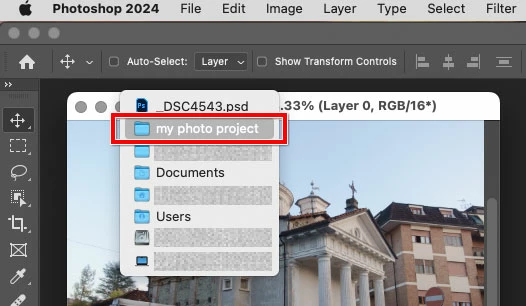
If the Photoshop document is not tabbed (an undocked floating window), then you can simply use the standard macOS file location reveal shortcut that works in almost any Mac application: In the document title bar, Control-click/right-click the filename to pop open a menu representing the folder path to the document, and choose the first folder in the menu because that’s the folder containing the document. Again, that will switch to the Finder desktop and open that folder for you. (In some applications including the macOS Finder, Command-clicking the filename also opens this menu.)


Edit: One problem with Photoshop is that other applications make Reveal in Finder visible on a normal menu bar command, so that you can find it by looking around. But in Photoshop, Reveal in Finder is not discoverable unless someone already right-clicks everything, but right-click is not enabled by default on macOS.


3 replies

Conrad_C
Community Expert
Conrad_CCommunity ExpertCorrect answer
Community Expert
October 3, 2023
quote

…even though I have it visible in PS, on the screen. My question is: Why isn't there a way to see where the file is located?

By @tuomasvirtanen.fi


The answer to your question is, when a document is open in Photoshop, there already is a way to see where the file is located.

On your Mac, Control-click the document’s tab and choose Reveal in Finder. (Or right-click, if you have enabled right-click on your Mac.)


Reveal in Finder does several helpful things at once, including:

  • Switches to the Finder desktop 
  • Pops open the folder containing the Photoshop document 
  • Selects the Photoshop document in the folder 


Many Mac applications have the Reveal in Finder command, although the exact menu changes depending on the application. In Windows, it’s typically named Reveal in Explorer.


If the Photoshop document is not tabbed (an undocked floating window), then you can simply use the standard macOS file location reveal shortcut that works in almost any Mac application: In the document title bar, Control-click/right-click the filename to pop open a menu representing the folder path to the document, and choose the first folder in the menu because that’s the folder containing the document. Again, that will switch to the Finder desktop and open that folder for you. (In some applications including the macOS Finder, Command-clicking the filename also opens this menu.)


Edit: One problem with Photoshop is that other applications make Reveal in Finder visible on a normal menu bar command, so that you can find it by looking around. But in Photoshop, Reveal in Finder is not discoverable unless someone already right-clicks everything, but right-click is not enabled by default on macOS.

Inspiring
October 4, 2023

Thanks a lot for your contribution, Conrad C! You are right - and after a while, after sending my question, I also ended up in finding the solution by clicking everywhere 🙂 As to comments finding files, I completely agree. In fact, my true intention is to sort my photos and other resources so logically as possible. Unfortunately, although that is very advisable, I think, it happens every now and then that I just lose the track, in folders and their sunfolders, and ... Thanks!

tuomasvirtanenNET
D Fosse
Community Expert
Community Expert
October 2, 2023

There's no point in showing where the file is when you have it open - because it's right there. You have full control of where you want it to be. It hasn't been saved yet.


The Home Screen is not a file browser, it does not keep track of the file. It's just a passive link to the location the file was initially saved - but if the file is later moved, the link simply goes dead.


The purpose of the Home Screen, or any "recent" files list, is to let you quickly pick up where you left off before lunch. It's not for file management.

Kevin Stohlmeyer
Community Expert
Community Expert
October 2, 2023

@tuomasvirtanen.fi are you saving in the same general location? The only reason a file would loose connection to the homescreen is if it was moved or removed outside of Photoshop.