



Why does PS keep changing my keyboard shortcut?
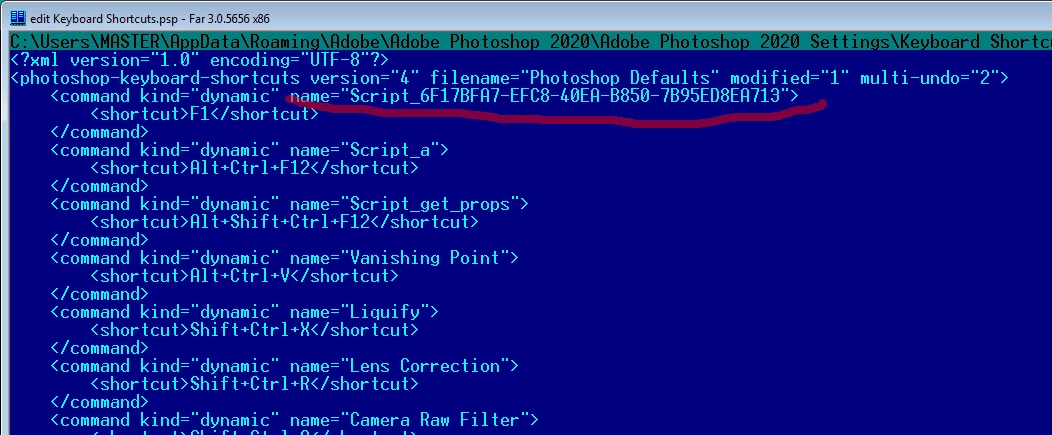
I extended the "Load Files into Stack" script to do some extra processing on bracketed photos and I assigned a keyboard shortcut to it. I can assign the shortcut and save it to my custom set without any issues and it works fine for the remainder of the time PS is open. However, if I close PS and open it again, whatever shortcut I have set gets reassigned to the "Load Files into Stack" script that I forked. I've tried a variety of different shortcuts and it happens with all of them.
It seems like more than coincidence that it's the script I forked that the shortcut is reassigned to. My best guess is that there's something in the script I needed to change when I forked it, like perhaps this `eventid` element in the comments at the top.
Here it is in the original script:
// BEGIN__HARVEST_EXCEPTION_ZSTRING

<javascriptresource>
<name>$$$/JavaScripts/LoadFilesintoStack/Menu=Load Files into Stack...</name>
<eventid>6F17BFA7-EFC8-40EA-B850-7B95ED8EA713</eventid>
</javascriptresource>

// END__HARVEST_EXCEPTION_ZSTRING
Here it is in my script:
// BEGIN__HARVEST_EXCEPTION_ZSTRING
<javascriptresource>
<name>$$$/JavaScripts/LoadAEBImages/Menu=Load AEB Images...</name>
<eventid>6F17BFA7-EFC8-40EA-B850-7B95ED8EA713</eventid>
</javascriptresource>
// END__HARVEST_EXCEPTION_ZSTRING
You can see that those event IDs are the same. I don't know where or how this ID gets generated or what event it's dealing with so I just left it alone. Could that be the culprit? If so, can I just arbitrarily change it? I haven't actually tried changing it because I don't really like to mess with things I don't understand without doing some research first.
If anyone has any insight into this they'd be willing to share I'd sure appreciate it.
Thanks!
 AdChoices