
Participating Frequently
September 22, 2024
Question

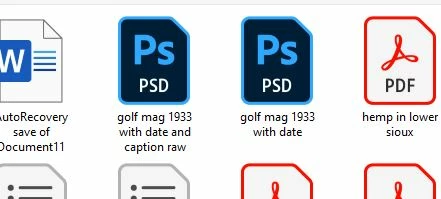
Windows 10 Thumbs no preview pic

  • September 22, 2024
  • 1 reply
  • 137 views

Tired of this and is idiotic that by default images are not displayed on icons, instead Adobe expects us to remember each image we have by text instead of SHOWING THE PICTURE ON THE THUMB!

Please advise on how to change this so the image is displayed for the photoshop related specifically to the PSD.  Do not want a 3rd party plugin has to be a way to do this in latest version of photoshop.  thanks 


This topic has been closed for replies.

1 reply

Rob_Cullen
Community Expert
Community Expert
September 22, 2024

This is not an Adobe problem, it is a Windows Explorer problem. Ask Microsoft if they can help.

And see here- https://community.adobe.com/t5/creative-cloud-services-discussions/how-can-i-view-psd-files-in-explorer/td-p/12815190


Regards. My System: Windows-11, Lightroom-Classic 15.4.1, Photoshop 27.8, ACR 18.4, Lightroom 9.4, Lr-iOS 10.4.0, Bridge 16.0.3 .