


Inspiring
July 26, 2021
Answered

Adobe Photoshop Elements 2020 - System error

  • July 26, 2021
  • 2 replies
  • 541 views

Hi, 


I am trying to share PE 2020 between my desktop where PE 2020 and my laptop. I have successfully succeeded sharing using "Nearby Sharing" but when I try to run PE 2020 from my laptop, I get the following error message:
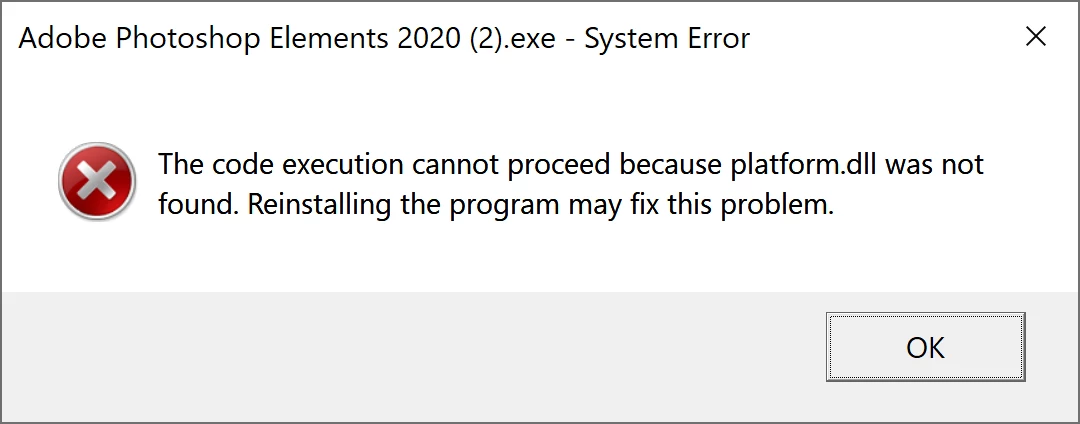


Note that "platform.dll" is present in my desktop folder and I use Win10 Pro.


Can someone help?


Thanks,

This topic has been closed for replies.
Correct answer Glenn 8675309

Yes, I can help: stop this sharing business and just install it on both computers.  The EULA even states you can do that- you just can't have it open and using on both systems at the same time. It may not be answer you like, but it's a very simple solution.

2 replies

Glenn 8675309
Glenn 8675309Correct answer
Legend
July 26, 2021

Yes, I can help: stop this sharing business and just install it on both computers.  The EULA even states you can do that- you just can't have it open and using on both systems at the same time. It may not be answer you like, but it's a very simple solution.

YvesBAuthor
Inspiring
July 26, 2021

Hi Glenn,


Thanks for the info.


I will just do that.


Ged_Traynor
Community Expert
Community Expert
July 26, 2021

Moving thread to the Photoshop Elements forum from Photoshop ecosystem