Participant
April 18, 2026
Answered

Can't install CameraRaw plug-in in Photoshop Elements 2026

  • April 18, 2026
  • 7 replies
  • 69 views

I work with a Mac (Tahoe 26.4.1) and cannot install CameraRaw in PSE Editor 2026.


I loaded and installed CameraRaw_18_3.dmg. The message afterwards is successful, but ... not quite.

Because I still keep getting the message that I need to install the CameraRaw plug-in whenever I want to open a RAW file in PSE.

    Correct answer Jeff Arola

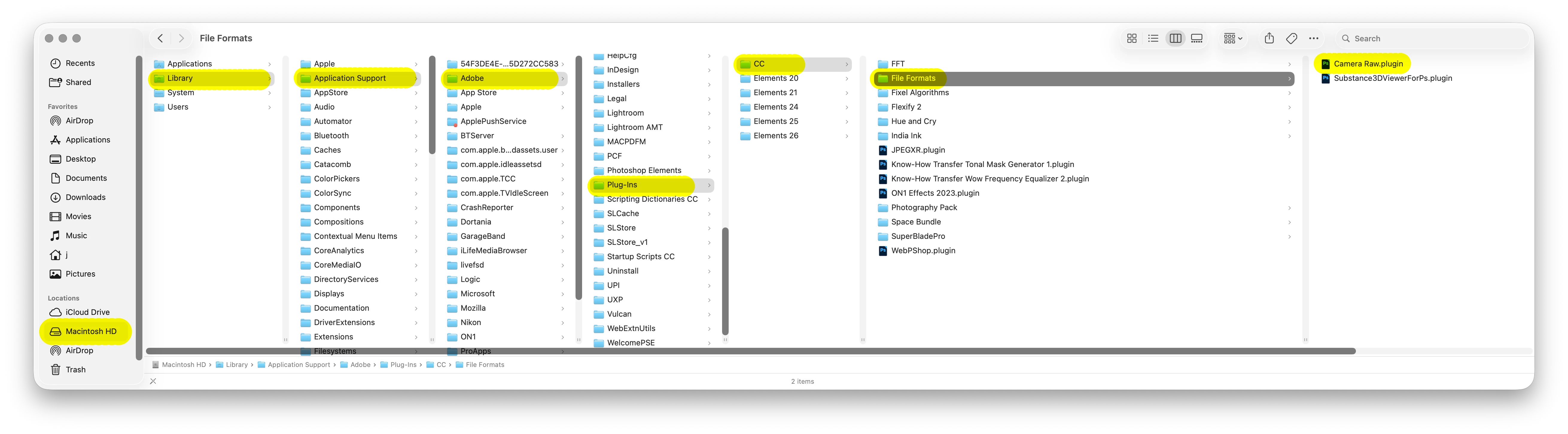
    From your install of the 18.3 Camera Raw plugin you should now have a File Formats folder in 

    Macintosh HD/Library/Application Support/Adobe/Plug-Ins/CC, with a Camera Raw.plugin inside, is that correct?


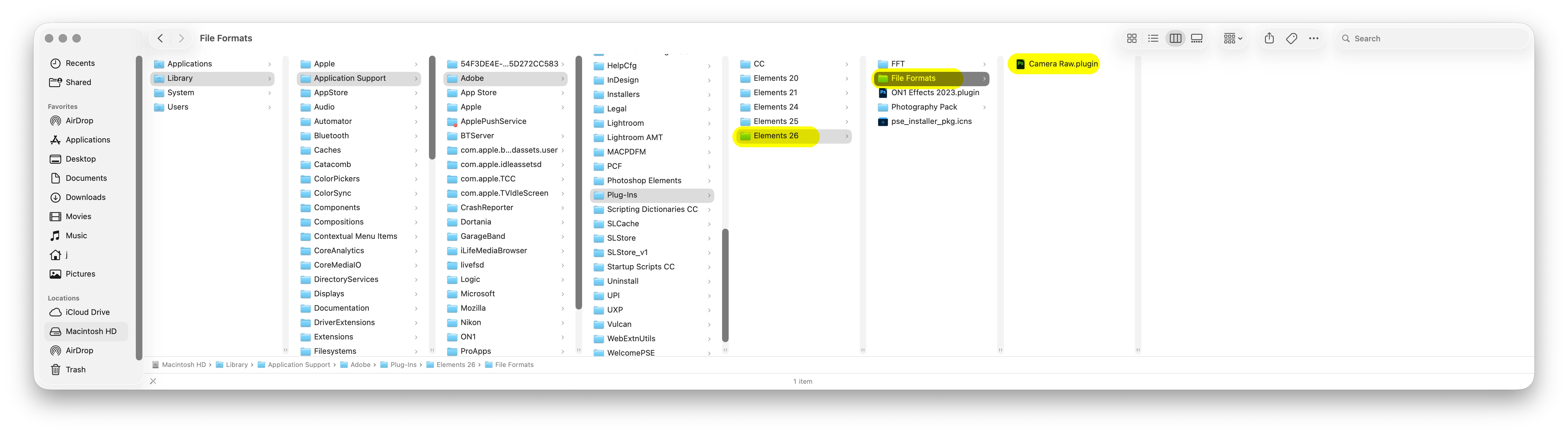
    If so, you just need to make a Elements 26 folder with a File Formats folder and then copy the Camera Raw Plugin from the CC/File Formats folder to the Elements 26/File Formats folder.


    7 replies

    DeCisseAuthor
    Participant
    April 20, 2026

    Many thanks Jeff !!

    It works now, after your instructions to make a folder Elements 26 and copying that Camera Raw.plugin to it.

    🙏🏻

    Jeff Arola
    Community Expert
    Jeff ArolaCommunity ExpertCorrect answer
    Community Expert
    April 20, 2026

    From your install of the 18.3 Camera Raw plugin you should now have a File Formats folder in 

    Macintosh HD/Library/Application Support/Adobe/Plug-Ins/CC, with a Camera Raw.plugin inside, is that correct?


    If so, you just need to make a Elements 26 folder with a File Formats folder and then copy the Camera Raw Plugin from the CC/File Formats folder to the Elements 26/File Formats folder.


    DeCisseAuthor
    Participant
    April 20, 2026

    Thanks Jeff for your advice.

    But I did it already in both ways: installing from within PS 2026 and manually.

    Manually: it seems that nothing happens, PS keeps asking to install ACR.

    From within PSE: PSE “freezes”.


    Jeff Arola
    Community Expert
    Community Expert
    April 19, 2026

    Restart your Mac then try the Camera Raw install from within Photoshop Elements 2026 by going to Help>Install Camera Raw.


    Your Camera /Lens combo should be covered by the 18.2 Camera Raw plugin that gets installed.


    When installing Camera Raw the manual way, the Camera Raw plugin goes in Macintosh HD /Library/Application Support/Adobe/Plug-Ins/Elements 26/File Formats, however, your won’t have the correct folder unless a Camera Raw plugin was installed by using Help>Install Camera Raw.

    Still if the automated installed just won’t work, we can tell how to manually make that folder.

    DeCisseAuthor
    Participant
    April 19, 2026

    Thanks for the Answers. I have a Nikon 1 V2 camera with as lens a NIKKOR1 10-100mm. This is in the list of supported lenses.

    Trying to install ACR from within PSE 2026 also did not: nothing happens and PSE just hangs - I have to use Option-Command-Esc to force a stop.

    Even after leaving the Mac on for 10 hours. And following the tips in the link 

    gives me no solution: I have not a map “CC” or “Plug-ins” in this 

    “On macOS: /Library/Application Support/Adobe/Plug-ins/CC/File Formats”

    Glenn 8675309
    Legend
    April 18, 2026

    When you install ACR such as what you did it does not install it to pse (Unless you install it directly from the program.)

    I actually had the same issue with pse telling me to install ACR- I did what the editor said, but it didn’t work.

    What did work?   Following the “nicer to look at”, which I made a year or two ago.   It all involves just copying 1 file, and pasting it into the correct location.  

    Follow the directions Jeff posted and you will be good.

    Jeff Arola
    Community Expert
    Community Expert
    April 18, 2026

    What camera do you have?


    If your camera hasn’t just been introduced, then the easiest way to get a Camera Raw plugin is from within Photoshop Elements 2026 by going to Help>Install Camera Raw.


    List of cameras and the minimum required Camera Raw plugin:

    https://helpx.adobe.com/camera-raw/kb/camera-raw-plug-supported-cameras.html


    Otherwise if you do need Camera Raw 18.3 you can follow the directions here to install it:

    https://community.adobe.com/questions-716/manually-install-adobe-camera-raw-acr-nicer-to-look-at-1209785