

Pregunta
Distortion When Using Sinhala Fonts IN PSE
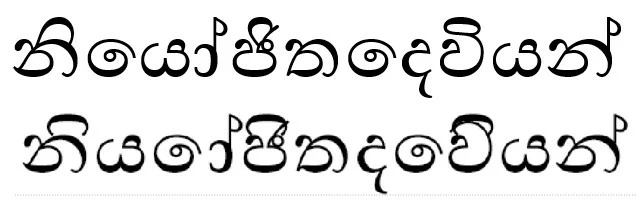
If I wish to type in Sinhala using Photoshop Elements I always get an incorrect display or distortion. (I also get the same problem in CorelDraw.) The fonts only display correctly in a word processor.
So the only work around is to take a screenshot from Microsoft Word, then paste into a graphics software, trace to a vector and export as a png with transparency to use in PS Elements. I find this very inconvenient.
Is there a way to make Sinhala (or maybe other Asian fonts) display correctly. Your advice would be appreciated.
Kind regards
Chris
Example: Correct text on top. Distorted below.


 AdChoices