
Known Participant
May 21, 2021
Answered

Captions not displaying correctly with Sinhala Fonts

  • May 21, 2021
  • 3 replies
  • 5433 views

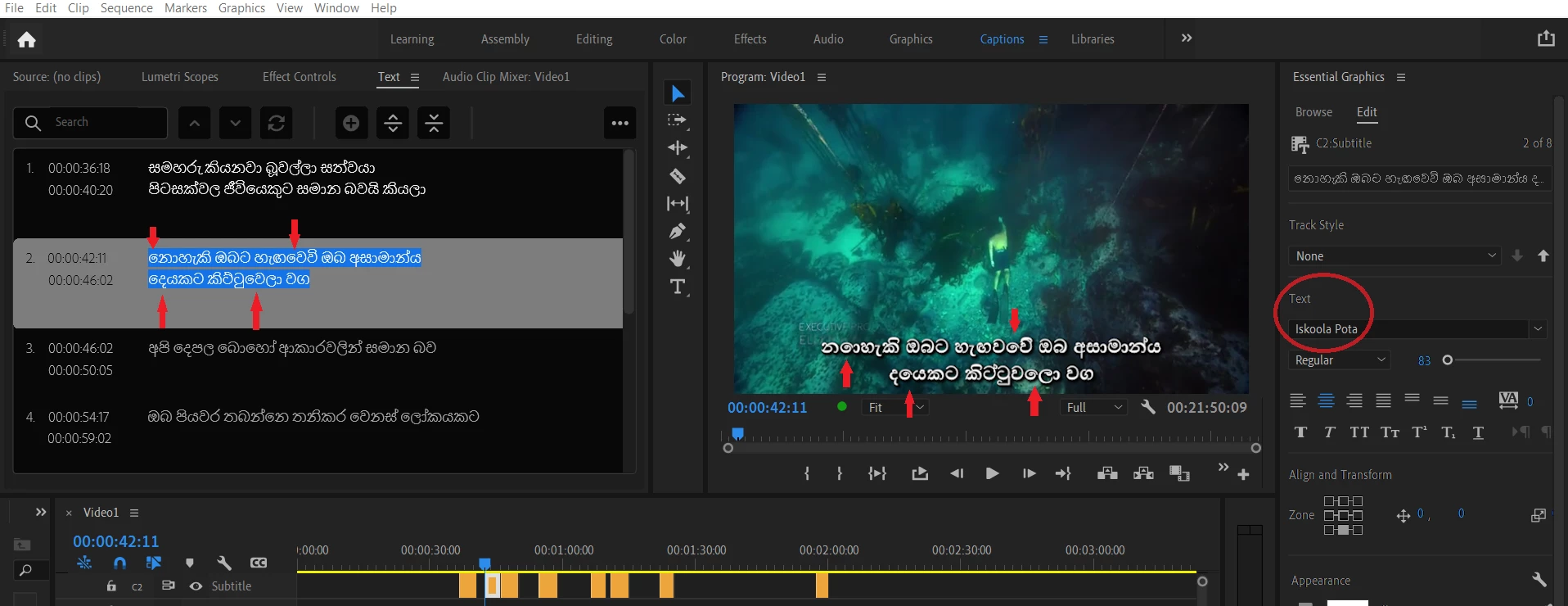
Please see attached image. Notice the Red arrows. As you can see words look fine in the Caption track, but on program monitor some letters are scrambled within the words. What's going on here? How can I fix this?   I tried several different Sinhala font types with the same results.

I'm using Premier v15.2 and Windows 10, and windows standard Sinhala Font:  Iskoola Pota

no such issues with ms word or powerpoint with the above font.
This topic has been closed for replies.
Correct answer Stan Jones

Sorry that I am not clear on waht type of font that is, but I am going to assume it might be one of these. This is an undocumented option in the new (PR 2021) caption workflow.


See the correct answer from staff (Trent Happel via Kevin Monahan):

https://community.adobe.com/t5/premiere-pro/srt-import-with-right-to-left-language-e-g-hebrew-arabic...


"Do you have South Asian and Middle Eastern set in your Caption Track Settings? Right-click on the Caption track header, choose Track Settings... and then under Styling Options > Text Engine, click button for South Asian and Middle Eastern. Then click Ok button."


Interestingly, I don't think you need to set the regular preferences to South Asian and Middle Eastern as long as you set the caption track. But when I set the regular preferences to that and created a new track, it set the caption track to the same.


Let us know if this helps (or not).


Stan

3 replies

Participant
November 5, 2024

මම O/L කරනකොට මට ඕන කරලා තිබුනේ engineer කෙනෙක් වෙන්න. අම්මා මට කිව්වා. ඔයා එකවුන්ට්ස් කරන්න O/L වලට කියලා. මං කිව්වා මං එකවුන්ට්ස් කරන්නේ නෑ. මොකද මට engineer කෙනෙක් වෙනවට මට එකවුන්ට්ස් ඕනේනෑ. පුතා එකවුන්ට් වල ගනන් හදන්නෙ වෙන විදිහට. ඔයා ඕක දන්නේ නැත්තං ඔයා ජීවිතය success වෙන්නෙ නෑ. ඒක හින්දා ඔයා O/L වලට එකවුන්ට්ස් කරන්න. මම A/L කරනකොට මගේ බස් එකේ මගේ යාළුවෙක් හිටියා ඉකොන් කරන. මේ ඉකොන් සබ්ජෙක්ට් එකට හරි ආසාවක් ආවා. එතකොට මගේ වයස අවුරුදු 16 සෙන්ට්රල් බැංකුවේ ඇනුවල් රිපෝට් එකක් ගෙනල්ලා දුන්නා. මම එදා ඉඳලා ඒ අවුරුදු දෙකම සෙන්ට්රල් බෑන්ක් රිපෝට් එක බලනො. එයත් එක්ක ආගියු කරගන්නවා. එයා අම්මගෙන් අහල එනව. මං ඒ විදිහට තමයි ඉකෝන් මුලදී ඉගෙන ගත්තේ.

Stan Jones
Community Expert
Stan JonesCommunity ExpertCorrect answer
Community Expert
May 22, 2021

Sorry that I am not clear on waht type of font that is, but I am going to assume it might be one of these. This is an undocumented option in the new (PR 2021) caption workflow.


See the correct answer from staff (Trent Happel via Kevin Monahan):

https://community.adobe.com/t5/premiere-pro/srt-import-with-right-to-left-language-e-g-hebrew-arabic...


"Do you have South Asian and Middle Eastern set in your Caption Track Settings? Right-click on the Caption track header, choose Track Settings... and then under Styling Options > Text Engine, click button for South Asian and Middle Eastern. Then click Ok button."


Interestingly, I don't think you need to set the regular preferences to South Asian and Middle Eastern as long as you set the caption track. But when I set the regular preferences to that and created a new track, it set the caption track to the same.


Let us know if this helps (or not).


Stan

Nal5C2AAuthor
Known Participant
May 22, 2021

Stan, disregard my reply below. It works!!!

But like you said, General settings will not work, but:

Right click on the Timeline Subtitle heading,  Track Settings... Text Engin to South Asian works!!!

Without changing above, Sinhala True Type Fonts also works!

Stan Jones
Community Expert
Community Expert
May 22, 2021

Excellent! Thanks for reporting back. 


Stan

Nal5C2AAuthor
Known Participant
May 21, 2021

Just a note:  Microsoft Iskoola Pota font type is a Unicode Font,

but like I said, works just fine with MS Word and Powerpoint, but not with Premier.