Participant
October 28, 2022
Answered

Installed Elements 2023, converted Catalogue, some folders with no files showing in Organizer.

  • October 28, 2022
  • 2 replies
  • 873 views

On a new computer running Windows 11 I installed Elements 2023, converted the Catalogue.  I have some folders with no files showing in Organizer though they are in the explorer folder. I've tried Import Media but all I get is a list "8 Media files were skipped because they are already present in the catalog."  Thanks for any help.
This topic has been closed for replies.
Correct answer MichelBParis

Good troubleshooting, @Barry_Kruyssen ,

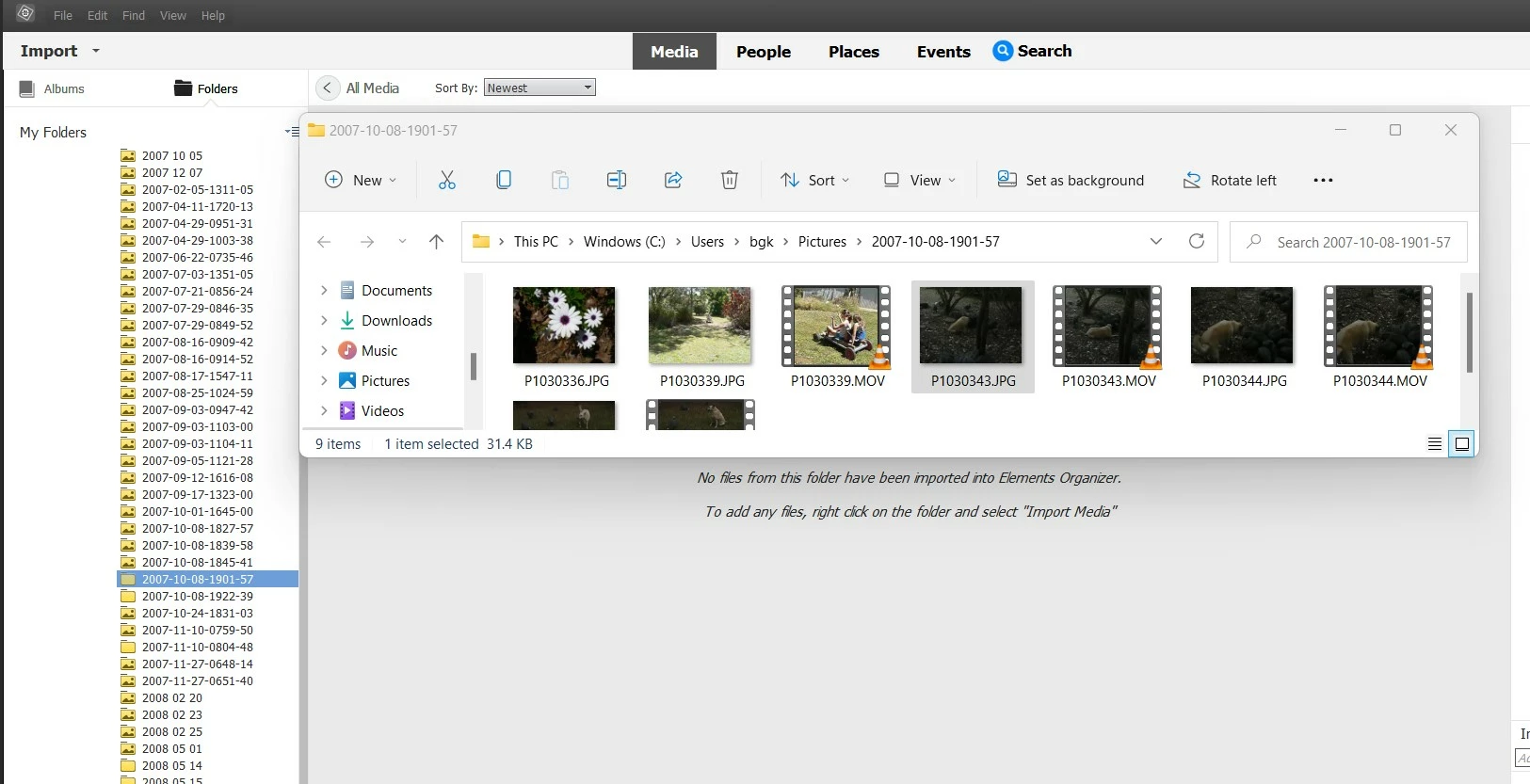
You can see that the flower is located in a folder ending with 1901-57 in the Explorer while the catalog has recorded another folder ending with 1827-57.

So, the filter to skip duplicates finds that it can't import it a second time, exactly what the error message is stating.

Probably the result of inadvertently dragging and dropping files in another folder?  It would have been harder to find the real position if the reason had been a rename instead of a move.

Anyway, the solution would be to remove the displaced files from the catalog (NOT from the disk) and to reimport the real folder. Note that if the blank folder had correctly shown pictures, they would not be imported as duplicate, only the missing files.


Am I reading your screenshots of the catalog and the explorer correctly this time?


2 replies

MichelBParis
Legend
October 28, 2022

1 - Don't display your folders in 'list' mode, use the 'tree' mode, similar to the tree view of the Explorer.

2 - The folder icons all in yellow don't contain imported pictures, but they have subfolders which do.

3 - To display all the subfolders of a seemingly empty folder, use the right click option on the folder icon to show all subfolders.

4 - If the files visible in the Explorer can't be imported, the general explanation is that they have been already imported from another folder. Try to check by a search by name / date in the organizer to find where they can be.

Participant
October 28, 2022

Thanks for the reply.  

1. I am in tree mode view it is just we have a BIG tree, 92K photos and videos.
2. and 3. I'm aware of as that is how I found the problem.

4. Searching for the photo finds it in the folder where I'm looking and it is not being displayed. I've included the more screen shots showing the empty sub folder with import media and overlayed with the explorer window.  The scond screen shot is of the file search for the flowers showing the properties which has the file in the folder where it is not displaying.  

MichelBParis
MichelBParisCorrect answer
Legend
October 29, 2022

Good troubleshooting, @Barry_Kruyssen ,

You can see that the flower is located in a folder ending with 1901-57 in the Explorer while the catalog has recorded another folder ending with 1827-57.

So, the filter to skip duplicates finds that it can't import it a second time, exactly what the error message is stating.

Probably the result of inadvertently dragging and dropping files in another folder?  It would have been harder to find the real position if the reason had been a rename instead of a move.

Anyway, the solution would be to remove the displaced files from the catalog (NOT from the disk) and to reimport the real folder. Note that if the blank folder had correctly shown pictures, they would not be imported as duplicate, only the missing files.


Am I reading your screenshots of the catalog and the explorer correctly this time?


Ged_Traynor
Community Expert
Community Expert
October 28, 2022