
Participant
March 7, 2022
Answered

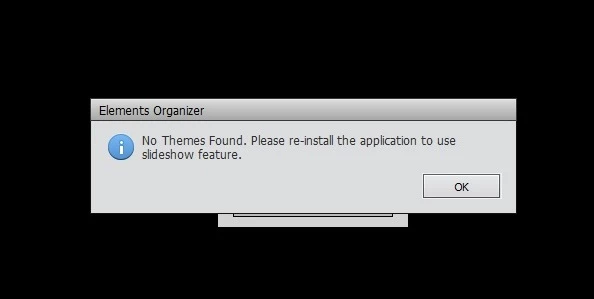
Slideshow themes not found

  • March 7, 2022
  • 2 replies
  • 401 views

I am working with PS & PE 18.0  Trying to create slideshow, message of 'No Themes found. Please re-install' so I removed both PS & PE (yes, I choose the option to clear files), uploaded App Creative Cloud (read that this is now required to re-install), turned off my Windows Defender virus scan, did download from Adobe for both programs, ran the .exe files .... enter the serial #s for PS & PE -> went to create slideshow and the same message appeared 'No Themes found. Please re-install'  HELP, what am I doing wrong? BTW, I am running Windows 10
    This topic has been closed for replies.
    Correct answer Raven650
    I contacted 'chat' support and they were able to determine the problem - I
    needed to allow the extensions to bypass security...

    2 replies

    Raven650AuthorCorrect answer
    Participant
    March 8, 2022
    I contacted 'chat' support and they were able to determine the problem - I
    needed to allow the extensions to bypass security...
    Peru Bob
    Community Expert
    Community Expert
    March 7, 2022

    I've moved this from the Using the Community forum (which is the forum for issues using the forums) to the Photoshop Elements forum so that proper help can be offered.