

chirah2830269
Participant
May 23, 2017
Answered

Wie kann ich Ebenen in eine Gruppe tun?

  • May 23, 2017
  • 2 replies
  • 414 views

Hi! Ich habe folgendes Problem: Ich habe Photoshop Elements 14 und kann keine Ebenen in eine Gruppe tun. Ich habe es weder als Symbol dort zu finden
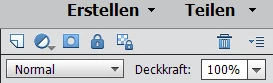
noch unter
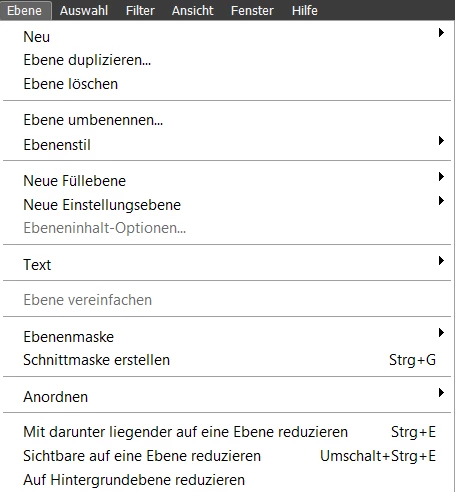
Und das Shortcut strg + g erstellt bei mir eine Schnittmaske aber keine Gruppe.

Wie kann kann ich dafür sorgen das ich das Gruppen Symbol für die Ebenen habe? Vielen Dank fürs Antworten im Vorraus!

    This topic has been closed for replies.
    Correct answer MichelBParis

    chirah2830269  wrote

    I find not this symbol

    in Photoshop Elements 14.  Is not there.

    Yes, that icon has been added in Elements 15 which is the first version to support layers groups (which were considered a feature for the full Photoshop only).

    2 replies

    chirah2830269
    Participant
    May 23, 2017

    I find not this symbol

    in Photoshop Elements 14.  Is not there.

    MichelBParis
    MichelBParisCorrect answer
    Legend
    May 23, 2017

    chirah2830269  wrote

    I find not this symbol

    in Photoshop Elements 14.  Is not there.

    Yes, that icon has been added in Elements 15 which is the first version to support layers groups (which were considered a feature for the full Photoshop only).

    MichelBParis
    Legend
    May 23, 2017

    Elements did not support 'layer comps' before version 15.

    To add that function, you could buy the very affordable add-on 'Elements+' which has a script to manage those layers groups.

    About Elements+

    Grouping Layers

    chirah2830269
    Participant
    May 23, 2017

    In Photoshop Elements 14 I can´t do layers groups?!? Ok....thanks for answer.