
Participating Frequently
April 14, 2017
Answered

Windows 10 and PSE11

  • April 14, 2017
  • 16 replies
  • 11421 views

I just updated to Windows 10 Creator version and Photoshop Elements 11 is not working properly. Without getting into why I still use PSE11, the product has worked flawlessly since my first upgrade to Windows 10. My main issue is that the menus are missing any text. Anyone else experiencing this?
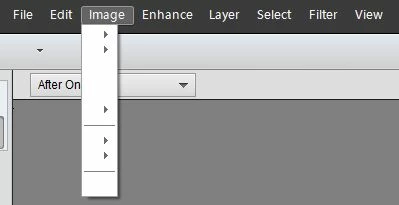
Thanks David

    This topic has been closed for replies.
    Correct answer georg_58

    I found a solution for the problem which is caused by Microsoft Win 10-CU:

    I copied ALL FONTS from the Windows folder of an "old" Windows 10 PC via USB stick to the PC with CU (Creators Update) / "no overwriting".

    Only a few of the great number of fonts have been copied - but the fonts needed by PSE 9, 10, 11, 12, 13, .... were included.

    Now it works - even after several reboots. I think it will also operate with the Windows 7 fonts.

    Problem with Win 10-CU seems to be that most of the fonts used by Adobe Products have automatically been deleted!

    (Thanks to

    16 replies

    jefferyh5112046
    Participant
    August 15, 2017

    I had the same problem with Elements 12.

    I installed the missing fonts per this thread:

    Re: PhotoShop Elements 12 und WIN10

    This fixed my issue at least for now.

    Participant
    August 15, 2017

    Replacing missing fonts works. I went to the fonts folder in an old laptop that was Windows 10 but had not yet updated to the Creator version. To do so, go to the older computer and use the following folder path:

    This PC/Local Disk C/Windows/Fonts. Right click on the fonts folder and copy the folder.

    Then using a thumb drive for transfer, paste the copied folder into the thumb drive. Once done remove and take to your Creator updated computer.

    Following the same path in your Creator computer, navigate to the fonts folder and open it.

    Now go to the thumb drive fonts folder copy, open it, select all, copy, and paste into the Creator fonts folder. As it pastes it will alert you to duplicates, so tell it to ignore duplicates. Once done, close everything and reboot the computer. Your Photoshop elements should now work properly!

    Participant
    August 9, 2017

    I appreciate the issue as I have had the EXACT same problem.. IDENTICAL!!!!!!!!! so everybody both Adobe and Microsoft know about the problem.. I will NOT!!!!! buy the new upgrade program until this is fixed..

    I have done the same as most on here.. uninstalled and reinstalled now twice.. and still so solution.

    If there is one please email me directly..

    Participating Frequently
    August 9, 2017

    When you say "I have done the same as most on here.. uninstalled and reinstalled now twice.." do you mean you reinstalled Elements twice, or you reinstalled the "Old" fonts twice? If you read my post number 41, you will see what I did.  It worked for my elements 10, and has been stable for a couple of weeks now. Good luck. I share your frustration.

    Participant
    August 7, 2017

    Bonjour

    J'ai exactement le même problème. Depuis le passage à windows10, les polices de windows ne sont plus prises en compte par PSE11.

    La question a été posé en avril 2017, à ce jour elle ne semble pas résolu ! C'est le seul logiciel qui bogue, chez moi !

    Peut-on me dépanner, SVP.

    Merci

    póló48237490
    Participant
    July 24, 2017

    This also happened to me. In the middle of using Photoshop Elements 11 Windows 10 just shut it down. Then the menu contents came up blank as with others above. I then uninstalled Elements and reinstalled it - same problem. I then tried to uninstall Premier Elements and the uninstaller got stuck in the middle. Now it doesn't work at all telling me it is in the middle of doing something.

    I didn't ask for the latest (Creator or whatever it is) so i feel very cheated. All my psd files are now useless. Next computer will definitely be a Mac. The arrogance of Windows is unbelievable.

    Let us know if anybody comes up with a solution that non-techies can implement. Also how to get out of my stuck uninstaller.

    And no, this question has not been answered, at least in terms of a problem beiing solved.

    Participant
    July 20, 2017

    Thank you for the research done on this thread. I encountered the same problem with Elements 11 and Win 10 Pro (1703 Build 15063.483).

    Updated all fonts from Windows 7 then 8, booted windows, and so far so good (before the boot it did not work).....

    Participant
    July 25, 2017

    Update- the problem is back.

    I now need to recopy the fonts, restart the PC and the Elements 11 would work.

    After a few days, / restarts, the problem comes back and then it is font paste and restart all over again.

    This blows....

    PSE_stuff
    Participating Frequently
    May 27, 2017

    Shutdown, booted back up again today, missing menus are back again

    Seems the KB update did not fix the issue.

    georg_58Correct answer
    Participating Frequently
    June 27, 2017

    I found a solution for the problem which is caused by Microsoft Win 10-CU:

    I copied ALL FONTS from the Windows folder of an "old" Windows 10 PC via USB stick to the PC with CU (Creators Update) / "no overwriting".

    Only a few of the great number of fonts have been copied - but the fonts needed by PSE 9, 10, 11, 12, 13, .... were included.

    Now it works - even after several reboots. I think it will also operate with the Windows 7 fonts.

    Problem with Win 10-CU seems to be that most of the fonts used by Adobe Products have automatically been deleted!

    (Thanks to

    Participant
    July 1, 2017

    I tried with W7 fonts. Worked right after copy but not anymore after reboot. I have PSE 10.

    PSE_stuff
    Participating Frequently
    May 26, 2017

    Microsoft have just released KB4020102 which addresses some font issues introduced with the Creators Update.

    I have downloaded and installed the update and the menus have reappeared in PSE12.

    PSE still feels sluggish to use (it was fine before the Creators Update) but my hard disk is busy doing something since the KB update so that might be the cause of the sluggishness (if that's a word!)

    I would recommend forcing a windows update and seeing if you get the same results for yourself.

    A word of warning though, I have yet to try shutdown and reboot !!

    PSE_stuff
    Participating Frequently
    May 24, 2017

    I already have scaling set to 100%, changing it to a different setting made no difference for me.

    I does make me wonder if screen resolution is part of the problem. I am using 2560x1600.

    May 26, 2017

    I am using 1920x1080.

    May 24, 2017

    I "solved" my problem with the blanc menu in photoshop elements 11. In Windows 10 settings I reduced the scaling (text, apps and other elements) back to 100%. I normaly use 125%. After a reboot photoshop elements 11 worked again, all text was back in the menus. It seems the blanc menu-problem results from higher scaling in windows 10.

    Hope it works for you to! :-)