



15 seconds delay between pressing "play-button" and real start of video
Hello,
since some weeks I have massive performance problems with Premiere CC 2017. And there is the strong suspicion that it has something to do with the audio hardware / audio settings or the audio drivers.
Some of the problems I have already described here in the forum:
Premiere blocks "adaptive noise reduction" for some 5.1-clips - What is the reason?
What is going on with my audio level? Mysterious swelling of audio
Premiere CC2017 is after up- and downgrade extremely slowly - No more work possible
None of the problems have been solved. The first thread listed was also discussed with the german Adobe support. They asked me to upload an sample project, what I did. This was 3 weeks ago and Adobe promised to give feedback via mail. But nothing happened. The staff member here in the english forum Kevin-Monahan kindly asked the german support team once more about the current status, but again: No reaction, which slowly streches my patience.
My film project is running out of time and it is impossible any more to work with Premiere, especially because of the worst problem I want to discuss in this current thread here. And hope that someone can help with an idea:
Between clicking the play-button and the moment where Premiere really starts to play the video is a delay of 15-20  seconds. Afterwards the video plays stuttery.

I know that it is not due to a slowly PC. Because for month I had great performance in the same project, with the same footage and the same PC with the following technical data:

Now comes the "soultion": If ALL audio devices are deactivated in the device-manager, the delay of the play-button is gone and the old good performance is back.
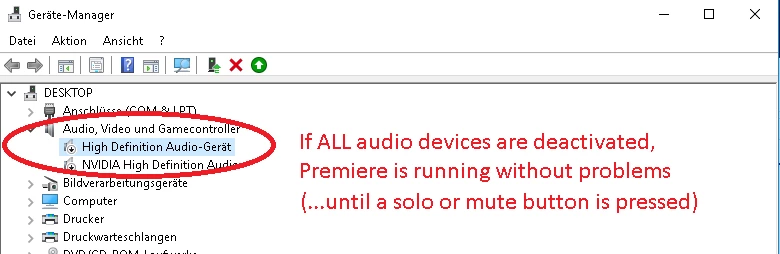
But only till the moment one of the mute/solo-buttons of the audio tracks is pressed (Of course no audio can be heard at all because the computer has all audio devices deactivated). If a mute or solo button is pressed once, the 15 s delay of the audio button comes again.

By the way, it did also not help to reset the computer (Win10 PC reset without loosing personal data) and re-install Premiere CC 17. (Premiere CC 18 is no option. I tried that also, but it ended in total crash of the project)
I have to mention, that I had temporarily a third party audio device for microphone recordings plugged in (Tapco audio interface). So as I earlier said, I think that there is any heavy audio problem. Does anyone has an idea how to come to a solution?
Thanks a lot!
 AdChoices