
Participant
February 16, 2017
Question

Adjustment Layer not working?
  • February 16, 2017
  • 2 replies
  • 4375 views

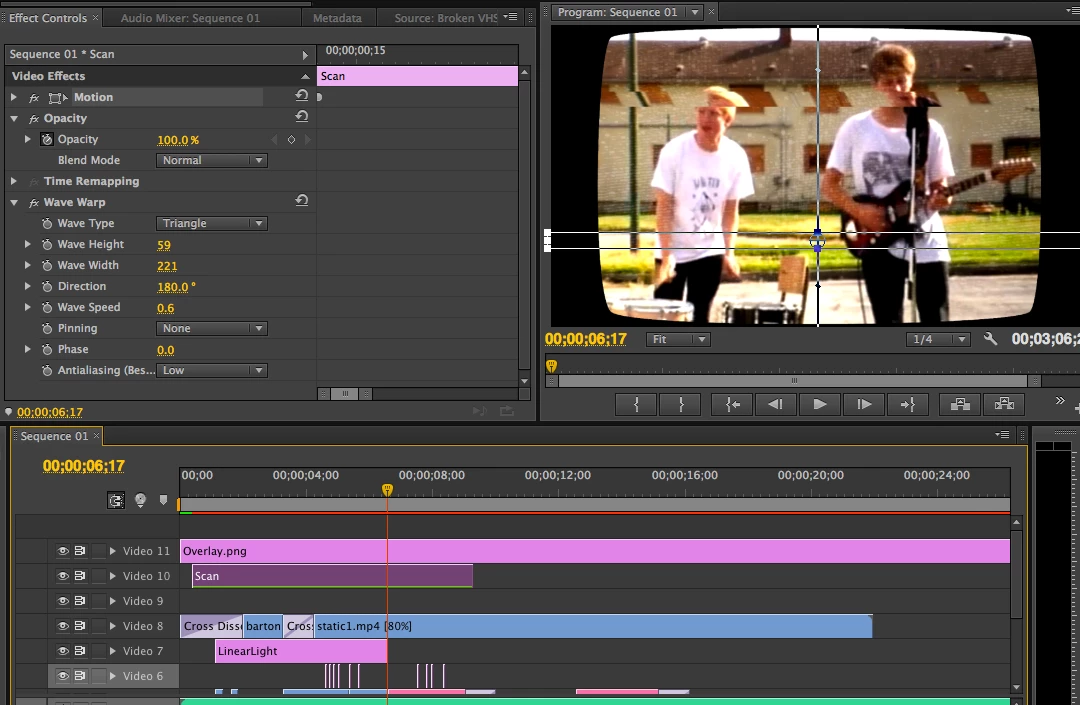
Hello. So I'm playing around with random effects here and I'm trying to make a moving scan that warps the image like an old VHS effect, right? So I make this adjustment layer (Scan) that is gonna run through the video. HOWEVER, it is ONLY working ontop of the Linear Light adjustment layer I made (with various coloring effects) but is also ( as you can see ) not even close to where it should be in my keyframes I set. I selected motion to show where it should be, but it's scanning way above that, and then the scan stops after the Linear Light adjustment layer ends. IF I delete my other adjustment layer, the scan doesn't show at all....I am so lost here, what is going on?

This topic has been closed for replies.

2 replies

Participant
February 16, 2017

Update: my adjustment layer below had an unneeded keyframe for opacity on it, and once I removed that my scan will now work wherever (why that has anything to do with it, I have no clue). BUT now I cannot achieve motion with this scan layer, it only works in one place, and when I try to keyframe motion it just stays in one spot. I even exported to see if it was just my program rendering fudging up, but nope. Doesn't move there either, even though the selector shows it moving.

Lesson is, don't try to make moving adjustment layers in Premiere Pro CS6 I guess because it won't work.

Inspiring
February 16, 2017

Sorry. Didn't notice you were using CS6. The latest versions have a built in mask in the Wave effect which effectlively allows you to move your warp wave effect anywhere you want. I am assuming you want to move your warp wave effect lower.

In CS6 , pinning the top edge would keep the warp wave on the lower portion of the video.

R Neil Haugen
Legend
February 16, 2017

I'm trying to figure you what you're asking, but among other things, I'm not understanding this part:

"but is also ( as you can see ) not even close to where it should be in my keyframes I set. I selected motion to show where it should be, but it's scanning way above that, and then the scan stops after the Linear Light adjustment layer ends."

A bit clearer explanation would help.

Neil

Everyone's mileage always varies ...
Participant
February 16, 2017

I just meant that I selected the layer so you could see where the scan should be (the selected area in the preview, down by the men's waists) but the actual effect is running above that, chopping near the men's heads. I have no idea why it would do that.

And no matter where I place the Scan layer, it only shows its effect when it's above the color correction adjustment layer I made (Titled Linear Light)

R Neil Haugen
Legend
February 16, 2017

Thank you ... much clearer now.

This is something that perhaps Ann Bens​ would be better at helping with ... let's see if she'll pop in though it might be a few hours.

So, the effect is supposed to be within the bars going across the monitor, and is instead appearing quite a few pixels above that. I know sometimes there's been similar things with re-sized frame-sizes with other effects ...

Neil

Everyone's mileage always varies ...