
Known Participant
March 5, 2014
Question

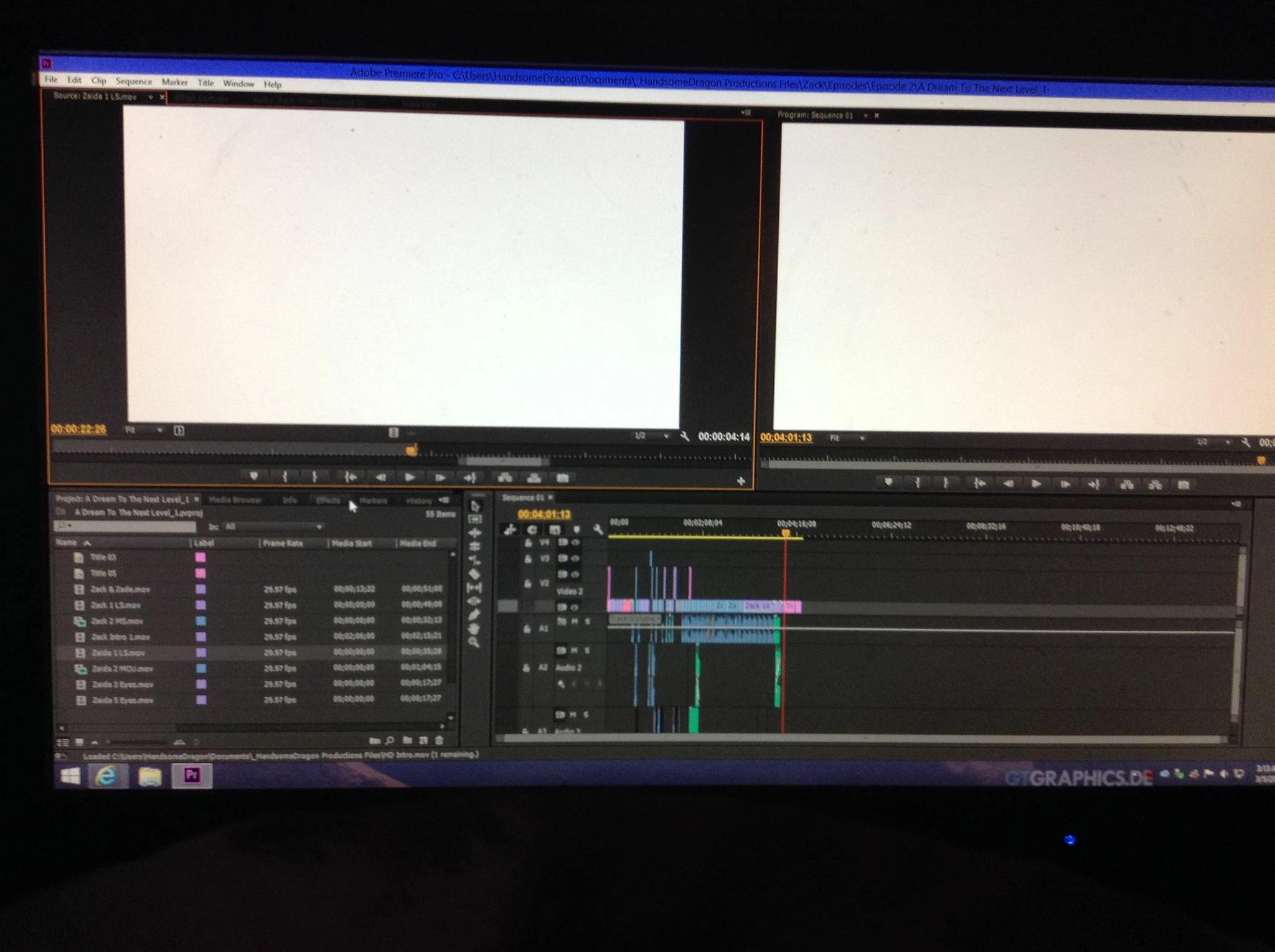
Adobe Premier Pro CC showing White Screen

  • March 5, 2014
  • 29 replies
  • 49267 views

So when I scrub or play through any clip, its's white. However when I export the video, the video is clear. It's just the viewers. This is happening to every single one of my projects with Adobe Premier Pro CC, even projects way before this

problem ever occured. I even used it last week. The only thing that changed between last week and now, was that I updated my Windows PC from 8 to 8.1. I was forced to there were certain things I could use without 8.1.

I tried reinstalling it, updated the software, nothing has worked. Also a side not, sometimes when I scrub through it, big blocks of random texs with a black background appear, its really weird.

Adobe Premiere Pro cs6 is working just fine though, its just the stupid CC.
This topic has been closed for replies.

29 replies

October 20, 2019

Open 'Task manager' and looking for 'nahimic' services and kick all.
I did it and my problem solved.

Participant
October 20, 2021

I solved this problem eliminating the cache files to force Premiere to generate them again. Worked for me. 

Participant
September 29, 2019

The only thing that helped me is resetting the preferences of Adobe Premier Pro, all you need to do is hold down the option key (Mac) or Alt key (Windows) while opening Adobe Premier Pro, and if asked to reset the preferences you click "Ok". That is about it, when you open your project back up, everything should work again.

Participant
March 29, 2019

1. Close PREMIERE

2. Disconect any external monitor from your hdmi output port.

3. Launch PREMIERE and your current project

4. Reconnect your external monitor

5. Your welcome

Not_Doug
Inspiring
March 15, 2020

@eassafhn THANK YOU OH MY GOD!! Do you (or anyone else) know why the heck that bug happens??

But seriously, this has been drove me so mad in September that i edited in AE instead out of spite. Glad to get this fixed.

boristr
Participant
March 21, 2019

For Anyone in 2019, go to File > Project Settings > General... > Video Rendering and Playback > Renderer. Change the render. If that doesn't work, or gives you some issue, switch it back again.

metalvinny
Participant
November 29, 2018

It's November 2018 and this is still a significant issue. I had a 2-3 hour phone call with an adobe engineer several weeks ago - he remoted into my machine and the workaround he discovered was to log in not with my windows profile, but with the administrator profile. Fast forward two months: even that no longer works. The work arounds regarding changing work spaces work until I try to open an individual video file to preview, and the displays freak out, freeze, and return to just a white screen.

System information:

Version    10.0.17134 Build 17134

Processor    AMD Ryzen 7 1700X Eight-Core Processor, 3400 Mhz, 8 Core(s), 16 Logical Processor(s)

BIOS Version/Date    American Megatrends Inc. 4012, 4/20/2018

Adapter Type    GeForce GTX 1080 Ti, NVIDIA compatible

Running dual monitors - because editing on one is a nightmare.

I'm on a custom built windows 10 machine with a brand new 1080ti, and 32gb of ram. I built this machine with my own personal cash mixed in with approved funds from my employer, and it's not great news to them that the machine they helped build can't function for its intended purpose. Has anyone at Adobe found an actual real solution for this?

I've been a paying adobe subcriber for years, and now I'm 3-4 months into barely being able to use the software for which I'm paying. Unacceptable.

Participant
May 18, 2018

Hey guys !
Had that problem after windows 10 update. If solution "software only" doesn't help, try to reinstall Quick time codec.


#whitescreen #whiteprogrammonitor #premiereprowhitescreen

Participant
December 14, 2017

Ugh! Adobe! Why is this still an issue? You can search back through forums and see this cropping up again and again.  It's new to me as of CC 2018 in the last week or so.

Thx for the workaround, Heinz, but it's certainly not an Adobe fix. 

Participant
November 19, 2017

I was having the same issue and seem to have found a work-around. I changed the workspace settings to "assembly" and video playback returned (following a entire day of heartache and failure).

Inspiring
November 25, 2018

Tried that, still sucks

Participant
July 13, 2017

Hi, I'm having the exact same issue, white screen of death, only its with AE... PP works fine???

Windows 10 64bit version 1703

24GB RAM

AMD RYZEN 5 1400 QUAD-CORE 3.2 GHz CPU

AMD RADEON RX 580 (4gb)

1TB 7200 RPM HD

footage ive uploaded (from external drive and from desk top) is from Nikon D500.

My GPU driver is up to date, just did it.

Windows is up to date.

I've toggled between OpenCL and software only.

Nothing.

I already contacted Adobe but they told me to contact Windows, who wanted $120 just for a diag?

Quinn

Participant
May 23, 2017

Hi guys. I had the same issue, AMD and windows user. Tried many ways and none of them worked.

Found the issue and solution: I was using two monitor, one newer other older. Disconnected the older and it's all good now, no white screen with OpenCL checked.