DanielZapata
Participant
April 4, 2018
Answered

Anybody having trouble with PNG's with the new Update of Premier Pro 2018 April 3rd?

  • April 4, 2018
  • 61 replies
  • 30592 views

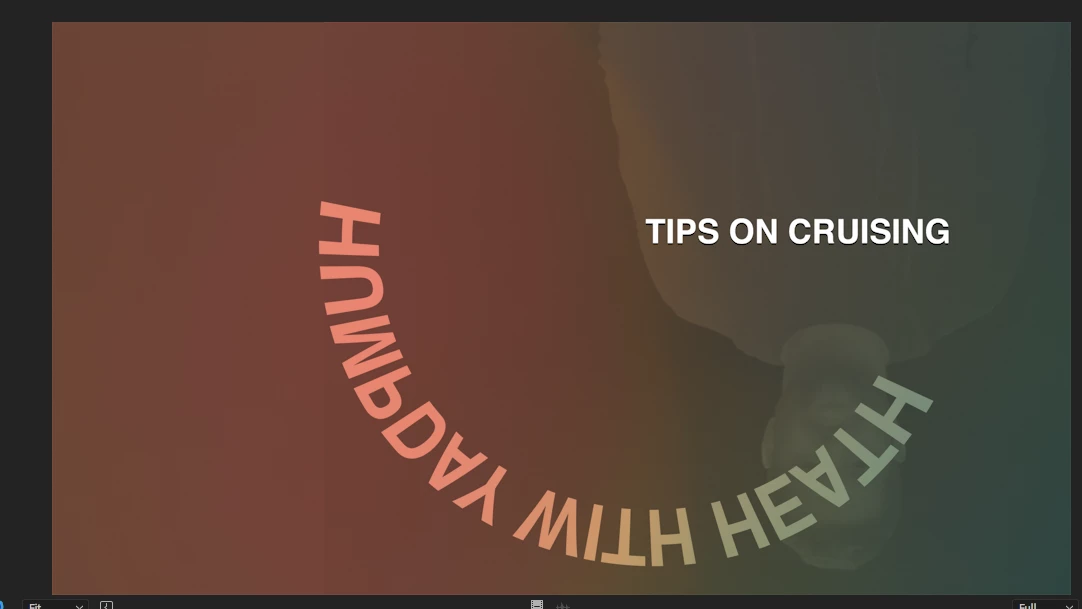
I cant get Premier to read PNG's, I make them in Photoshop and export them as PNG's but when they come in Premier is all the weird crap.

I already clear the cache, re installed, re exported, started  new project, I cant get it t work! WHAT THE CRAP IS HAPPENING!!!

This are two pictures of PNG's it is one title, but Premier is merging all the PNGS in to one picture, same with the one below, it suppose to say TIPS on crussing, not all that weird color and reverse shadow going on.... this is totally wrong!!

This topic has been closed for replies.
Correct answer Vinay Dwivedi

Hi,

The patch has been released and live now. This patch includes bug fix related to PNG's.

Bug fixes in Premiere Pro versions 12.1 and 12.1.1

//Vinay

61 replies

maureenmleem
Participating Frequently
May 11, 2018

I installed the latest update, and still having the problem with .pngs. FREAKING OUT because I need to get these videos to the client!!!!

Inspiring
May 11, 2018

I sent you an message with my direct contact information. We need a project with the offending PNGs to make any progress on this.

Blastermann
Participant
May 10, 2018

Unbelievable... this shit still isn't fixed.. It has caused an absolute shit show.. Think I'm going to print Adobe logo on a mug just so I can smash it...

R Neil Haugen
Legend
May 10, 2018

It has been fixed in most cases ... but clearly not all. Please file a report with full details of your gear & media on their new UserVoice system so they get the data on what's still screwed up.

This needs a complete fix.

Neil

Everyone's mileage always varies ...
May 9, 2018

Just stick to psd and you will have your peace of mind

Participating Frequently
May 9, 2018

Will do. Thx for your answer !

Participating Frequently
May 9, 2018

This issue hasn't been fixed at all. Same problem for me : png are doing really crazy stuff in Premiere. At first everything is fine but suddenly the glitch appears and stays on top of everything on the timeline. To get rid of it i have to delete de png or click on the eyeball to de-activate the video track.

By the way all my apps are updated and i'm working on a mac pro (trashcan) with 32Go of Ram and AMD Firepro D700 for the graphic card.

I believe the quickest fix to that is to encode the png into a video file with alpha but, it really slows down the workflow and isn't a real solution to the problem.

Please adobe fix this ASAP.

R Neil Haugen
Legend
May 9, 2018

If you're on 12.1.1 and still having this, ​please​ file a report on the new User Voice system.

Neil

Adobe Bug /Feature Request form: https://adobe-video.uservoice.com/forums/911233-premiere-pro

Everyone's mileage always varies ...
Known Participant
April 30, 2018

I'm still seeing the superimposed issue after updating to 12.1.1

Inspiring
April 30, 2018

I sent you an IM so you can contact me directly and we can get to the bottom of this. This issue should be fixed in the latest update.

Participating Frequently
May 1, 2018

I'd like it if someone from Adobe would tell me why I can't use Pr, Ae, Pl, AME on Windows 7 ZBook with Nvidia K2100. All drivers up to date. All other apps work just fine. All video apps "Unable to start correctly".

April 23, 2018

Working with the psd file is far better than png. With the psg you can always edit the image or images in Photoshop. Even if I get png file from the net I convert them to Photoshop layers for further editing keeping the quality high

R Neil Haugen
Legend
April 23, 2018

The patch release of a couple-three days back has fixed the png issue for most people ... have you tried that?

Though as you mention, the psd files can keep more ability to modify things later. PNG files somewhat easier to move around, always a choice it seems.

Neil

Everyone's mileage always varies ...
Inspiring
April 23, 2018

FWIW, this is true for PR and AME, but AE's patch has not gone public yet.

Dan R.

masku2000
Adobe Employee
Adobe Employee
April 19, 2018

Check out today's release of Premiere Pro 12.1.1 and let us know if you are still seeing problems with PNGs.

Inspiring
April 19, 2018

I've also confirmed that this newest patch(12.1.1) fixes the same issue with PNG Codec Quicktime MOVs.

agriffith373
Participant
April 19, 2018

Sorry to report but my .mov with alpha are still displ specs of PNG/PSD frames when animated. I use these for lower thirds. Howeve my still PNGs are now working fine.

Participant
April 18, 2018

Quick fix until Adobe updates:

Turn your PNGs into TIFFs using Preview (Export...)

In Premiere just select your PNGs > Make Offline, then Link Media... and select your new TIFFs. DO NOT Replace Footage... it will interpret the images as video and glitch out.

AdiShoots23
Participant
April 17, 2018

Same issue here, and it's April 17th! Literally the only thing that worked was going to an older version of premiere. So if anyone's on a deadline, revert back to the old premiere, it will be your fastest bet to fixing this.

Participating Frequently
April 18, 2018

Yes, trying to export an XML from 12.1 is a failure. Even starting a new project and dragging the XML doesn't work; doesn't include adjustment layers.

Uninstall 12.1, reinstall 12, re-do all the work that you did in your 12.1 project.

In the future, we have to remember NOT to update Adobe products for 6 months, as they are always buggy at first.

Participant
April 17, 2018

YES!  Not only is the ghosting intermitent but Premiere also combined all the PNG's in used in different sequences into one PNG image.  For example if there are 3 sequences each with a different car (png), it started combining all 3 png's into one file so each different sequence had 3 cars layered on top of each other.  The only work around was to convert the PNG to a PSD file and that worked.