DanielZapata
Participant
April 4, 2018
Answered

Anybody having trouble with PNG's with the new Update of Premier Pro 2018 April 3rd?

  • April 4, 2018
  • 61 replies
  • 30592 views

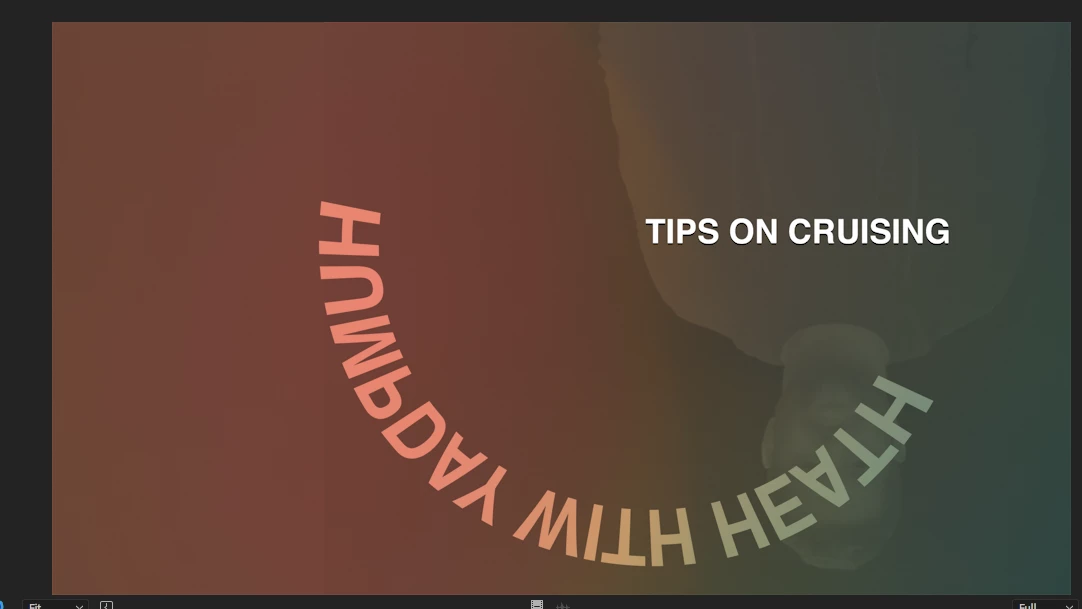
I cant get Premier to read PNG's, I make them in Photoshop and export them as PNG's but when they come in Premier is all the weird crap.

I already clear the cache, re installed, re exported, started  new project, I cant get it t work! WHAT THE CRAP IS HAPPENING!!!

This are two pictures of PNG's it is one title, but Premier is merging all the PNGS in to one picture, same with the one below, it suppose to say TIPS on crussing, not all that weird color and reverse shadow going on.... this is totally wrong!!

This topic has been closed for replies.
Correct answer Vinay Dwivedi

Hi,

The patch has been released and live now. This patch includes bug fix related to PNG's.

Bug fixes in Premiere Pro versions 12.1 and 12.1.1

//Vinay

61 replies

vitorlmartins
Participant
April 11, 2018

This is so frustrating, we have deadlines Adobe! It cannot took so long to fix it. Who is gonna say to my client that i'm behind the schedule because of a stupid PNG!

Known Participant
April 11, 2018

Same issue here on my iMac and MacBook Pro. Both running High Sierra (10.13.4). Nvidia GPU's in both. Latest web drivers.

Not only do the PNG's look a little crazy but the rest of my timeline picks up weird artefacts in both my viewer and renders.

I thought my GPU had died at first but it appears to be an issue on both machines.

Combine this with the new lack of codec support.. pretty frustrating, I have absolutely zero issues with Resolve and I pay absolutely zero £'s for that.

Participant
April 11, 2018

Same problem!!!

This was so annoying. I had to go back to the old version. But in one project I already made so much progress that i had to finish it in this new stupid update.

The solution i found is to export all the png's in tiffs keeping transparency and then in Premiere "replace footage." Even the option replace footage is not working properly so you have to replace the footage "twice" for every png, because the first time when you replace clicking "okay", it seems to get freeze and nothing happens so you have to select the .png and replace again and the second time it gets replaced by the tiff...

Of course replacing more than 100 pngs was terrible.

No brownie points for premiere... very bad issue guys...

Participant
April 11, 2018

This is horrible.  I didn't bother to see if there were any issues with the update.  I asked everyone at work to update and all of sudden, all hell broke loose.  We had clients waiting and we couldn't figure out why we were getting all of these glitches.  So for now, we are only using PSD's or JPG's until Adobe fixes it.  Hope they will do it soon.  This bug really affected us. 

mikeirvingmedia
Participant
April 10, 2018

@Adobe where is the patch to fix this? Extremely aggravating that you can't export for clients and it's been since APRIL 3RD!!!!!!!

Switching to Avid if this bullshit continues. Costing me time and money.

Participant
April 11, 2018

argh. I'm having the same problem and it's April 11th now.... what is adobe doing about this please?

Participant
April 11, 2018

I was on chat support with them today and the representative said the patch is coming next week but no specifics on what day.

willaemmm
Participant
April 10, 2018

wow, this is nuts. how was this not picked up in testing?

Participant
April 10, 2018

Same Problem. Exported the .png to a single layer .psd and that worked.... for now.

Participant
April 16, 2018

Same PNG-problem here! Dead line on friday! I do hope that Adobe can fix this...

Thanks for the tip... plenty of extra work to do!

T-J

Participating Frequently
April 9, 2018

This was very frustrating especially since I had a working project and upgraded.  Yes, I know I shouldn't have done that.  After trying everything I called support and they had me clean.  That does not work.  I called back and waited two hours and in the meantime I found a solution that worked for me.  I simply opened each png file in PS and saved it out as a tiff and replace footage.  That is the only way to solve this for now.  The concept of instant upgrades in CC does not seem to be a good model.  I much prefer the yearly upgrades with a few months of beta testing to iron out the wrinkles.  I wonder who the moron was that was writing the code that screwed this up.

Participant
April 9, 2018

Temp fix:

1. Open the .png in Photoshop

2. Export it as .psd

3. Import .psd in Premiere

4. Replace .png file with .psd file

@ Adobe: Please don't release versions like this anymore. It has more issues and is impossible to use professionally.

tl90154969
Participant
April 11, 2018

Thanks! This is the best solution for this problem.

Having the same issues as everyone else with PNGs. Converting the PNGs to PSD files in Photoshop is probably the speediest work around until the bug is fixed.

Known Participant
April 11, 2018

We are forced to use PNGs in the workflow from InDesign and Character Animator. Also Mac screen grabs are PNG by default. Converting all these is a real chore. Adobe should really look at how these applications work with AfterEffects and Premiere before they abandon support for PNG.

Strangely this is creating a good reason to set up a retro platform division just to open and work on old projects!

Participant
April 9, 2018

THIS IS A NIGHTMARE!!! I performed edits in the updated premiere, but then ran into this unsolvable issue, so today I went ahead and reverted to an older version as suggested, and as I feared now it can't read the project. I have to redo all of my edits. A whole day of work LOST! Deadlines to meet and probably won't meet them! PLEASE RESOLVE THIS ISSUE ADOBE! PNG SEQUENCES SHOULD WORK AS THEY ALWAYS HAVE! NOT GLITCH OUT! Please don't fix what isn't broken and break what has been working for years.

Known Participant
April 9, 2018

you have to export an XML file from the new software before reverting software or sharing with a user with previous edition