DanielZapata
Participant
April 4, 2018
Answered

Anybody having trouble with PNG's with the new Update of Premier Pro 2018 April 3rd?

  • April 4, 2018
  • 61 replies
  • 30592 views

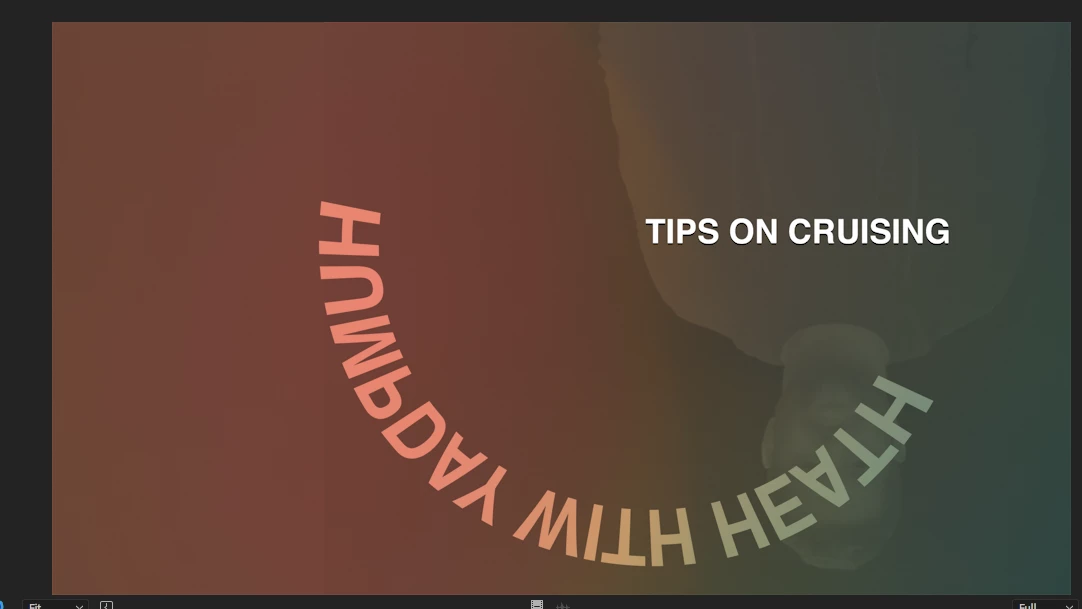
I cant get Premier to read PNG's, I make them in Photoshop and export them as PNG's but when they come in Premier is all the weird crap.

I already clear the cache, re installed, re exported, started  new project, I cant get it t work! WHAT THE CRAP IS HAPPENING!!!

This are two pictures of PNG's it is one title, but Premier is merging all the PNGS in to one picture, same with the one below, it suppose to say TIPS on crussing, not all that weird color and reverse shadow going on.... this is totally wrong!!

This topic has been closed for replies.
Correct answer Vinay Dwivedi

Hi,

The patch has been released and live now. This patch includes bug fix related to PNG's.

Bug fixes in Premiere Pro versions 12.1 and 12.1.1

//Vinay

61 replies

Ramnaider
Participant
April 13, 2018

I'm having the same problem and I have SO many transparent PNGs, it is a HUGE inconvenience and delay on our deadline! Adobe please fix immediately, release the patch already. It is URGENT.

Thanks

Participant
April 13, 2018

Fyi, I had built my png files in Illustrator. Importing the .ai file also seems to work as a work around for now.

Rameez_Khan
Legend
April 13, 2018

Hi all,

We have identified this as a bug and are working on a fix.

Appreciate your patience!

Thanks,
Rameez

Participant
April 13, 2018

HI,

When and where are we going to be notified that the issue has been fixed?

Thanks

Participating Frequently
April 13, 2018

After having this problem with the png's I decided to uninstall the latest update and go back to the previous version.  The png's work fine now, but most of my videos on the timeline are corrupt.  I'm having to replace almost all the videos on my 60 minute film.  And if I right click and "replace footage". it's still corrupt.  I have to bring in the video file and line it up again.  I have so many video files in this project.  I'm caught between a rock and a hard place trying to figure out if I spend the time replacing all the videos with previous version, or waiting for latest version fix and reinstalling that to see if then both my png's and videos work as they did before this nightmare of an install.  Did anyone else have this problem when they went back to previous version?

Participant
April 13, 2018

I did something similar. I was working in a master file with multiple sequences of short videos (2-5 minutes each) when I did the update. It created a new version of the project so when I had problems with the update, I installed the previous version to back to what I was working on and went back to the previous version of my project that was compatible with that version of Premier. My video wasn't corrupt but it was SUPER glitchy, whereas it was perfectly fine to begin with if it didn't have a PNG. I couldn't fix the jittering it so I just updated again to the 12.1 and kept moving forward by re-building PNGs as PSDs after finding that solution was working for people. Not sure if that helps.

Participating Frequently
April 13, 2018

Thanks!  That's likely what I'll have to do.  I really want to install the latest version for all the great new features, so I might just have to change all the png's to psd and hope the video is back to normal when I update.  Good times!

ztjones
Participant
April 13, 2018

Same problem here. WTF adobe. going back to Avid

lehestro
Inspiring
April 13, 2018

I'm having this same problem too. Will file a bug report when I have time and am not freaking out about getting out to client. MAJOR f- up on Adobe's part with this one. Good heavens. 2018 has been a disaster for me thus far.

Participant
April 13, 2018

Encountering the exact same problem, after updating yesterday.

I found that re-encoding a new identical png bought me some time, but the issue reverted back shortly after.

Can't say this is helping me make any bloody deadlines, also disconcerting to see this problem has been identified for nearly two weeks with no fix in place.

Adobe, get on this man!

Ville Honkonen
Participating Frequently
April 13, 2018

I am a TV news editor and i update the premiere and use today 6 HOURS(!!!) with this problem.

We use a PNG elements for interview people and this is a BIG problem because i didn't know that here is a bug. It looks in timeline that everything is ok, but when you push the export button first:

- The exported mp4 file with png image goes totally blue / pink

- When you return to premiere, the timeline is broken (there is random in+out footage)

- The library png files is broken, you need to rename png and export again

- Image is shaking, and it is pink (in the position of png file).

I update old premiere version and it work's now, but i need to edit 4min TV news story again..

Maybe 1-2 months payment refunding should be ok adobe?

Participant
April 13, 2018

IDK if anyone posted this but I turned my PNG into a Quicktime animation with alpha in Ae and seems to be at least a work around.

Participant
April 12, 2018

I'm having the exact same problem in PP, on good Mac running 10.13.4. Issue has popped up in two different projects. One of them is a template I've been using weekly for a year. It's a weekly news bite that has a countdown timer in the corner. The timer is a .png sequence. It's been especially fun since it took me most of the week to actually identify the problem, so yay, more lost productivity.

I also use a win10 pc, but I haven't updated it yet (whew!), so I can't say how the problem looks there.

Seriously, how do you break a png? There's money on the line here. Get that patch out.