


Participant
March 3, 2017
Answered

Audio out of sync when exporting H.264

  • March 3, 2017
  • 24 replies
  • 160585 views

I just discovered the following:

Whenever I export a H.264 in MP4 container, the audio in the resulting file goes about 10 ms out of sync. (575 audio samples to be exact.)

Screenshot:
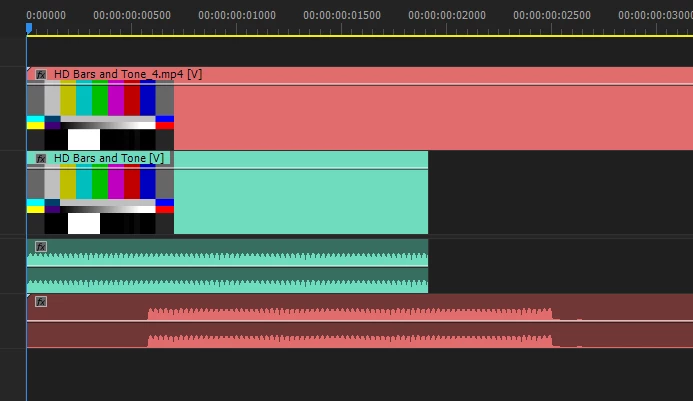
Green is the original clip, red is the resulting file from export.

I used 25fps in export settings.

To test this I used:

  • HD bars and tone that lasts exactly 1 frame @ 25 FPS
  • Cleared / reset the cache
  • Disabled the h.264 acceleration in settings and restarted premiere
  • Rendered the timeline to green
  • Tried to render with Adobe media encoder

The result was always the same, audio is not in sync with the original timeline.

To see if it's just a display issue, I copied the empty space in the start of audio, pasted it 100 times and it was silent. I also brought the video file to cubase and the desync was clearly there as well.

I tried other codecs and they all worked fine and are 100% in sync, including H.264 in .MOV container.

The video is exactly the same in the resulting file and lasts for 1 frame as it's supposed to, the audio starts 10ms late.

I tried to export audio only as MP3, that made the audio go even further out of sync.

I've gotten similiar files from my coworkers using adobe premiere, which is telling me that this is not a problem with my system only.

What is the cause of this and can it be fixed?

    Correct answer roberth63696283

    It was driving me crazy, but I found that VLC played it perfectly.


    24 replies

    Participant
    April 3, 2021

    Hi, total Premiere Pro noob here but here's how I solved this issue. Maybe this will help someone


    The problem was that the frame rate of my footage and the frame rate of my sequence did not match. I solved with 2 changes: 

    1-I encoded my original footage to Constant Frame Rate using Handbrake (very easy to use). I set the frame rate to 30 Frames Per Second. This alone did not solve the problem however.

    2-I adjusted the frame rate of my sequence in Premiere Pro to match the frame rate of my footage (30 FPS). Victory!


    It took me a mere 2 days to solve, piece of cake 😉

    Participant
    April 1, 2021

    Had some strange sync issues out of the blue when exporting. Was using the Vimeo Full HD preset. Wasn't seeing issue when using Match Source - High bitrate. The audio used was an mp3. Restarting Premiere resolved the issue. FYI.  

    Mystical_Twinkle50B8
    Participant
    March 28, 2021

    Hello Everyone, i had the sam issue and tried different things burt what ended up working was changing the export file to be HEVEC, preset for youtube 720p and then ticked the üse maximum render quality" box.


    I'm not sure what made the difference, but after exporting this way it worked.


    Hope it helps osmeone else.


    Cheeers!


    Participant
    March 28, 2021

    I found a pretty weird solution to this problem that has worked for me (and might for other mac users as well). Once I export my project (H.264, high bitrate), I drop it into iMovie. When I scroll through the timeline in iMovie, there is no issue with the A/V sync. Then I export the video from iMovie and it's totally normal. Hope this helps someone with this very frustrating problem!

    Participant
    April 4, 2021

    THANK YOU!!!!! This worked for me! I was not looking forward to trying to change the settings for a 3rd time to make this work. 

    Participant
    December 4, 2020

    I am about to throw my computer across the room if I don't figure out what is going on with this. I'm having the same issue and no matter what I do I can't export an mp4 without the video being sped up and the audio being completely out of sync. I have a client expecting their video uploaded today and if I don't figure out what's going on there will be issues. This has never happened to me before and I have no idea what to do.

    Averdahl
    Community Expert
    Community Expert
    December 4, 2020

    What happens if you during export set the Format to QuickTime and choose the GoPro CineForm YUV 10-bit Preset and export that file and import it into Premiere Pro? Does that file playback without the issues you describe?


    If yes, make sure that all your source footage has constant frame rate and not variable frame rate and make sure that the audio clips you use are .wav instead of .mp3 and that all audio files have a sample rate of 48000 instead of 44100.


    If no, iow that the imported file looks and sounds ok, use Adobe Media Encoder to encode it to H.264.


    Participant
    December 4, 2020

    Thank you for the suggestions, I'm trying it right now! How do I check to see if the source footage has constant frame rate and not variable frame rate??

    Participating Frequently
    July 2, 2020

    Cool little thing, now I've incorporated into my workflow exporting png sequences out of after effects to put into premiere then drop audio in just to get it exported out of premiere with audio in sync. Why, why, why, Adobe, does your software keep getting worse. Seems like I would gladly take what we had a decade ago in a production environment over anything recent. I have associates moving to competitors, there is a decent amount of us highly interested in an alternative to your bloated, bug filled software of late. These are simple, fundamental things that baffle me as to how they get approved to go out to the public. It's absolutely incredible. 

    Participant
    August 5, 2020

    I was having the same problem but noticed that I wasn't having issues exporting as an MPEG.

    I fiddled around with the export settings in Media Encoder and changed the Bitrate Settings to VBR, 2pass; Target Bitrate, 20; Max Bitrate, 24. Took a long time to process, but it came out in sync!

    Not sure why that works, but I'm happy with it!

    Participant
    August 21, 2020

    This helped me fix the issue as well.


    Thank you!

    Participant
    June 22, 2020

    HEY, I have literally the same issue, it is already the second fitness video I am exporting and after that, the audio is slightly behind the video footage, in out of sync...any help? I am not a professional video editor but i sue premiere from 4 months, and never happened this to me before.

    ryanmacphoto
    Participant
    July 1, 2020

    I've stumbled across this issue now as well. 2 minute video starts fine then half way through the audio becomes out of sync. 

    IS THERE STILL NO SOLUTION FOR THIS? this thread is 3 years old. Surely there must be a fix by now. 

    Participating Frequently
    May 21, 2020

    I was working on a music video last week and this issue surfaced for me as well. I've been suspecting a problem like this for a while because my audio never seems quite right, but it was especially obvious when everything was cut to the beat and the beat was off. DX Although for me it's not just exporting, my audio playback appears to be inconsistent in the sequence. It plays just a few frames further ahead than my playhead. 

    ryanmacphoto
    Participant
    July 1, 2020

    Any solution yet?  Im having the same issue 

    normalville
    Participating Frequently
    December 20, 2018

    Here it is December 2018 and this is still an issue for some. Virtually all my H264 exports drift out of sync. The longer the piece, the more accumulated slippage so that I’m several seconds out of sync by the end of a :90 piece. This seemed to have started with one of the 2018 CC updates but I’m not sure which one.

    I’m not looking forward to all the work & time required to get to the bottom of it but I suppose there’s no choice. Is it possible for an Adobe expert to get involved and directly help with this critical problem?

    Participating Frequently
    December 20, 2018

    What is the source video? Do Sequence Settings perfectly match source? If source is Variable Frame Rate, or source and Sequence or export have different frame rates, that is not going to help.

    Thanks

    Jeff

    normalville
    Participating Frequently
    December 20, 2018

    I'll have to dig that out of the projects, but one of the projects is an ongoing series where nothing has changed in the source materials yet the exports now drift out of sync. They are mixed sources with various video frame rates, After Effects comps and AIFF audio, but I always made sure the seq rate matched the dominant video source and subsequent export rates. Again, nothing changed in the workflow except updating PPro and Mac OS.

    BUT!    I just tried an export with one minor change to the export preset I've been using for a couple years: within the 'Multiplexer' selector, the options for 'Stream Compatibility' are 'Standard, PSP or iPod'. It had been set to iPod and I changed it to Standard to see what happened. For whatever reason, that seems to have fixed the problem because the export test I just did stayed in perfect sync. Fingers crossed that this was the problem and the fix is permanent.

    Have to say I deeply miss the days when there was an engineer down the hall who understood most of this stuff and kept you editing and out of trouble. Flying solo is a whole other thing.

    On Thursday, December 20, 2018, 1:45:06 PM PST, SAFEHARBOR11 <forums_noreply@adobe.com> wrote:

    Audio out of sync when exporting H.264

    created by SAFEHARBOR11 in Premiere Pro CC - View the full discussion

    What is the source video? Do Sequence Settings perfectly match source? If source is Variable Frame Rate, or source and Sequence or export have different frame rates, that is not going to help.


    Thanks


    Jeff

    If the reply above answers your question, please take a moment to mark this answer as correct by visiting: https://forums.adobe.com/message/10827101#10827101 and clicking ‘Correct’ below the answer

    Replies to this message go to everyone subscribed to this thread, not directly to the person who posted the message. To post a reply, either reply to this email or visit the message page:

    Please note that the Adobe Forums do not accept email attachments. If you want to embed an image in your message please visit the thread in the forum and click the camera icon: https://forums.adobe.com/message/10827101#10827101

    To unsubscribe from this thread, please visit the message page at , click "Following" at the top right, & "Stop Following"

    Start a new discussion in Premiere Pro CC by email or at Adobe Community

    For more information about maintaining your forum email notifications please go to https://forums.adobe.com/thread/1516624.

    This email was sent by Adobe Community because you are a registered user.

    You may unsubscribe instantly from Adobe Community, or adjust email frequency in your email preferences

    Inspiring
    December 20, 2018

    I get the exact same issue. If I export the WAV by itself, all is good. The h264 audio is always slightly late. Is this an h264 codec issue or just an Adobe issue.