


Audio out of sync when exporting H.264
I just discovered the following:
Whenever I export a H.264 in MP4 container, the audio in the resulting file goes about 10 ms out of sync. (575 audio samples to be exact.)
Screenshot:
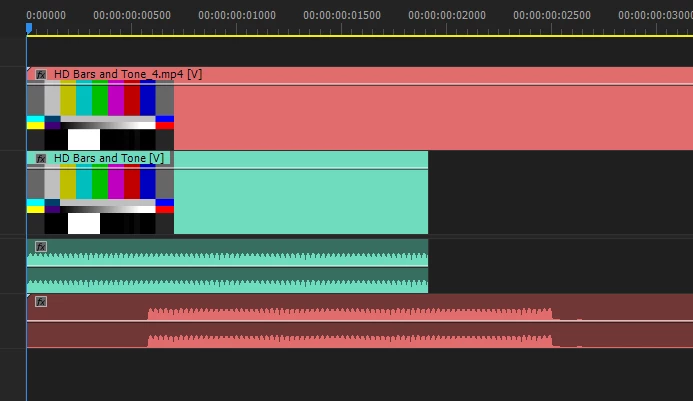
Green is the original clip, red is the resulting file from export.
I used 25fps in export settings.
To test this I used:
- HD bars and tone that lasts exactly 1 frame @ 25 FPS
- Cleared / reset the cache
- Disabled the h.264 acceleration in settings and restarted premiere
- Rendered the timeline to green
- Tried to render with Adobe media encoder
The result was always the same, audio is not in sync with the original timeline.
To see if it's just a display issue, I copied the empty space in the start of audio, pasted it 100 times and it was silent. I also brought the video file to cubase and the desync was clearly there as well.
I tried other codecs and they all worked fine and are 100% in sync, including H.264 in .MOV container.
The video is exactly the same in the resulting file and lasts for 1 frame as it's supposed to, the audio starts 10ms late.
I tried to export audio only as MP3, that made the audio go even further out of sync.
I've gotten similiar files from my coworkers using adobe premiere, which is telling me that this is not a problem with my system only.
What is the cause of this and can it be fixed?
 AdChoices