
StianEriksenfilm
Participating Frequently
November 30, 2017
Answered

Bad UI design - Premiere CC 2017 & 2018

  • November 30, 2017
  • 3 replies
  • 2031 views

Hi.

I just encountered this crazy UI design in Premiere CC 2018 (it's the same in 2017 too).

Is this a feature (someone please explain) or a flaw?

See gif file.
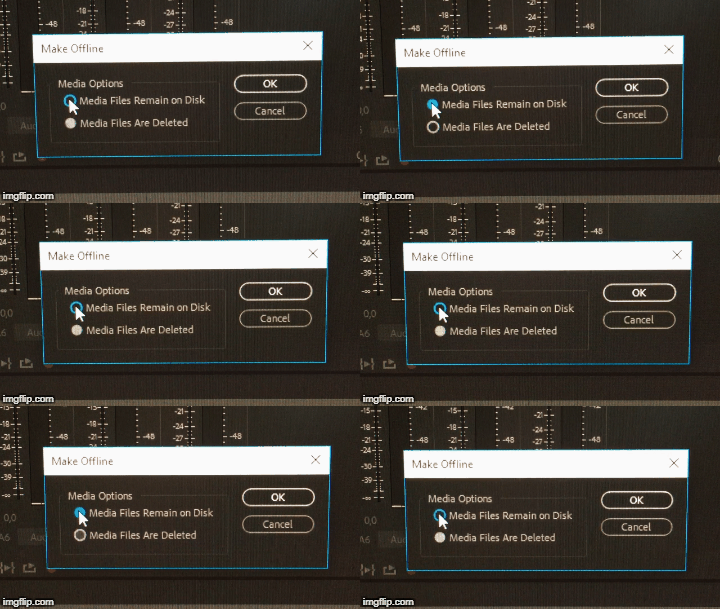
I'm basically clicking the same radio button, and this does not select the button, it changes state between the two options.

And the blue on the top button indicates... nothing, other than confusion that is.

1. They make a badly designed radio button(hard to see intuitively which choice is selected)

2. They add some mediterranian blue for no reason. ooooh, flashy!

3. They make button into a switch so know one knows what the heck is going on

Hooray Adobe!

Here, take more of my money!

This topic has been closed for replies.
Correct answer stefan_gru

Hi Stefan. Thanks for your reply!

I used the gif to show that the state changes when I click the 1st option multiple times.

Because of this I can’t intuitively figure out which state is what.

Best regards,

Stian Eriksen


Thanks for letting us know. We'll fix it ASAP.

3 replies

Swandive stream
Inspiring
January 12, 2018

That looks like a glitch. I'm no pro but normally a radio button should be when you click the button you see a white or blue fill and a black dot to indicate checked. Not sure what it's flipping back and forth though hard to tell from a GIF.

Legend
November 30, 2017

I recommend not changing the default (top) selection and doing all your file management with a proper file manager like Windows Explorer or Finder.

StianEriksenfilm
Participating Frequently
November 30, 2017

Thanks for your reply Jim.

I understand what you mean, but what if you don't know if the greyed out circle OR the grey circle with a hole in it is the active one?

Then you're not sure if you're changing it or not.

This bug (I call it a bug rather than a feature) is not hindering me from doing my work, but I still think the design is flawed and left hand work (if you're left handed it'll be right hand work to you) that should never have been approved. What's wrong with normal check/tick boxes?

In Premiere, if you go into Preferences - Graphics and look at the similar radio buttons there. They are still a poor design, but at least they can't be misunderstood.

If you want to try it out for yourself, you can make a clip offline and then press the top selection a few times. Don't tell me this is not really poor design.

The only right answer to my question from Adobe would be:

Thanks for letting us know. We'll fix it ASAP.

stefan_gru
Inspiring
January 12, 2018

joakim8907​: It does seem like a confusing UI design, and it may be a bug. Screen shots are easier to read than your GIF.

Default state of the Make Offline dialog box — the gray dot should be blue:

After clicking the 2nd option and then the 1st option again, it is blue:

The UI designers may have decided that because the OK button is blue, the default option (gray) was obvious enough to indicate which option was going to be enacted upon when clicking OK.

File a bug: Feature Request/Bug Report Form

Ann Bens
Community Expert
Community Expert
November 30, 2017

If Premiere is acting weird trash preferences and plugin cache.

Hold down shift + alt while opening Premiere.

StianEriksenfilm
Participating Frequently
November 30, 2017

Hi Ann.

Thanks for your quick reply.

Unfortunately your suggestion does nothing to fix this problem.

I guess this is just a sweet feature, like russian roulette!