Participant
February 6, 2025
Answered

Blue colour appears on .mov after export on Premiere Pro 24.6.4

  • February 6, 2025
  • 3 replies
  • 559 views

When working with a .mov file on Premiere Pro, everything looks good. But once I export the video, these blue anomalies appear :

 

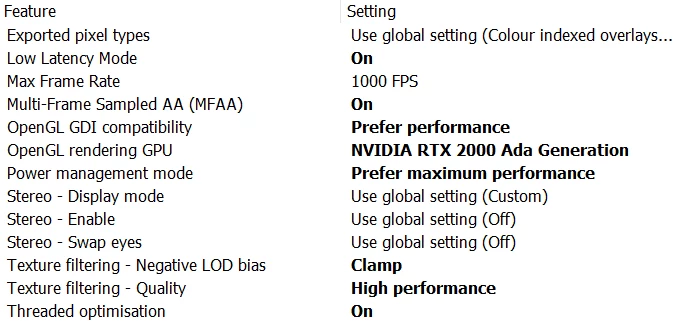
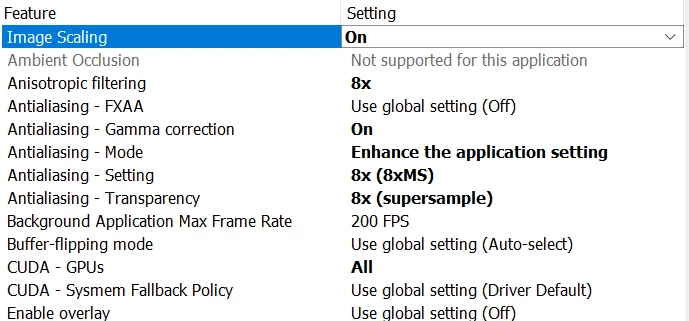
I'm working on a brand-new PC and did some changes on the graphic card settings with the NVIDIA app for Enterprise. At the beginning, if I exported my video directly via Premiere, nothing weird would happen but Media Encoder would create this issue. But now, both exports from Premiere and Media Encoder have this problem even though no settings have been changed. It just started happening all of a sudden.


Specs:

Intel(R) Core (TM) i7-14700 2.10 GHz

RAM : 64 GB

Windows 11 Pro

Premiere Pro 24.6.4

NVIDIA RTX 2000 Ada Generation - version 572.16


Also the graphic card settings : 
Correct answer TeleBielingue

Hi, thank you for the quick answer.

I actually just found out what the issue was : I had to right-click on the .mov file, then Modify ⇾ Interpret Footage and tick the box "Conform Alpha Premultiplication to:". Problem solved, I appreciate the message though. Will be taken into account next time.

3 replies

Community Manager
February 6, 2025

Fantastic.  Glad you resolved it!

TeleBielingueAuthorCorrect answer
Participant
February 6, 2025

Hi, thank you for the quick answer.

I actually just found out what the issue was : I had to right-click on the .mov file, then Modify ⇾ Interpret Footage and tick the box "Conform Alpha Premultiplication to:". Problem solved, I appreciate the message though. Will be taken into account next time.

Community Manager
February 6, 2025

Hi @TeleBielingue ,

Thanks for the message. Welcome to the forums. Can you show me an image of the color expectation for the export so we can see what you're expecting?  Did you update to the latest Windows version last week?  Can you tell us a bit more about your color workflow?

If you have time, please give the team a few more details. See: How do I write a bug report?


I hope we can help you soon. Sorry for the pain points.