
Participant
September 18, 2024
Question

box text issue

  • September 18, 2024
  • 4 replies
  • 421 views

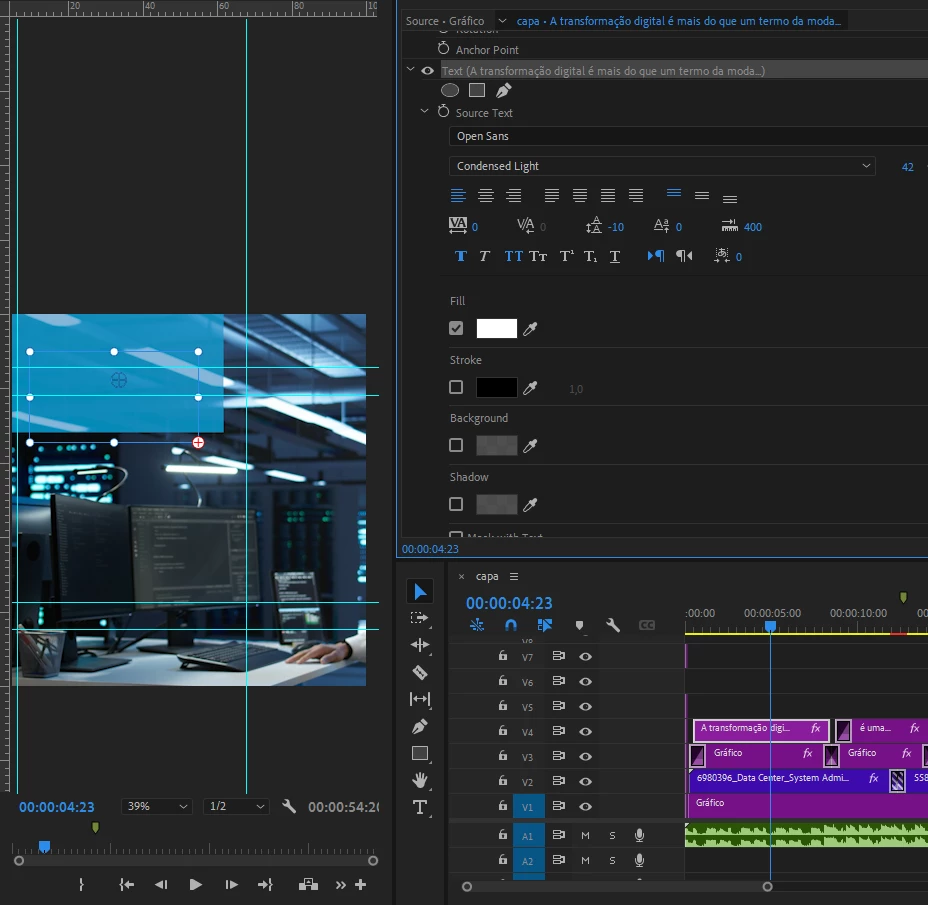
i have a bug in the premiere pro text box (paid version, latest att)
the text is simply disappearing from the box... and it's happening with all the fonts.
it identifies the text, as you can see there's a ''+'' there
the font size is ok, the spacing is also all right... the text is literally disappearing...
I'm creating a new file, starting editing from scratch and the same thing is happening
Does anyone know how to solve it?
I've already done it:
reinstalled the program, installed a much earlier version than the current one, restarted the pc... and nothing
ps.: in after effects everything is ok, the fonts are being identified normally...

Translated with DeepL.com (free version)
This topic has been closed for replies.

4 replies

Kevin J. Monahan Jr.
Legend
November 1, 2024

Hi @Jose Augusto G5C80,

How are you? I hope your issue is resolved. Is it? While we await your reply, I'll move your thread to our Discussions forum. Please let us know how it's going. We'll be glad to meet you there.


Cheers,
Kevin


Kevin Monahan - Sr. Community and Engagement Strategist – Adobe Pro Video and Audio
Kevin J. Monahan Jr.
Legend
September 19, 2024

Is the text behind the blue box? It's hard to tell, @Jose Augusto G5C80. Maybe @Theresa Rostek might comment.


Otherwise, please provide more information. See, How do I write a bug report?


Thanks,

Kevin

Kevin Monahan - Sr. Community and Engagement Strategist – Adobe Pro Video and Audio
Ann Bens
Community Expert
Community Expert
September 19, 2024

Please post screenshot of Effect Controls with all parameters showing.

Stan Jones
Community Expert
Community Expert
September 19, 2024

What version of PR are you running?


Stan