
7thheavengtr
Known Participant
August 24, 2025
Question

Bug - inverted frames, skipped frames, pixelated frames - when original video is perfect

  • August 24, 2025
  • 3 replies
  • 485 views

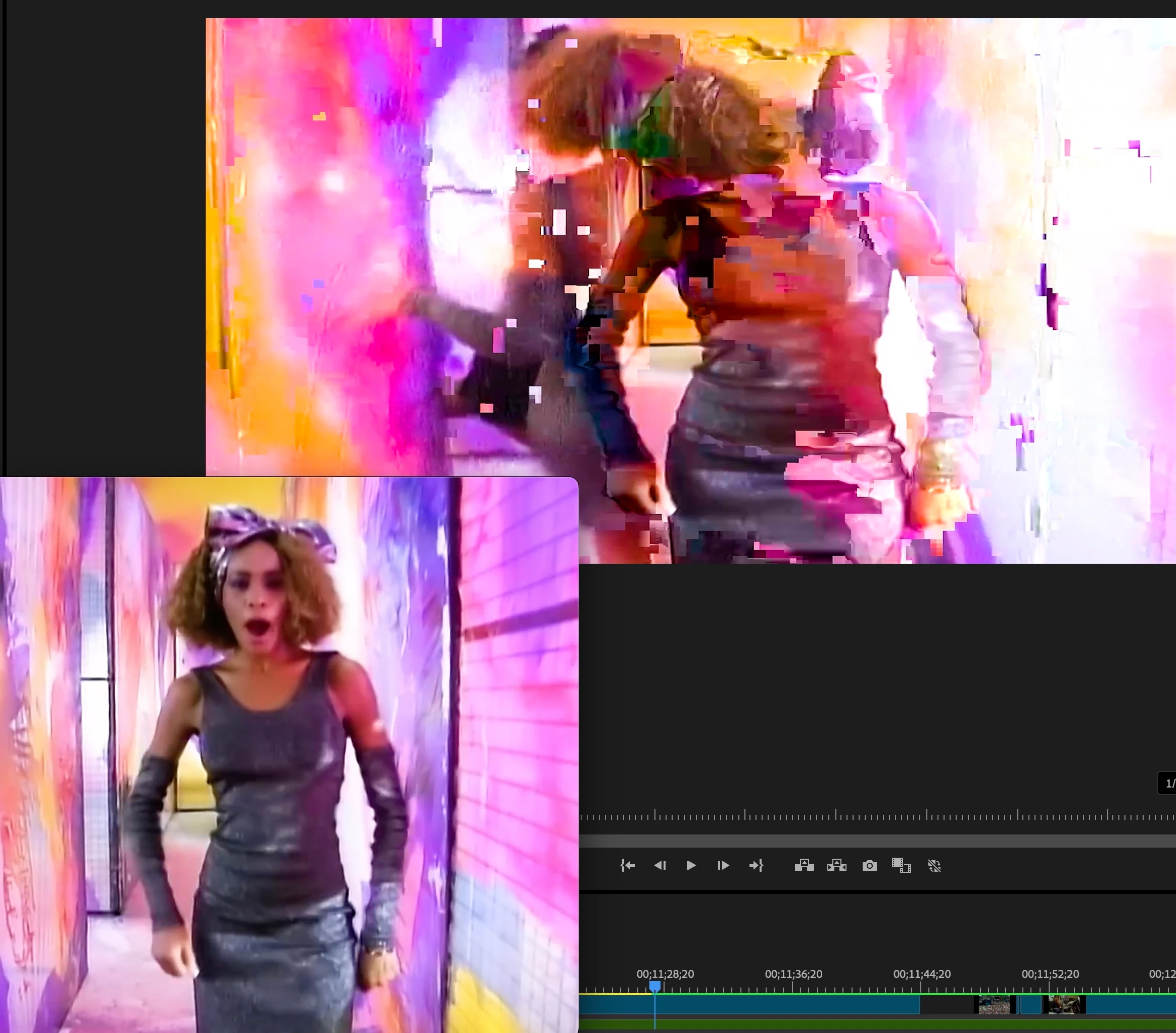
There seems to be an issue with Premier that does weird things to the video, edited on a timeline.

The original video does not have the issue.  It is clean.  (see attached same frame of original in quicktime, and same frame on premier)
So it randomly does this.  Once it happens on the timeline, it stays there.  Even with render in to out.  Even after exporting in various codecs (pro res, mov, H264, etc..)
I see other are having this issue too.

How do I fix this, without having to edit this in another app?

I did try rebuilding the cache, and still not working correctly.
3 replies

Community Manager
August 25, 2025

Hi 7thheavengtr,

Sorry to hear about this. Could you please confirm the version of Premiere Pro, OS & the GPU driver version that you are using? Also, is this happening with any specific media or all of them? Let us know, we're here to help.


Thanks,

Sumeet

7thheavengtr
Known Participant
August 26, 2025

2019 Mac Pro

3.2 GHz 16-Core Intel Xeon W

AMD Radeon Pro Vega II 32 GB

768 GB 2933 MHz DDR4

Premeier 25.4.0

Raw Video - MPEG4 - one I'm editing and is dropping pixels 


Is there a way to rebuild it, without losing all my editing and links?


Community Manager
August 26, 2025

Thanks for confirming that. Generally, GPU drivers on macOS are integrated with OS updates. Have you checked if there are any updates available for your Mac? Also, what is the source of the media file (recorded on a camera or encoded from any other app)?


-Sumeet

Peru Bob
Community Expert
Community Expert
August 24, 2025

Try updating or rolling back your graphics driver directly from the video card manufacturer’s site. If NVIDIA, do a clean installation of the latest Studio Driver (NOT the Game Driver).

7thheavengtr
Known Participant
August 25, 2025

My graphics card - AMD Radeon Pro Vega II 32 GB


7thheavengtr
Known Participant
August 25, 2025

There seems to be an issue with Premier that does weird things to the video, edited on a timeline.

The original video does not have the issue.  It is clean.  (see attached same frame of original in quicktime, and same frame on premier)
So it randomly does this.  Once it happens on the timeline, it stays there.  Even with render in to out.  Even after exporting in various codecs (pro res, mov, H264, etc..)
I see other are having this issue too.

I am re-sizing video files, and they seem to be ok, until I start chopping them and editing them.  Then I start getting random pixelations. 

It happens in the timeline video.  Even after rendering, it's still there.  Only way to get rid of it is to re-do all the work.

How do I fix this, without having to edit this in another app?

I did try rebuilding the cache, and still not working correctly.

Ann Bens
Community Expert
Community Expert
August 24, 2025

No info to go one:

How to Report a Problem