
Inspiring
March 16, 2023
Question

BUG: Use Previews....Doesn't Use Previews.

  • March 16, 2023
  • 98 replies
  • 16172 views

This workflow has been broken for a long time and I would really love to fix this one. I know this used to be on uservoice but I can't find the old bug. 


Steps:


1. Set sequence preview file to "Apple ProRes 422HQ" or whatever your favorite is. 

2. Render Sequence to full green.

3. Go to Export, Select an H.264 preset, check "use previews"

4. Watch as PrPro doesn't acess a single preview on disk and instead renders the whole timeline from scratch. 


From my current example I have a .png sequence from blender than I've rendered to green in the timeline.


Export->H.264, use previews checked...


Look at windows resource monitor, why is premiere chewing up PNGs when it should just be referencing the preview files I JUST RENDERED. 
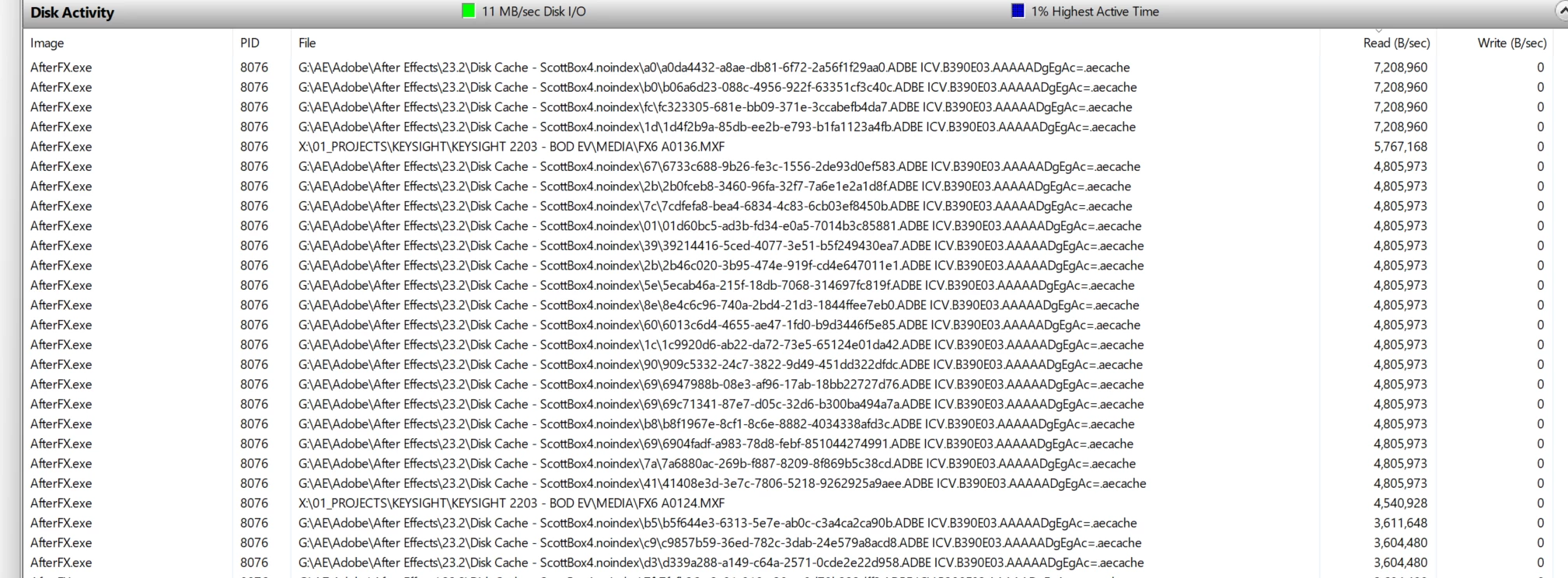
.aecache files being acessed for no reason. 
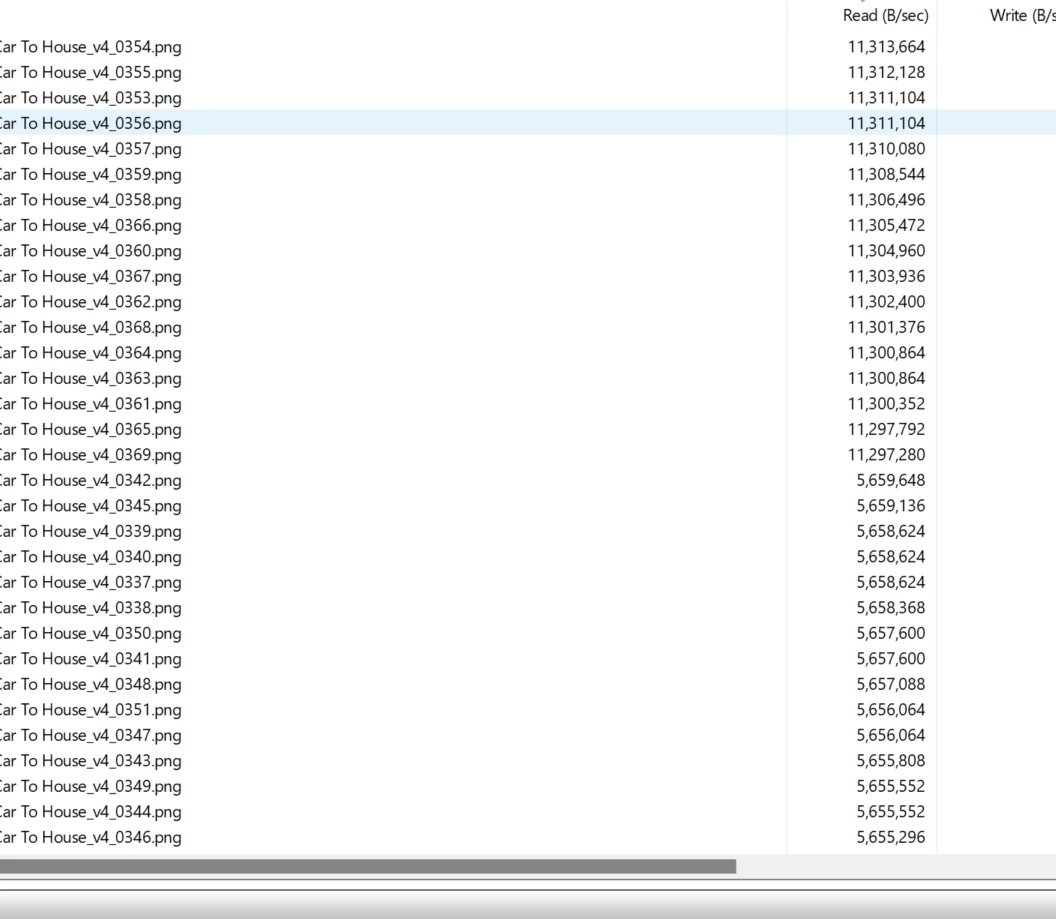
.png sequence being read. WHY. 


98 replies

Scott.C.Author
Inspiring
March 7, 2025

I see this is now ii the "discussions" section of the forum. Leads me to believe the devs (or their managers) have no interest in making this former feature available anymore. I guess, it is not considered a bug, even though the checkbox still exsists to mock us of how it used to work. I have been doing GFX work for the past year or so maybe I'll finally ditch and go to Resolve if I get back into the editing ring. This lack of TLC has always left a poor taste in my mouth when it comes to Adobe software. Seems like Adobe is just interested in chasing investor $$$ with splashy AI image gen tools vs actually making this the most robust post workflow availiable. Between this and the busted project manager and buggy multi-camera waveform behabior, this app really has some major holes they need to fill.  

MobyTrix
Known Participant
March 8, 2025

I'm working on a 4k hour-long project.  In the latest version (not beta): If I pick QuickTime ProRes 422 HQ as the preview format, render the entire timeline to it, then on the Export tab (stay in Premiere, don't lauch Media Encoder) pick Quicktime ProRes 422 and check "Use Previews", then touch no other options and export to a new file... it works as intended.  So while it's not a full return to the original functionality, it is acceptable.

(I have other issues with the latest non-beta version, such as the colorspaces snapping between settings randomly in clips... but at least this is working which makes fine tuning bearable on a 4k project.)

Scott.C.Author
Inspiring
March 13, 2025

I guess a step in the right direction, but not acceptable for software that costs 600$ a year to rent. 

Path 88 Productions
Known Participant
October 25, 2024

Suggest checking the timeline/sequence and see if any 3rd party effects plugins are being used.  I've found this to be something that causes problems when using "USE PREVIEWS" on export.

IanB_360
Community Manager
Community Manager
October 30, 2024

Hey Adobe Community friends, here is a note on the "Use previews" option from our devs. It will work just as long as the codec you choose to make preview files matches your export files codec. So Apples to Apples and H264s to H264s. Please see below explanation on how this feature works. Thank you for your patience and sorry for any frustrations with lack of responses.

Ian

Detailed Description

"Use Previews" will only export with rendered preview files in the following cases:

  • "Match sequence preview settings" is the selected preset, which automatically enables the "Use Previews" checkbox
  • "Use Previews" is enabled and the export Format & Codec matches the sequence's preview codec setting

If you enable "Use Previews" when export & preview codecs do not match, rendered preview files are ignored and files are exported from the original source media.

Path 88 Productions
Known Participant
October 30, 2024

Nope.  Just to let you know, it's still not working for me.  Using 3rd party plug-ins = non-functional.  Should just spit out a file quickly from compiled previews, but it absolutely re-rendering.  And since I'm using intense plug-ins, it takes a really long time.

FYI, I've used this "Use Previews" function in the past and it's worked fine.  My sequences are set up to use AppleProRes422 and that's the thing I also want on export.  Many of us understand the theory and practice of the "Use Previews" feature.  We're not new users misundersatading the concept here.  It's rather easy to recognize and identify that it's not working as intended.

Scott.C.Author
Inspiring
July 30, 2024

@Kevin-Monahan thanks for clarifying and for continuing to advocate for this internally!

Kevin-Monahan
Community Manager
Community Manager
July 30, 2024

Hello @Scott.C.,

Thanks for the question, and sorry for the confusion. Changing the status of a bug report to "Needs More Info" signals the editor and the product team to collaborate more to ensure enough information is in place to reproduce and fix a bug.


The community has provided a lot of information here. Thank you! Since this bug has a history and many upvotes, it would be great if a product team member could comment on what else is needed. I will submit the issue again with them on internal channels to see if we can get more traction here.


This is a reminder that I'm not a Premiere Pro product team member, but I'm doing my best to solve this issue for the community. Sorry for the frustration.


Thanks,
Kevin


Kevin Monahan - Sr. Community and Engagement Strategist – Adobe Pro Video and Audio
Scott.C.Author
Inspiring
July 30, 2024

@Kevin-Monahan What more info do you need? I feel like we've provided a lot here. I'm happy to walk through whats going on if it moves the needle, but a little alarmed that someone can look at this thread and come up with "needs more info."

Kevin-Monahan
Community Manager
Community Manager
July 29, 2024

The status of this bug report has been updated.

Kevin Monahan - Sr. Community and Engagement Strategist – Adobe Pro Video and Audio
Shebbe
Community Expert
Community Expert
July 27, 2024

That may well be true. But it doesn't change the fact that a checkbox exists that is named "Use Previews" that doesn't use preview files when encoding to any format. If Adobe doesn't deem this a bug they should remove the checkbox because it doesn't do anything. And the preset Match Sequence Settings may as well have an internal Use Previews mechanic.


But I'm pretty sure that hasn't been the intent. And multiple users including me claim this function actually used to work but years have past since and it's still broken...

JonesVid
Community Expert
Community Expert
July 27, 2024

Sorry I meant to add here : from a logical point of view - the fact that Smart rendering does not work when you choose the Codec yourself ( and have to use Match Sequence Settings) suggests to me the piece of code that looks to see what Codec you have chosen to output to - now doesn't exist. It only looks for Match Sequence Settings.

That's my theory !

JonesVid
Community Expert
Community Expert
July 27, 2024

Yes,  agree with you both Shebbe & Scrozier on the point about H264 output when you have a say, a fully rendered ProRes timeline available.

I must admit I have been banging my head against the wall for nearly two years just trying to get the Smart Rendered output working when Use Previews was ticked, so that has been my focus.

Now I can get the master I can re-encode to H264 etc, but yes, its more time wasting and shouldn't be necessary really.

I think there is a need for some serious code re-work in the Export area now for Premiere Pro.


Shebbe
Community Expert
Community Expert
July 26, 2024

Yea I too realized last week that picking Match Sequence actually works but manually selecting identical codec format doesn't. Yet another area where the whole Use Preview mechanism is simply broken. And for reasons the entire thread even exists; encoding to H264 from a ProRes 422/4444 rendered timeline is one of the biggest desires in speeding up workflows which now still would require another conversion step after the ProRes render if going with the workaround. Nobody should ever set h264 as the timeline preview format, it would defeat al means of QC after rendering the timeline.