
Inspiring
March 16, 2023
Question

BUG: Use Previews....Doesn't Use Previews.

  • March 16, 2023
  • 144 replies
  • 16538 views

This workflow has been broken for a long time and I would really love to fix this one. I know this used to be on uservoice but I can't find the old bug. 


Steps:


1. Set sequence preview file to "Apple ProRes 422HQ" or whatever your favorite is. 

2. Render Sequence to full green.

3. Go to Export, Select an H.264 preset, check "use previews"

4. Watch as PrPro doesn't acess a single preview on disk and instead renders the whole timeline from scratch. 


From my current example I have a .png sequence from blender than I've rendered to green in the timeline.


Export->H.264, use previews checked...


Look at windows resource monitor, why is premiere chewing up PNGs when it should just be referencing the preview files I JUST RENDERED. 
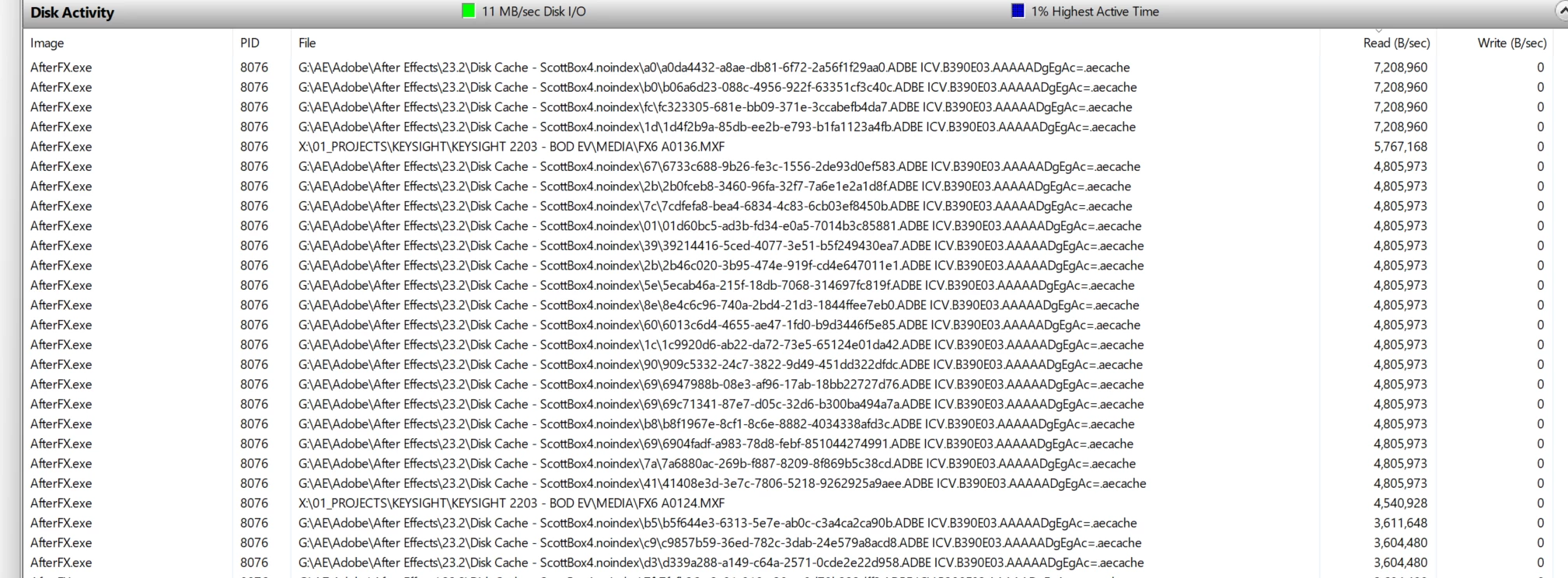
.aecache files being acessed for no reason. 
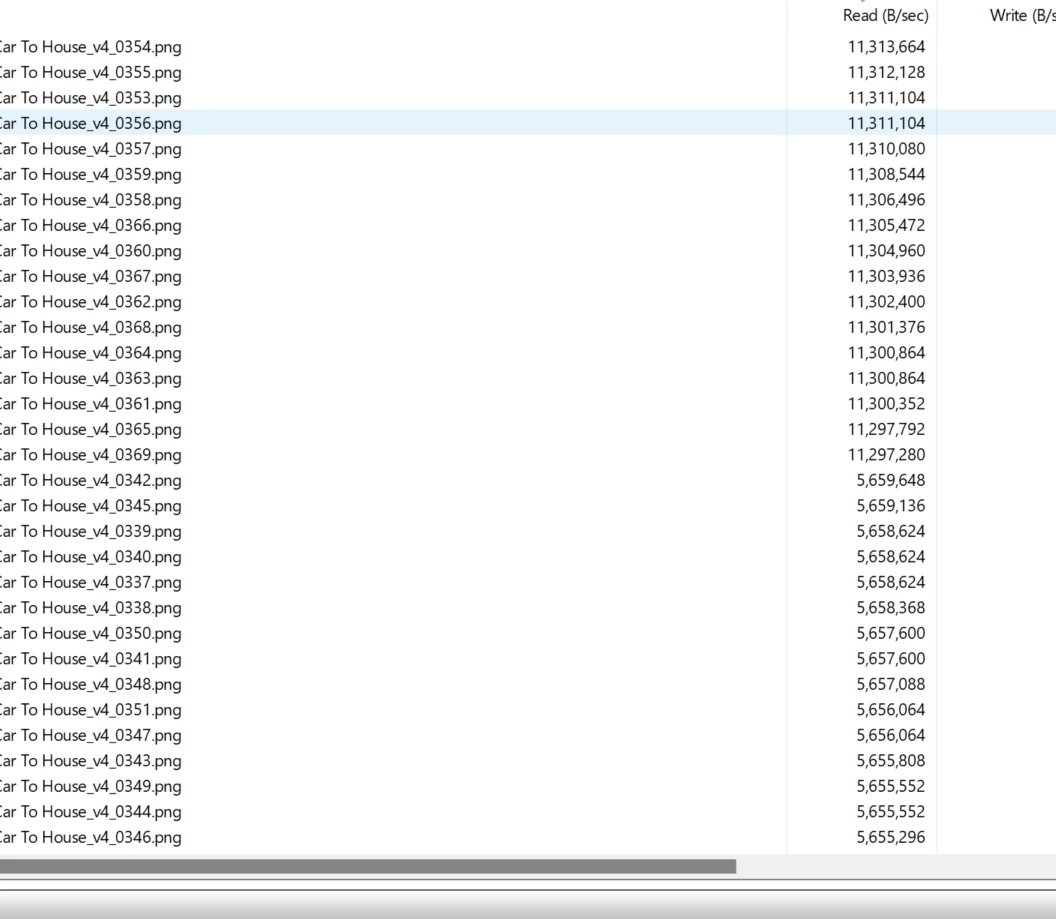
.png sequence being read. WHY. 


144 replies

Warren Heaton
Community Expert
Community Expert
March 31, 2023

@Scott.C. 


If quality is a concern, H264 should be avoided.

Use a CODEC with a deep peak signal noise ratio (PSNR).

Warren Heaton
Community Expert
Community Expert
March 31, 2023

"Use Previews" functions exactly as described.

If "Use Previews" is enabled, Premiere Pro uses the files in the corresponding dot PVR folder during export.


If "Use Previews" is disabled, Premiere Pro does not use the files in the corresponding dot PVR folder during export.


If the Previews have been rendered to an appropriate resolution for the export settings, it should always be worth enabling this option.

As far as H264 goes, no NLE uses it as an optimized COEC for editing because it's not an optimized CODEC for editing.

Kevin J. Monahan Jr.
Legend
March 31, 2023

Sorry guys, as you may know, I'm not a dev, and I'm not on the Premiere Pro product team at all, so I have no say in the matter as to why the feature works the way it does in the past or present. If you want Using Previews to work differently, you are free to create a feature request.


I agree that the topic is confusing and the documentation you pointed out is not helpful, so I'll work with that team.


Thanks,
Kevin

Kevin Monahan - Sr. Community and Engagement Strategist – Adobe Pro Video and Audio
Ryan Fritzsche
Inspiring
March 31, 2023

I'm trying to remember when I first started noticing this issue - that is, my export times started to get longer - and I can't recall exactly but I think it was with CC 2020 or maybe CC 2021?  But I'm 100% certain it used to work the way that @Scott.C. and I are describing.  I've been using Premiere as my primary NLE since 2014.

Scott.C.Author
Inspiring
March 31, 2023

https://www.adobepress.com/articles/article.asp?p=1661113&seqNum=5


Here is an older article back from the CS4-CS5 days (about when I started using PrPro) when the feature was still intact.

Scott.C.Author
Inspiring
March 31, 2023

Kevin, 


Appreciate you taking a look at this. I don't think its my best use of time to dig through Premiere's manual to try and prove something here. Looking for this feature to work and not necesarily a webite update. 


Just on a quick google I did come across this: https://helpx.adobe.com/premiere-pro/using/bestpractices-export.html


Most of these suggestions are thrown out the window because use previews doesn't work as described. 


"Using Previews to speed up export

Premiere Pro’s default Previews are optimized for playback, not image quality. If you select Use Previews in the Export mode, Premiere Pro will apply the Preview render files for your export.[false or does not mention that you need to match codec] That may give you a speed boost, but you will be re-compressing an already compressed file, which is not ideal for quality.[Premerie straight up refuses to re-compress files using previews at this point] You can get the best of both worlds (editing performance and optimal export quality) by choosing a high-quality codec for your Previews. [false]


Again the very name "use previews" alludes to a time where it actually used previews to export, not its current funcitonality. Agree with @Ryan Fritzsche that this is at the very least, a poorly named feature, but more likely a bug or feature that was turned off. 


At the end of the day this SHOULD be a feature, (and unless my memory is just horrendously damaged), was a feature that used to work. Just admit its a bug I don't know why there is so much runaround in this community. 

Ryan Fritzsche
Inspiring
March 30, 2023

@Scott.C. Hey man!  Gillian was stoked to hear from you - small world!  

@Kevin-Monahan We understand that this is how it works.  We are saying we think this is silly.  Maybe that makes this a feature request?  When I set my previews to ProRes, for example, a series of ProRes preview .movs are created in my previews folder.  Then, when I hit play in my sequence, Premiere strings (or "edits", if you will) them together in sequence, in real-time.  When I go to export, why can't I ask Premiere to just do that same process directly into the encoding engine or process?  It's doing it when I hit play in the timeline.  


Here's why this matters: on any given project, whehter it's a :30 spot, a 3 min corporate video, a short film, a feature film or anything else, the vast, vast majority of the exports I do will be lo-res, lo-quality screeners that I'm sending to clients/directors/producers/etc to review the creative edit.  I'll only be mastering at full or maximum quality and resolution a couple times - (ideally once, but someone always has to mess around after pic lock).  So, requiring the export mechanism to re-create preview files (that would have been absolutely fine for my needs, even if they are low quality, which i somethign I can and control on purpose) every time I do an export to a codec such as H.264 is time-consuming, and creates multiple issues. 


I understand wanting to make sure exports look their best but 19 out of 20 exports, I don't care about it being 10-bit 8k 4444 or whatever. I just need to quickly get a low or medium quality .mp4 out, and besides... if I want it to work from the highest quality and resolution settings, then I'll set my preview settings to that.


Examples: Today I'm working on 90s piece for a corporate client that involves a tremendous amount of 4k & 6k Sony and RED footage, with lots of color correction and other FX.  It take about 5 mins to render the sequence on my Mac Pro.  The sequence is set to 1080p ProRes.  If I export it directly to H.264, at 640x360, it takes about... 5-6 minutes.  If I export it as "use sequence settings", it takes about 1 minute to generate a 1080p ProRes .mov.  If I take that 1080p ProRes .mov into Media Encoder, it takes about 45 seconds to produce the 640x360 H.264. That is my workaround.  But there is no technical reason I can see why the middle man couldn't be cut out there; that is, why can't I export, "using previews" directly into the 640x360 H.264 in about 45 seconds from Premiere directly?  


Now I get why that may sound like crying over spilled milk, becuase what's wrong with the extra step if it saves 4 minutes, even if I might prefer to save 5 minutes.  But... when I am cutting feature docs, with many mixed formats of raw footage, I frequentkly export 1 to 2 hour sequences.  I expect that to take a while of course, but here's the real Sophie's choice. If I export it directly into H.264, it takes hours.  If I export it "using sequence settings" then it's obviously much faster, but it still takes a lot longer than 1 minute to export an hour of ProRes.  Plus I end up with a large interstitial file, which I have to have disk space for, and there's the tax of disk write speed - now Premiere has to not only read all those preview files, but also to write them somewhere else, and that little bit of extra disk writing starts to add up to a big inefficiency, especially when all the ProRes previews have already been written.  So... now instead of being able to hit export and have an .mp4 by the time I get back from lunch, I can either hit export and have an .mp4 hours from now, or I can export the ProRes, which will be done when i get back from lunch, but then I have to run that thru AME or Premiere to make the H.264, and wait on that process.  So in either case, extra time or extra steps are involved in what should be a one-click process.  


Premiere doesn't have a problem accessing those preview files in real time while I'm editing, so why should it have trouble accessing and stitching them together accurately on export? 


I get that inter-frame codeces create problems of call kinds and aren't a great previews format, but that's not a workflow I ever use.  I always use ProRes or DNxHD or some other intra-frame codec for previews.  Conversely, unless I'm delivering a final master, I'm never going to post a 100 GB ProRes file for review on Frame - it's monstrous overkill and would take forever to upload.  I'm never going to use an inter-frame compression such as H.264 for previews, b/c that would tax performance inordinantly.  So whether you agree with me that our descriptoin of this whole situation is a bug or a feature request, surely I hope you can see why my workflow of cutting with ProRes previews, and exporting to H.264 is common, and the efficiency of it ought to be taken into consideration.


Ok, so there's my case.  


But here's one more thing: It seems that under the current, intended functionality you described, the "use previews" checkbox is a meaningless setting in the export dialogue, unless the export format/codec matches the previews.  If that's the case, then why is it not grayed out when I'm exporting with a format or codec that differs from the sequence previews setting?  The "use proxies" checkmark always does what it says, no matter what codec i'm exporting from or to, and it's right next to the "use previews" checkmark, so I would expect them to behave in similar fashion. If I can select a checkbox, then it ought to do what it says; otherwise it shouldn't be grayed or invisible.  


Currently, the export UI is not correlating with the current or intended functionality, and if nothing else, that's confusing, and promises an outcome that's not actually being offered. Surely I hope we can agree that at very least, that could be considered a "bug".


Thx for humoring us, Kevin - I know you guys hear a lot of belly-aching from editors on here, and I can imagine it gets tiring.  But this is an issue that consistely frustrates me and slows down my workflows, and I would really love to see a "use previews" option for situations where I'm NOT exporting "using sequence settings".

Kevin J. Monahan Jr.
Legend
March 30, 2023

Hi scrozier,

Using Previews really only works in a smart rendering workflow. Previews are not used in any other kind of export where codecs are mixed (H.264 and ProRes, for example). Preview files must match the export codec, and that it must be capable of smart rendering. H.264 is not one of those codecs. Sorry if this workflow is unclear. If you can find anything in the documentation that says otherwise, please point me to it and I will make sure a correction is made.


If I recall, this was the same workflow that Final Cut Pro used to give us.


Thanks,
Kevin

Kevin Monahan - Sr. Community and Engagement Strategist – Adobe Pro Video and Audio
R Neil Haugen
Legend
March 30, 2023

I'll have to take your word for it, until I can get some time on this in the shop. Last time I used the process was sometime in December.


And at that time, an export using previews of the same codec worked. I had my previews set to ProRes 422, export also to that, and it was a very fast process.


If that no longer works it would be a mess.


@Kevin-Monahan can you test this on Macs?


Neil

Everyone's mileage always varies ...
Scott.C.Author
Inspiring
March 30, 2023

Also FCP7s preview files were more robust! The program was able to render partial preview files on the fly and wouldn't throw away an entire render if you changed just one part of a longer clip. Also the thumbnail cache! What a concept! I'm still waiting for PrPro to reach feature parity with FCP7 10 years on.