
mgd0128
Participant
January 10, 2018
Answered

Can I select an area of a clip and be able to modify it?

  • January 10, 2018
  • 3 replies
  • 998 views

I didn't really know what to title this because it's hard to explain, but here's what I mean:

So basically I want to be able to select an area in my clip and be able to scale it and things like that.
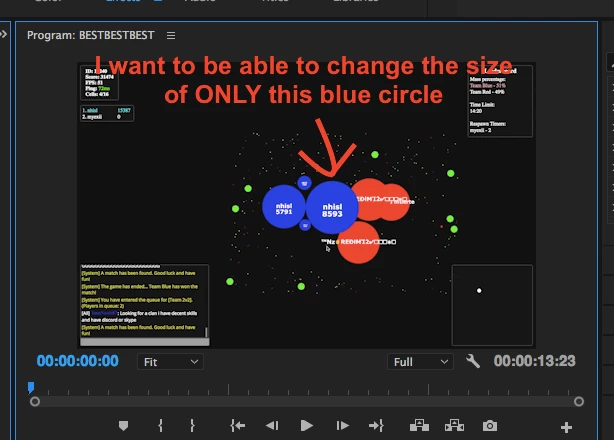
Is there a way I can select just that blue circle and change the size, like if I increase the size, only the blue circle grows and it overlaps the rest of the video?  Idk if this is a feature or not.  Thanks!

    This topic has been closed for replies.
    Correct answer R Neil Haugen

    This would require multiple layers of the clip, and doing some masking of the one layer that would scale up and down along with the vid layer.

    It's a bit of work  ...

    Neil

    3 replies

    Mike Dziennik
    Community Expert
    Community Expert
    January 11, 2018

    Peru Bob
    Community Expert
    Community Expert
    January 11, 2018

    mikedzk  wrote

    The video says "...unavailable"

    Mike Dziennik
    Community Expert
    Community Expert
    January 11, 2018

    Oops - should be available now.

    Legend
    January 10, 2018

    An oval Opacity Mask would do this.

    mgd0128
    mgd0128Author
    Participant
    January 11, 2018

    Thank you.  I will look into that

    R Neil Haugen
    R Neil HaugenCorrect answer
    Legend
    January 10, 2018

    This would require multiple layers of the clip, and doing some masking of the one layer that would scale up and down along with the vid layer.

    It's a bit of work  ...

    Neil

    Everyone's mileage always varies ...
    mgd0128
    mgd0128Author
    Participant
    January 11, 2018

    I appreciate you're response.  Do you know of any tutorial or video that can help me with this?  Thanks

    R Neil Haugen
    Legend
    January 11, 2018

    Look for things using opacity masks and/or track mattes. A track matte is used based on some element in one layer to show or hide something on a higher layer. Essentially.

    To really start using this program, it takes some time to learn which pays off big when working after it. I suggest getting Jarle Leirpoll's book "The Cool Stuff in Premiere Pro" which sounds like a light thing but is 500+ PACKED pages of practical editing from project management, basic to very advanced cutting steps, an amazing array of keyboard shortcuts and the reason to set and master them, sound, Lumetri color, motion graphics and animated titles including a bit of working with After Effects links, and a ton more.

    It's an ebook available from his site of premierepro.net, and there's a lot on his site besides.

    And past that, a few months with hours spent working through Lynda.com tutorials is fantastic.

    Also retooled.net and premieregal.com have some stuff ranging from basic to well above.

    Neil

    Everyone's mileage always varies ...