


Participant
May 1, 2017
Answered

Can't Auto Balance R3D

  • May 1, 2017
  • 13 replies
  • 3260 views

Hello
I haven't been able to find any information related to my issue.
I have had this issue for some time and never needed to fix it, but now I am working on a project with a lot of RED footage and this issue is adding hours to the work.
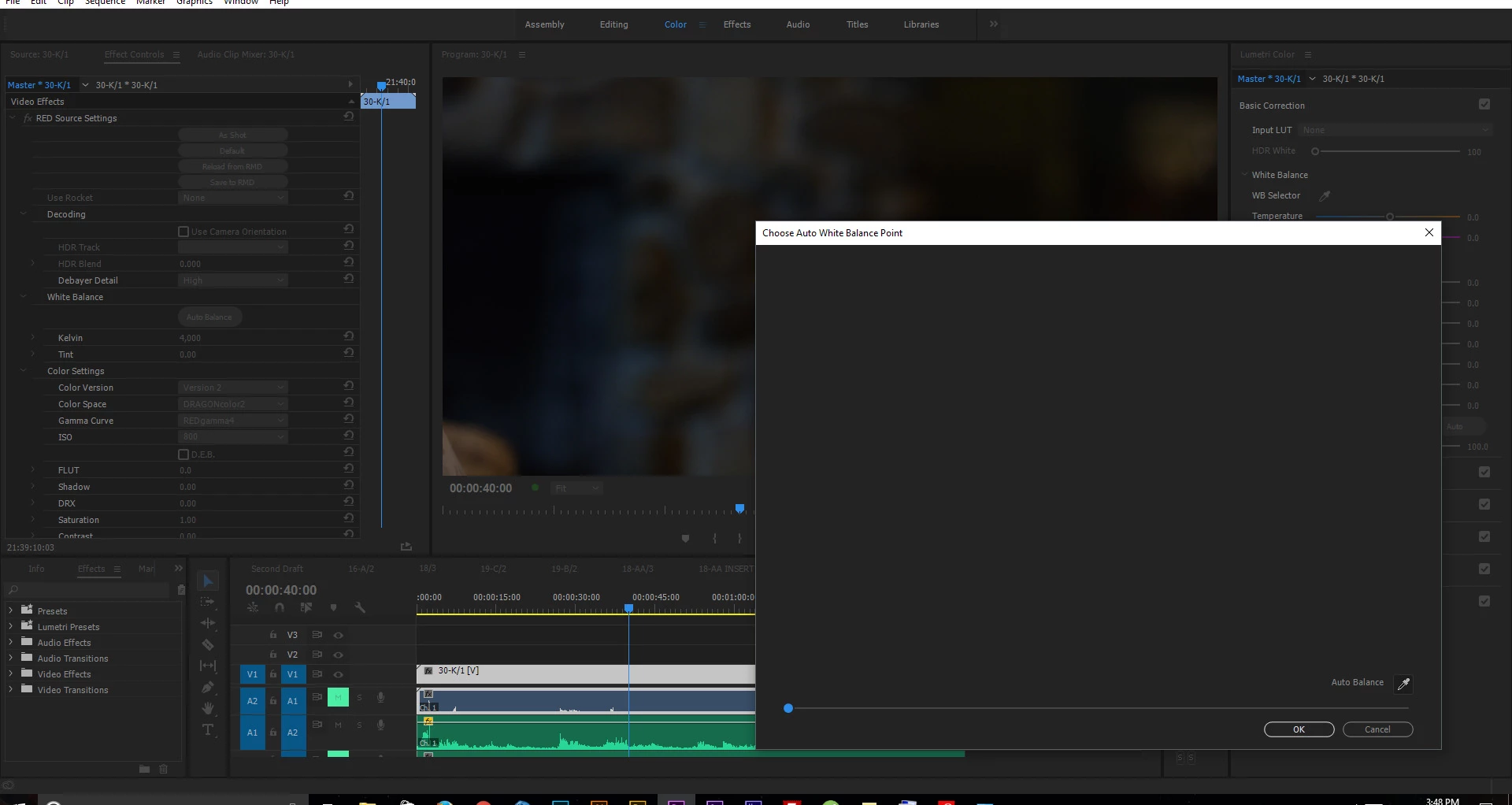
In the master clip settings there is a button labelled "Auto Balance" in the "White Balance" drop down option. When I click the "Auto Balance" button, a window pops up but the footage does not load into the window.

- I am running the latest version of Premiere Pro CC 2017, this issue was with previous versions as well (all 2017 and 2015 versions that I tried).
- I have a Maxwell Titan X with latest drivers, this issue was with previous drivers as well.
- I have the latest beta of REDCINE X PRO installed but I had the issue with the full release REDCINE X Pro as well.
- I am running Windows 10 Pro x64 with all updates, I had this issue all the way back to before installing any updates on the system.

Screenshot of the issue-
Thanks

Correct answer Kevin J. Monahan Jr.

Hi,

This is an old bug. Feel free to file a new one here: https://community.adobe.com/t5/premiere-pro/ct-p/ct-premiere-pro?page=1&sort=latest_replies&filter=all&lang=all&tabid=bugs


Thanks,
Kevin


13 replies

WaywardWizard
Inspiring
March 22, 2025

2025. It's still happening. 

I'm color correcting the long way because I refuse to light candles while chanting an incantation before packing up all my footage and traveling to the highest peak to dance under a full moon while the planets align, all because Adobe can't get their act together.

Kevin J. Monahan Jr.
Community Manager
Kevin J. Monahan Jr.Community ManagerCorrect answer
Community Manager
March 26, 2025
Kevin Monahan - Sr. Community and Engagement Strategist – Adobe Pro Video and Audio
iStormIt
Participating Frequently
July 15, 2020

Yes, here in july 2020, 3 years later. Still doesn't work properly. 


iStormIt
Participating Frequently
July 15, 2020

A workaround is to start a new project, import the footage again, set the WB you want and then copy the settings over...

Participant
October 14, 2019

Have same issue and more.. I think issue was gone in PR(13.1.3) but then it stopped working again. down't work after latest update either. nor can i save or reload from RMD in both after effects and premiere. also even if save new setting to RMD and then click Reload from RMD, it loads smth else... tried to use redcine to save to RMD and then reload in PR or AE doesnt work... so I've tried to type manually WB setting etc., using Source Settings window and it doesnt work as well, (you can use slider to adjust, but you can't dial excat number, it just resets value to unknown number) and it pi**ing me off madly, cuz of deadlines, cuz I pay for the software that dosn't work... ADOBE PLEASE SOLVE THE ISSUE


footage located on internal ssd.

project files on second internal ssd

system runs on 3rd internal ssd


Processor Intel(R) Xeon(R) W-2123 CPU @ 3.60GHz, 3600 Mhz, 4 Core(s), 8 Logical Processor(s)

Installed Physical Memory (RAM) 32.0 GB

OS Name Microsoft Windows 10 Pro

NVIDIA GeForce GTX 1080 Ti

(system not build by me)


juhoh16939234
Participant
September 16, 2019

I have the same issue. 
I've found out that if I move the original footage from my external SSD to my desktop, and drag that to the timeline without touching it, the white balance window will open correctly. The strange thing is, that even if I replace the original footage on the timeline with the one on desktop, and if I correct the autobalance using that new clip that works, the one that is clipped and part of the actual edit, it doesn't work and the edits made in the 'Master' settings doesn't apply. 

Anyone who could help?

bravelindo
Participant
April 9, 2020

Hey!! This can be the SOLUTION, while Adobe doesn't fix that! I did it and worked. So here's what we can do:


- Copy the original footage file to the desktop

- Create another project in Premiere and import those files from desktop

- Apply the Auto Balance (now, it should work just fine)

- Copy all the RED Source Settings from this balanced clip to the clip in your original editing project


That's a whole detour in the workflow, since you have to repeat that same process to each clip that Auto Balance doesn't work (try each clip before doing that, sometimes some work and some doesn't), but it can be life saver while this problem keeps going on! It's 2020 and it wasn't fixed yet, so maybe it's the only solution so far.

ramag48867665
Participant
May 3, 2019

Got another issue regarding Auto Balance. Once window pops up, you can change white balance, but after that you cannot close the window. basically it freezes premiere

Participating Frequently
June 20, 2019

Yup! I'm having the same issue. Only way to continue is to force quite premiere.

Known Participant
December 13, 2018

I'm having the same problem as well. Issue started today and I have never experienced it before. Although what I'm seeing is that clips with either or both timestretch and long clips is where it doesn't work. Can be a read-write issue. Not that I've done it my self yet, cuz I'm just eyeballing it, try to put it on a SSD, external harddrive and an actual harddrive to see if you're still having the issue. Could also be cache related.

Best regards

Kevin J. Monahan Jr.
Community Manager
Community Manager
June 5, 2018

Hi grantw,

Sorry for the headaches. Please file this bug here: Premiere Pro: Hot (1268 ideas) – Adobe video & audio apps

Thanks,
Kevin

Kevin Monahan - Sr. Community and Engagement Strategist – Adobe Pro Video and Audio
Participating Frequently
November 18, 2018

This problem has been and issue for years now and its driving me insane!  Please please please fix this! 

Also while your at it can you please put the color correction panel for .r3d into its own window like every other window of settings has?  That way every single time i want to make a correction I can just have the up and running rather then clicking 3 times to access it? Not sure what else to do other then post about this here.  Put in a request for this a dozen times.   Thank you!

Participant
June 5, 2018

This is still an issue in 2018.

Adobe, please fix this.

Legend
June 5, 2018
Participating Frequently
January 24, 2018

Have had this problem as well for awhile.  Please fix this Adobe!  heading over to davinchi slowly with all these .r3d bugs.

Dr.Rek
Known Participant
December 10, 2017

Same problem here, been an issue since 2016 for me.

It worked a couple versions back, now its just a grey screen.

Anyone file a bug report?

Dr.Rek
Known Participant
December 10, 2017

Just filed a bug report...

I had thought this one would get fixed without doing so, but after over a year of this being broken, it was time to let them know what seems like no one has noticed or cared.