


Participant
January 6, 2018
Answered

Can't change color of text or background of text in open captions? (Premiere Pro 14.9 and earlier)

  • January 6, 2018
  • 2 replies
  • 18297 views

I am trying to increase the opacity of the background on my subtitles in open caption. Although I click on opaque (there is no longer a dropper icon, just the word opaque among the choices of colors in the dropdown menu), the background remains black. I have tried various combinations of changing the background and text colors and nothing actually changes in the program monitor. Still black background, white text. I am also not seeing an option to change the font family? I am using the latest version of Premiere Pro CC 2018. Has anyone else had this issue?

Thanks.
This topic has been closed for replies.
Correct answer Meg The Dog

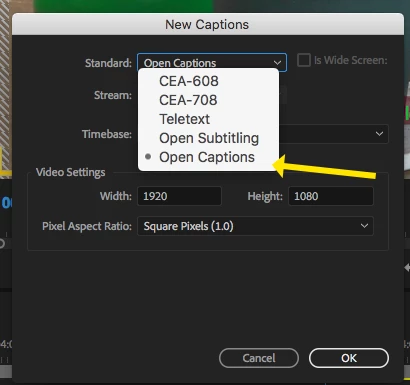
I believe that functionality is only available if you are working with Open Captions, and not with Open Subtitles:

but am not 100% sure about that.

MtD

2 replies

Meg The DogCorrect answer
Inspiring
January 6, 2018

I believe that functionality is only available if you are working with Open Captions, and not with Open Subtitles:

but am not 100% sure about that.

MtD

saraemAuthor
Participant
January 6, 2018

Oh my goodness! Such a simple solution. Thank you so much!

Participant
July 28, 2018

saraem, thank you for asking this and thanks to Meg The Dog for the answer. I've only been struggling for.... oh... about three, four hours and finally thought to google it. Hugs from Cape Town.

Inspiring
January 6, 2018

I can't replicate your issue, you are making your changes here, with these controls?

MtD

saraemAuthor
Participant
January 6, 2018

In my version, I do not have the dropper with the ability to change the percentage of opacity. ??