jh6000
Participant
June 30, 2017
Answered

Can't export 5.1 Audio only (WAV)

  • June 30, 2017
  • 3 replies
  • 4624 views

I've imported a 5.1 audio file (WAV) and Premiere shows all tracks when I put it on the timeline. When I try to export a section of that track as audio only (.wav), it won't let me export in 5.1, only stereo -- there is no 5.1 option, just Mono or Stereo.

Does Premiere support 5.1 WAV export at all?

This topic has been closed for replies.
Correct answer Richard M Knight

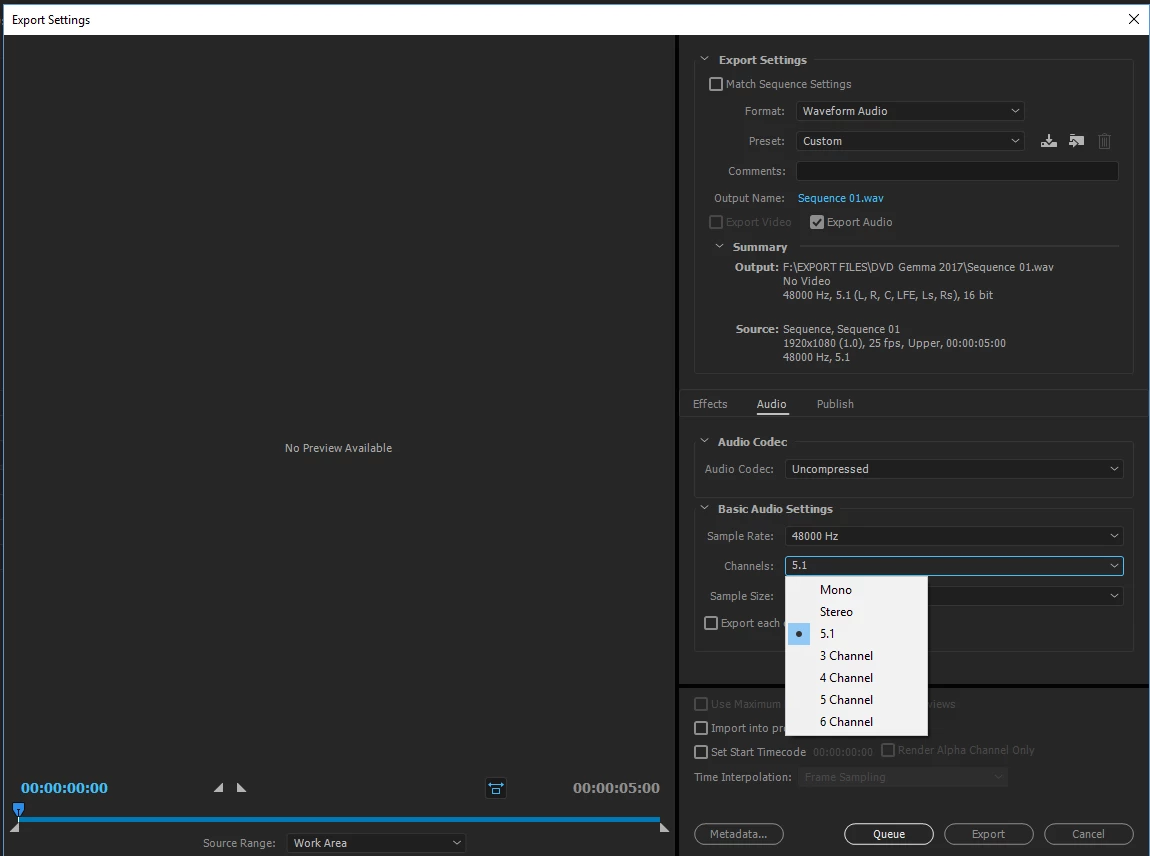
I have these option on Win. 10 latest Premiere.

Make sure you have a 5.1 sequence

3 replies

riamu
Participant
November 1, 2022

Five years later, still not possible. Drop down window "gives" an option to export in 5.1 uncompressed wav format but always falls back to mono or stereo. Any solutions now? Windows 10 and Premiere Pro 2022.

Participating Frequently
November 1, 2022

Waveform audio format does not allow 5.1 channels, it only allows Mono and Stereo. ACC audio format allows 5.1.

riamu
Participant
November 1, 2022

I believe it now. But AAC is a compressed format.


However, I found a solution. First make some settings in Premiere and send the project to Media Encoder. There I could open the export settings again, and select 5.1 WAV.  And when I finally get that 5.1 WAV I can convert it to 5.1 FLAC, which is my original intention. For converting I use EZ CD Audio Converter.

R Neil Haugen
Legend
June 30, 2017

You're right, in WAV it only allows mono or stereo, but in AAC allows 5.1.

Neil

Everyone's mileage always varies ...
Richard M KnightCommunity ExpertCorrect answer
Community Expert
June 30, 2017

I have these option on Win. 10 latest Premiere.

Make sure you have a 5.1 sequence

jh6000
jh6000Author
Participant
June 30, 2017

That seems to be working. However, I need to create a new sequence -- apparently you can't change the current sequence settings from Stereo to 5.1.

R Neil Haugen
Legend
June 30, 2017

I've never tried ... if you've got the full CC license, you could install Audition (if you don't already have it), send the clip to Audition, and should be able to export the 5.1 sound track setup from there, I would think.

Neil

Everyone's mileage always varies ...